HOME | DD
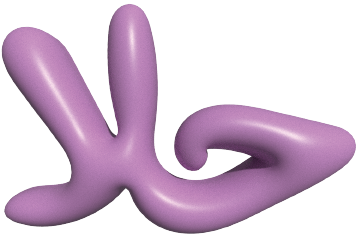
 halasstudio — Arabic Bubble Letters
#bubbletext #arabic #arabicbubbletext
Published: 2024-02-02 11:38:08 +0000 UTC; Views: 922; Favourites: 0; Downloads: 1
Redirect to original
Description
Adobe Illustrator beginner here. I'm here to document my creative learning process and the different skills I'm picking up with each week and project while using Illustrator. Last week, I really wanted to learn how to create Bubble Text using Arabic letter. I first had to learn how to fix Arabic Text using this video:www.youtube.com/watch?v=zbtgQ5…
I had to go to Edit->Preferences->Type->Check Show Indic Options->OK
Go to Paragraph in the Control Panel, Left Click and Select Middle Eastern and South Asian Single Line Composer
That was the first layer, I then locked it, added a second layer, and used it to trace the bubble letters. I know there are a couple different ways, but I chose this method shown from this video:
www.youtube.com/shorts/xlH27xa…
I used the Paintbrush tool and when I double-clicked it, I made the fidelity smooth. I traced over the Arabic writing in one stroke which was really hard, because I find the Pencil tool and anchor points still a little confusing. Then I swapped it from Stroke to Fill and colored it Lavender. I then went to 3D and Materials and clicked Inflate. I then took Perspective all the way to 100 and activated Ray Tracing and VOILA.