HOME | DD
 JLoneWolf — Talbain Process
Published: 2009-02-25 19:25:23 +0000 UTC; Views: 681; Favourites: 6; Downloads: 17
Redirect to original
Description
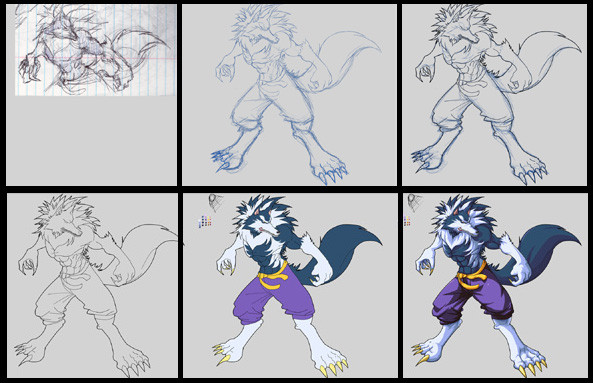
I felt like uploading the process for the Talbain pic I did. Starting at the top and going right.-You can see I started with a little sketch I had scribbled in a notepad. I like it so It's what I decided to use (this is after sketching 4 -5 other possibilites before hand aswell)
-I scanned it into photoshop and made a new full sketch which I made blue. (this is always my favourite looking stage)
- Using the pen tool (im no pro at it lol) I "ink" the pic. I used the pen tool so I could have perfect clean lines. (unlike more normal sketchy stuff)
- Make the sketch layer disappear and we see some clean lines ( I think this stage is ugly and want to quit lol)
- Lay down some base colours and create a Talbain Palette
-Many layers later, he's all coloured and shaded in and i'm liking how he looks.
((^(_^))
Related content




Comments: 2


OOooo <3333 more Werewolf stuffs!!! This is sooo great! I wish I could colorize like you do! T.T
👍: 0 ⏩: 0