HOME | DD
 MoeUmeko — Eye Tutorial
Published: 2013-12-12 19:30:25 +0000 UTC; Views: 298; Favourites: 2; Downloads: 1
Redirect to original
Description
Paint Sai Tutorial only
Warning: I suck at tutorials!
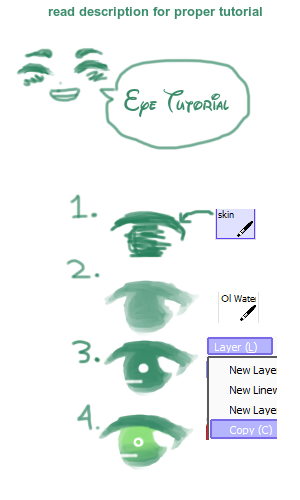
Step One:
Take the Skin Brush (I use it to sketch usually, hehe)
Settings are:
Size: 4
Density: 74
Sketch out the eye you want, it can be messy if you like and in any color that you want.
Step Two:
Take the Oil Brush
Setting size varies
Density: 44
Smooth out your eye, give it shape.
Step Three:
Make the eye darker by copying a new layer over it.
Use the Eraser now, make all the little details in the eye you want.
Step Four:
Add a new layer above your eye
Click Clipping Group
Add new colors using the skin brush, whatever color you feel suits it is fine.
Use the Oil Brush to blend it.
Ta-da!