HOME | DD

Aso-Designer β€” Spitz

#cat #dribble #spitz #warioware #spitz_warioware #dribbleandspitz
Published: 2018-08-11 21:22:38 +0000 UTC; Views: 2388; Favourites: 34; Downloads: 0
Redirect to original
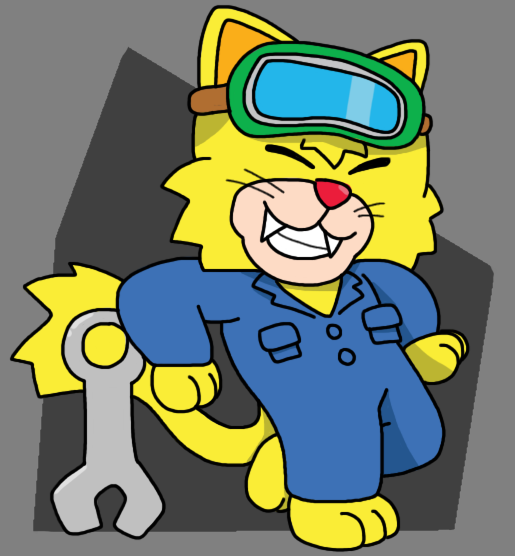
Description This picture is actually the first drawing I did of Spitz.

I just colored it recently.


Enjoy!

Spitz (c) Nintendo
Related content
Comments: 18

Crash-the-Megaraptor [2018-08-12 04:20:50 +0000 UTC]

"Remember Dribble, always keep cool"

He says as he blasts everyone in front of him with an Octoblazooka.

πŸ‘: 0 ⏩: 1

Aso-Designer In reply to Crash-the-Megaraptor [2018-08-12 09:04:50 +0000 UTC]

How ironic ! XD

πŸ‘: 0 ⏩: 0

StevenRoseCartoons [2018-08-12 01:15:23 +0000 UTC]

I noticed Dribble and Spitz have somewhat of a different character art style than the others in WarioWare Gold.

πŸ‘: 0 ⏩: 1

Aso-Designer In reply to StevenRoseCartoons [2018-08-12 09:06:05 +0000 UTC]

I kinda noticed that. Spitz is cuter in his redesign. ^^ I would pet him if he was real! XD

πŸ‘: 0 ⏩: 0

RandomBixbyFan [2018-08-11 22:03:22 +0000 UTC]

Is he from Wario?

πŸ‘: 0 ⏩: 1

Aso-Designer In reply to RandomBixbyFan [2018-08-11 22:48:21 +0000 UTC]

Yup , from Wario Ware series.

πŸ‘: 0 ⏩: 1

RandomBixbyFan In reply to Aso-Designer [2018-08-11 23:53:43 +0000 UTC]

Ah, thanks.

πŸ‘: 0 ⏩: 0

amisKaigle-et-Norman [2018-08-11 21:58:58 +0000 UTC]

He looks pleased to be here.

πŸ‘: 0 ⏩: 1

Aso-Designer In reply to amisKaigle-et-Norman [2018-08-11 22:48:38 +0000 UTC]

He sure is!

πŸ‘: 0 ⏩: 0

Dee-Artist [2018-08-11 21:55:14 +0000 UTC]

I notice a change in lineart.

πŸ‘: 0 ⏩: 1

Aso-Designer In reply to Dee-Artist [2018-08-11 22:50:25 +0000 UTC]

Yeah, I try the sharp pen tool recently on Medibang.

Too bad that Sai is more difficult to set up this tool.

πŸ‘: 0 ⏩: 1

Dee-Artist In reply to Aso-Designer [2018-08-12 18:10:58 +0000 UTC]

Try gimp.Β Β 

πŸ‘: 0 ⏩: 1

Aso-Designer In reply to Dee-Artist [2018-08-12 18:23:12 +0000 UTC]

Hum, I can’t color in a clean way with that program.

πŸ‘: 0 ⏩: 1

Dee-Artist In reply to Aso-Designer [2018-08-13 17:48:40 +0000 UTC]

Have you tried creating a separate color layer?

πŸ‘: 0 ⏩: 1

Aso-Designer In reply to Dee-Artist [2018-08-13 19:24:01 +0000 UTC]

I could

πŸ‘: 0 ⏩: 1

Dee-Artist In reply to Aso-Designer [2018-08-13 22:31:33 +0000 UTC]

If you want to color with the paintbucket tool, on your lineart layer, select a section you want to color with the magic wand tool then go to Grow under the Select menu up top.Β  Now use three pixels to grow the selection and then go to your color layer and then use the paintbucket to color the selected section.Β 

I hope this is clear enough. ^^

πŸ‘: 0 ⏩: 1

Aso-Designer In reply to Dee-Artist [2018-08-28 14:05:55 +0000 UTC]

Thanks!

πŸ‘: 0 ⏩: 1

Dee-Artist In reply to Aso-Designer [2018-08-29 19:26:05 +0000 UTC]

Sure.Β  Have you made a pic using that tip?

πŸ‘: 0 ⏩: 0