HOME | DD
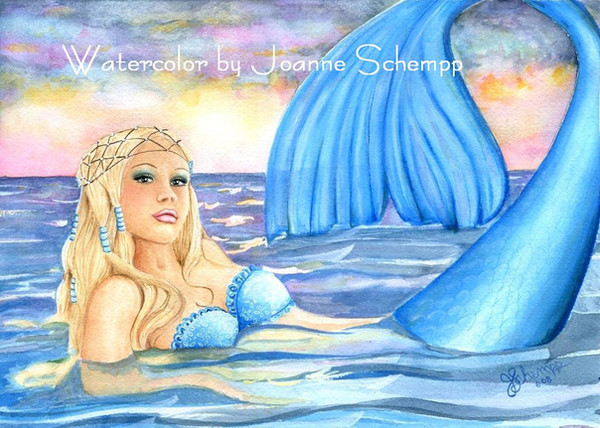
 B0RN2BWILD — :Mermaid:
by-nc-nd
B0RN2BWILD — :Mermaid:
by-nc-nd
Published: 2008-07-08 00:41:33 +0000 UTC; Views: 37200; Favourites: 653; Downloads: 298
Redirect to original
Description
Mermaid Watercolor done by JSchemppRelated content








Comments: 56

This is just fabulous. Are these digital water colors, or did you paint this piece? All the colors are just gorgeous. I love this piece. Jan
👍: 0 ⏩: 0


This has been featured! 
👍: 0 ⏩: 0


Wow that's awesome!!!!!!!!!!!! I don't know how you did it!!!!!
👍: 0 ⏩: 0


Wish I could color like that XP This is fantastic!
👍: 0 ⏩: 0


Looks like Jessica Alba in the face. I love it!
👍: 0 ⏩: 0


love the pic does anyone know where i can find a good mermaid tut ?
👍: 0 ⏩: 0


Oh my, what amazing craftsmanship. The sade of blue is very beautiful, the mergirl is flawless and extravagent, the sky is just lovely, and thte ocean is so realistic. I am awestruck!
👍: 0 ⏩: 0




I really like how subtle her scales are along her tail. Her face grabs me in a way most mermaid pictures don't. Usually, there's a lot of attention to the fishy parts but her mundane details are left a little more generic. This one is lovely and has personality in her eyes.
👍: 0 ⏩: 0


This is gorgeous! I adore mermaids, and watercolors! So them mixed together is just beautiful.
👍: 0 ⏩: 0


How did you get the scales to look like that? The shine is really good, but the scales are still quite visible and VERY realistic looking! And to still get the shading amidst all that! How do you do it?
👍: 0 ⏩: 1

Three things to get it to look like that. (I looked at my goldfish a looooong time) I lay thin coats of color in the scales first blending into the white area down the center, scrub a little paint off (lifting) after I'm finished then when I add alittle white to the strip to smooth it all out. I add the heavy white to the edges of the scales last. You could just color in the whole body and add a white strip of white down the center but that looks more like slick snake skin instead of fish shimmer.
👍: 0 ⏩: 1
Thanks for the note~


👍: 0 ⏩: 1
I'll give it a shot. My scanner decided to take a dump when I tried to clean up my computer so it's loading the scanner driver on again time. I understand about trying to talk you through it. I really have trouble with abstract comprehension sometimes, I'm more of a image person myself.
👍: 0 ⏩: 1
It's just an idea! I'd like to learn from a true artist!
👍: 0 ⏩: 1
I'm gonna give it a shot. I got my scanner up (for the second time) grrrrr Maybe tonight but I have a real desire to paint some dragons. My dark side is emerging and it wants to EAT! But I will really work on it.
👍: 0 ⏩: 1
That would be awesome!!! Whenever works for you! It was just an idea, and I think it would be a really useful tool for those who would like to improve or learn how to do scales on basically any character platform.
👍: 0 ⏩: 1
Okay, I scanned my last painting while I painted the scales. I'm gonna try to put them into some kind of tutorial. Since I STILL can't figure out photoshop without a manual that might take some doing.
👍: 0 ⏩: 1
OH!!
That would be great! I wouldn't know how to do it myself, but whatever you can do is totally just fine. At least maybe some kind of beginning, middle, end thing- like what you do for a base and so forth. Even if it's post one picture here, another picture there, or whatever. Thank you for taking the time to do that!! I appreciate it so much!


👍: 0 ⏩: 2
I made a tutorial in my scraps, scans arn't good. I dunno if I sent this message or not
👍: 0 ⏩: 1
I put a tutorial in my scraps file. The scans were awful. I didn't know this while I was painting cause I can't let it dry between paint washes. It'll give you some idea. I'll do another when I have time to do just the tutorial.
👍: 0 ⏩: 1

Thanks, I was kinda messed up on doing the sky. It doesn't look at all like my reference photo. Oh well. It is what it is.
👍: 0 ⏩: 1

Your welcome! Sometimes our mistakes become "portals of discovery" - gorgeous colors
👍: 0 ⏩: 0


Thank you so very much. I appreciate the comment. She started as Christine Aigulera but turned into something much softer.
👍: 0 ⏩: 1
| Next =>