HOME | DD
 BarryKiddPhotography — Snapshot Effect Video Tutorial
Published: 2005-04-06 12:54:33 +0000 UTC; Views: 24675; Favourites: 154; Downloads: 7035
Redirect to original
Description
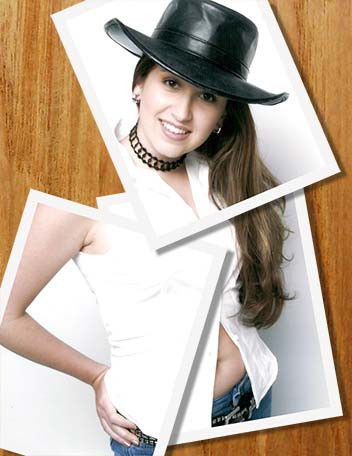
This is one more video tutorial I an posting in order to try and explain one way to create a snapshot effect of an image using elements from within the image its self.I once again need to apologize for the large file size but I have squeezed this thing down about as far as I can and still have a movie that can be viewed.
Since this was a question asked in the forums I may move this video to my scraps as I often do with such request.
I would like to thank ~amyestock for the use of her image girl41
Related content




Comments: 62

thanks for the tutor ..i ever saw this in tutor book in here..but too expensive ..thanks very much..i guees i'll learn it as soon as possible.
👍: 0 ⏩: 0

Your tutorials are so cool! Thank you so much for sharing them with us... I will definitely be using these effects in the future!!!
👍: 0 ⏩: 0


oh my god....im very happy with this tutorial..easy to understand.....thank you sooooooooooo MUCH!!!!!
👍: 0 ⏩: 0


oooooooooooooooooooooo aplauses aplauses nice nice nice nice nice
👍: 0 ⏩: 0

this is a great video, huge thanks for it! it will help me alot creating my own videos, to help other by sharing my photoshop style lol.
thanks again! i think ill 
👍: 0 ⏩: 0


oh thats good. I'm gonna go try that... you need to add a pause buttin, though

👍: 0 ⏩: 1

I have them but not on the copies uploaded to DA. My recorder makes the play pause and stop buttons as a separate SWF that are linked through and HTML doc.
DA only allows one file to be uploaded per slot and that would take 4 to get the buttons to work
👍: 0 ⏩: 1


Me too! I love these, they're just fabulous thanks a lot! and keep up the great work!
👍: 0 ⏩: 0


👍: 0 ⏩: 0


Thank you!
👍: 0 ⏩: 0

Your more than welcome.
👍: 0 ⏩: 0


hi i used this tut..
Intrigueing?
👍: 0 ⏩: 0

Wonderful! Damn, you should make a tutorial on how to make an animated tutorial! XD lol Keep up the awesome work!
I'll definitely have to try this.
~Blood~
👍: 0 ⏩: 0


Man, real inspiring, I'm gonna get back to PS now... I'm thinking of going into Graphics like you, do you got any advice?
👍: 0 ⏩: 1
Thank you for the comment and i am glad that you enjoyed the silly little movie.
As to graphics. I love the work but sadly the only advice I have it that it isn't what it once was. Desktop printing has changed it forever. That however is another story for another time.
👍: 0 ⏩: 0

great tutorial i used it here [link] thankz a heap for taking the time!
👍: 0 ⏩: 0

How do I download this tut? I clicked the "Download to Desktop" link and all I got was the snapshot.
👍: 0 ⏩: 1
By DA's default settings .swf files do not download to your hard drive when you click the download link they will open up in your browser window.
You can play the movie that way or you can simply click on the preview image to view it at the best screen resolution.
You find that you need want to download it to you hard drive instead you can right click on the download button and choose save target as for IE or save link as for firefox.
There browsers also have corresponding commands.
👍: 0 ⏩: 1
Thank you for clarifying that. I like your tuts a lot. Keep it up!
👍: 0 ⏩: 0

This is a great tutorial, i would really like to try this on a loved one when i have the time. Although you did go a bit fast, im sure if i watch it a few times i can get it 
👍: 0 ⏩: 1
Thank you so much for the comment! I am glad that you liked it.
I have just emailled the controles to your Yahoo.
jbajenaru7@yahoo.com
Please have a great day,
Barry
👍: 0 ⏩: 1
Awesome! Thank you so much.
👍: 0 ⏩: 0

hi!! can i ask a question why cant i downlaod your snapshot video and masking part 8 tutorial?
👍: 0 ⏩: 1
I can't say. Perhaps there is a glitch in the system. It happens from time to time and all .swf files on DA get messed up. Sometimes it sorts out in a few hours and sometimes a few days

👍: 0 ⏩: 0

very helpful and interesting! thank you so much for making such a great tutorial!!!
👍: 0 ⏩: 0

one of your best tutorials
would u guess that i didn't know how to transform selections? ...
jaako

👍: 0 ⏩: 0
This would make a neat effect wouldn’t it? Just create the effect and leave the background transparent and save as a .png. Yes that would be very nice I think.
Sadly I guess I am in the same boat that you are in. Even under the best circumstances I tend to look like a hardened serial killer when a camera is close by.
👍: 0 ⏩: 0

Wow Barry! That's a really neat effect. I wish I had a decent photo of myself so that I could make an ID with this effect.
👍: 0 ⏩: 0


wow.. ur so nice 
👍: 0 ⏩: 0

Freaking great tut buddy. I have never been dissapointed with your tutorials. Great work.
Biggest thing I learned: Dragging a layer style from 1 layer to another applies the exact same effect.
You don't know how many times I kept writing down drop shadow settings. A small notepad has become part of my design desktop because of it!
Second Biggest thing I learned: Adding a new layer doesnt screw up the border when applying a stroke.
Thanks a million.
//RG
👍: 0 ⏩: 1
Thank you and I am glad that you liked it.
As I read you statement about coping layer stiles I couldn’t think that perhaps you would be interested in knowing there is another way to do that as well.
If for example you have many layers that you wish to effect you can do so in one hit. I have found this very useful when building a web template. Since a complex web may have 2 or 3 hundred layers and you wish to change a single effect that is spread out all over the place you can simply right click on the layer in the layers pallet. Then go down to Copy Layer Style.
Once you have your layer style copied to your clip board you have two options. You activate another layer and right click once more and Paste Layer Style to get the same effect where dragging across a very large spread of layers will not be feasible or you can link 5, 10 or 20 layers the right click on a layer and choose Paste Layer Style to Linked.
This will apply the same style (now on your clipboard) to all linked layers weather it is 2 or 50.
Just thought you may find that bit of information handy.
Any way you have a great day and I do love you vectors. You should pass some of that talent my way
Barry
👍: 0 ⏩: 1
woah. Yet another great tip. Thanks!
👍: 0 ⏩: 1

hey, thanks fot this Tut its realy geat, I and just had to try it ..... here is the result [link]

Patric
👍: 0 ⏩: 2
Patric
👍: 0 ⏩: 0
If you like the basic idea behind this you can also get a very good effect by using slide templates or film effect channels like [link]
I also have an action that I think I downloaded off of the Studio Exchange ages ago that will produce a reasonably realistic digital slide in Photoshop that can be used as well and for free at that.
When using that effect however there is less of the actual image showing and the overall effect is nowhere as clean as this but it can be interesting.
👍: 0 ⏩: 1
| Next =>