HOME | DD
 bhast2 — Lemon Drop
Published: 2012-12-09 23:31:16 +0000 UTC; Views: 16334; Favourites: 24; Downloads: 1160
Redirect to original
Description
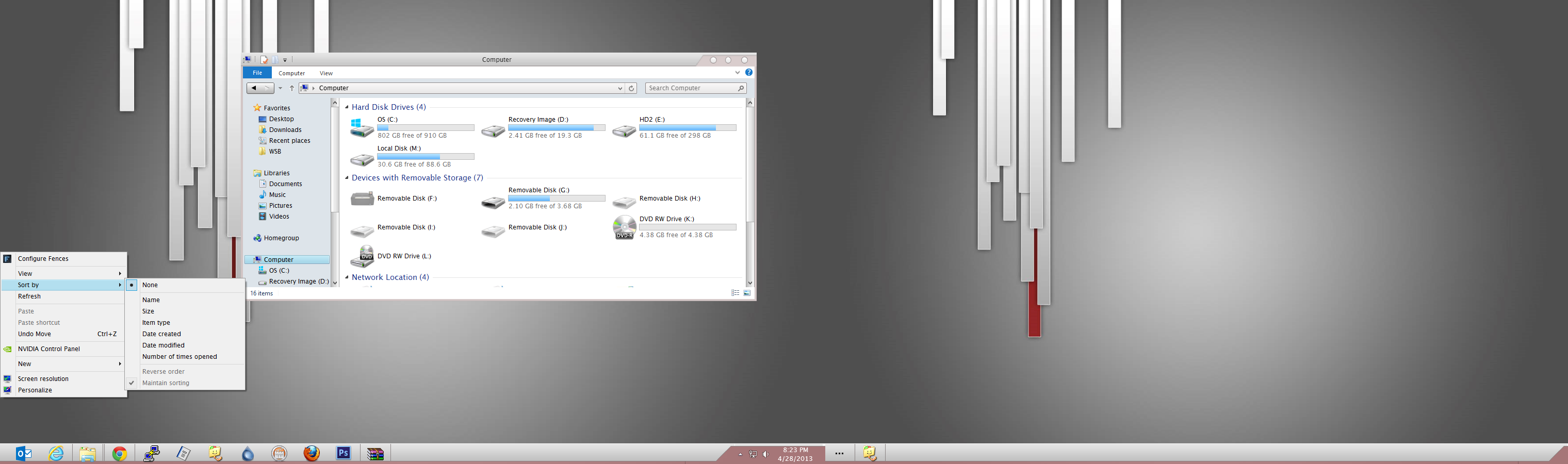
FREEThis Visual Style is Called Lemon Drop
UPDATE 4/28/2013
Major changes to this visual style!!!!!!
1. Made it more MAC like
2. Changed the system font to match OSX
3. Changed minmax close buttons
4. changed the nav buttons
5. changed a few minor details
6. fixed some bugs that I have found
7. add fonts to the rar file so people can use the VS
8 add extra wallpapers if people what to use them
9. Much Much more was changed but take to long to list
Future for this project
I will be doing more work to this visual style when I have time and update it when I get changed and the people that support me and buy this visual style
with get free updates when they come out
The wallpapers are done by ME
UPDATE 12/16
Changes to the scroll images and a few other minor Changes.
Added another wallpaper so now there are 9 different colors to choose from
Redownload at my site
UPdate 12/14
Did some changes and fix a few taskbar button flaws
MOre to come
COMING SOON
Working on dll files to change system icons and other changes in dll's
Update
There is now a Name for the VIsual style it is called LemonDrop thanks to Phenom II at www.winmatrix.com/forums/index… For the Help.
THERE IS A NEW VERSION ON MY SITE
I am working on fixing the pixel in the taskbar there is a white pixel by the clock and I am working on the caption buttons (close max min) to look better. Than I will move on to other parts of the Visual Style
If you have multi monitors you will have to go into the Personalization and pick what wallpaper you want or the color will be white for everthing.
If you only have one monitor than don't worry about it.
Download at winartstyle.com
it is under windows 8 theme
Related content






Comments: 26

Great Theme bro.
One Suggestion:Can Please Make The Progress Bar(design) Like You Had Make Computer drive bar(design).
Pls Don't Change the Colour Of Progress Bar As Green Colour Suits It.
👍: 0 ⏩: 1

Not understanding what you mean here
please show a screenshot of what you are talking about
thanks
👍: 0 ⏩: 1
that looks like it is program controlled what program is that
👍: 0 ⏩: 1
The Program Is Internet Download Manager But It Changes The Design And Colour Of Progress Bar As Per Theme. It Changes The Progress Bar When Your Passion Theme Is Applied.
The Design Of Progress I Was Trying To Say Design Progress bar Should be Like [link]
👍: 0 ⏩: 1
ok I will look into it thanks
👍: 0 ⏩: 0

Clean yet AWESOME !! Using it right now . definitely for Daily USE !!
👍: 0 ⏩: 1


just install uxstyle from [link] the one for Windows 8
Than put everything in C:\Windows\Resources\Theme
and than right click your desktop and pick personalize and find the theme and apply it
👍: 0 ⏩: 1

but it seems like changing the wallpaper and the taskbar but i don't see any new icons
👍: 0 ⏩: 1
oh sorry, i just wanna ask how to import icons like you do because when i installed the themes, it just change color and wallpaper. The old icons wasn't changed
👍: 0 ⏩: 1
Icons will be updated the next release or two
👍: 0 ⏩: 0


Looks pretty sweet. You should do a dark version of it.
👍: 0 ⏩: 1
Thanks I am building a dark one right beside it but it isn't ready for testing yet..
It will be released when the bugs get worked out. I am hoping to have this one finished by Christmas or sooner and the dark version too
👍: 0 ⏩: 1
Sweet, can't wait to see how this one turns out.
👍: 0 ⏩: 0