HOME | DD
 Computer-Master — Blue Windows 7 Progress Bar
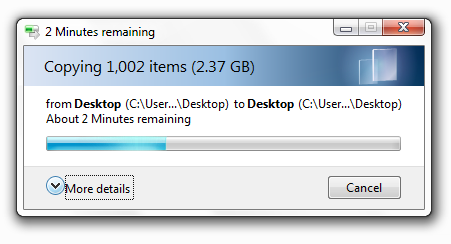
Published: 2009-05-24 00:37:08 +0000 UTC; Views: 34945; Favourites: 13; Downloads: 5917
Redirect to original
Description
I personally made this file, because a different msstyle kept removing some resources.This has only been tested on x86 and does not come with any program to take ownership of any files.
Also, for some reason, the taskbar progress will not be blue. If you know how to fix this, please let me know.
If something goes wrong, I have attached my original of aero.msstyles. I recommend making a backup of your
own just in case.
This only has the .msstyles file located at C:\Windows\Resources\Themes\Aero\
DESIGNED FOR WINDOWS 7 BUILD 7100 (RC) X86. HAS NOT BEEN TESTED ON ANY OTHER BUILDS!
Related content


Comments: 23

👍: 0 ⏩: 0


i want to add this on my modified aero pack can u plz tell me the steps.......
👍: 0 ⏩: 0


Could you try making a purple version? I'd really love that.
👍: 0 ⏩: 1

Nah sorry, I haven't touched this in a while.
👍: 0 ⏩: 1
Alright, I'll just use this one
👍: 0 ⏩: 0


👍: 0 ⏩: 0
I haven't touched this in ages, and black wouldn't be very easy. Sorry.
👍: 0 ⏩: 0

wow how did you do this... its great. Can you make in any other color also?
👍: 0 ⏩: 1
I simply edited the file with ResHack and found the green resources. Then I extracted those, made them b&w and gave them a blue "color" overlay in Photoshop.

👍: 0 ⏩: 1

👍: 0 ⏩: 0

Have you figured the taskbar progressbar colour out allready ???
Been searching for a way, but haven't found it yet.
There must be a way right ?
👍: 0 ⏩: 1
I did, but every time I tried to modify it, a white background kept appearing around it and it looked shit.

👍: 0 ⏩: 0

Good work but I search a purple progress bar for Vista.
Anybody can help me?
👍: 0 ⏩: 0

Nice work for blue progressbar.
I don't know how to make a visual style, but it seems to be possible when you edit IMAGE : 1018 and IMAGE : 1021 according to my friend.
I wait your update. Sorry for my bad English.
Thanks.
👍: 0 ⏩: 1
Thanks for the info on the image. I've been having two sorts of problems with editing those two.
1. It gives the bar a white background (looks horrible)
2. or it doesn't show it at all
As soon as I fix BOTH those problems, I'll update it.
I'm also working on a special All-in-one patch to change everything in Windows 7 from green to blue
👍: 0 ⏩: 1

I've been able to get the taskbar progress bar a different color. Instead of using resource hacker I use a program called Restorator. With that program I extract the PNG files of my aero file. To edit the taskbar progressbar I edit 1018 (I don't touch 1021) with a program called paint.net (or you can use photoshop).
One odd problem I had was originally I would just copy the png file from restorator into paint.net or photoshop and then monkey with the image but a lot of times the changes wouldn't work when I installed the theme (the aero transperancy would be gone and the theme would look similar to windows classic). Once I extracted the 1018 PNG with restorator and compared it to the PNG I simply copied into paint.net or photoshop I noticed the files looked a tad different despite the fact that they should be the same thing...I don't know if paint.net did something to it or not but I decided to open the extracted file into paint.net instead of copying it into it and for whatever reason when I monkeyed with it this time it worked fine when it came time to install the theme.
The six Aero resources I tend to edit most:
656-Horizontal Progress Bar
659-Horizontal Hard Disk Space Progress Bar (as seen when you open up Computer)
660-Vertical Progress Bar
663-Vertical Hard Disk Space Progress Bar
670-The marquee style progress bar
1018-The Taskbar Progressbar
Just mess around with the hues of these six resources in paint.net or photoshop to get what you want. I've got various tweaked aero files that I use when I feel like a different progress bar color.
👍: 0 ⏩: 1

thank you a thousand times for giving those numbers 
👍: 0 ⏩: 0