HOME | DD
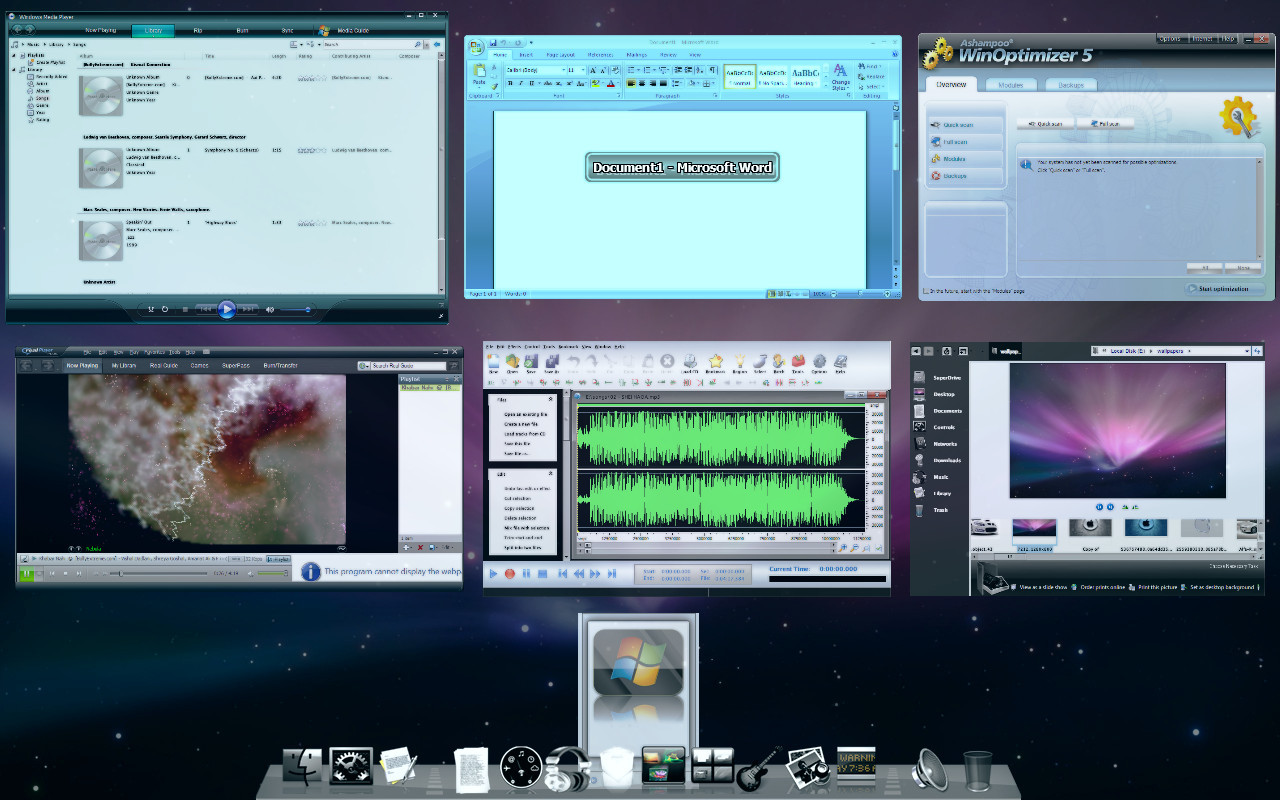
 devrexster — DExposE2 Final
Published: 2008-12-27 21:50:03 +0000 UTC; Views: 87386; Favourites: 19; Downloads: 35206
Redirect to original
Description
DExposE2 Hompage : [link]Hi!! So yeah this is the final version of DExposE2, so to speak, becoz there WILL be updates but the features,
options, structure etc wont change. Updates will only be minor ones after this release.
Whats DExposE2 ??, I hate being repetitive. Just google DExposE2.
|| New Features ||
------------------
# Cycle thru previews while in Exposed mode with pgdn, pgup keys. ( just like on Macs )
# Task switcher menu available through the context menu of the tray icon.
During all these months I have been recieving feedback ( literally speaking, I am BURIED under huge amount of
emails still ). And what I enumerated as the weak points of DExposE2 and what are the changes affected in
this version are as follows
----------------------------
* DExposE2 uses lot of RAM *
Answer: Ya, becoz it caches the previews in the RAM.
Solution: In this version I have provided a "Refresh" option which comes up when u right click on Systray icon
of DExposE2. This option immediately removes all those cached previews and brings down the memory usage to less than 10MB.
Also in the preferences, in the "previews Quality" section, there is an option which allows DExposE2 to use the video
memory instead.
--------------------------------------
* DExposE2 crashes with lots of apps *
Answer: Tell that to MS.

Solution: A menu Task switcher available from the tray icon's context menu. Directly jump to the app u need to
instead of exposing all of them. However it wont work if there are some minimized windows. In that case a normal
expose is done. What u must understand here is people working on a Mac dont have a taskbar like we do. This app
being an exact clone of Expose ( atleast the expose that I have on my hackintosh ) does as much.
-----------------------------------------
* DExposE2 doesnt work on Multimonitors *
Answer: That was a problem with a DirectX9 dll.
Solution: I had to disassemble the DirectX9 dll and its counterpart from DX10 and hexedit like mad. Took me
2.5 months to solve. But this time I am 110% sure it will work on Multimon.
----------------------------------------------
* Cant exclude some apps from the "exposing" *
Answer: The exclusion list was an internal list.
Solution: Now there is a "Exclusion List" section in the preferences window. Just add the names of the
exe files like Photoshop.exe, firefox.exe etc. And that is it.
------------------------
* Hotcorners dont work *
Answer: I forgot to add the bit about loading the monitoring dll.
Solution: Well, in the standalone version it still DOESNT work. But in the "zip" version which I will release shortly
it will be working fine. I am trying my best to figure it out to work in this kind of a standalone exe itself.
-----------------------
* DExposE2 looks ugly *
Answer: Beauty is in the eye of the beholder. Om Shanti! But I seriously suggest u atleast try this once.
Believe me u wont feel this is trash.
And yes it will work on Windows7. Coz this exe is "virtualized" (read, thinapp-ed).
Oh and I think some people on this forum already know this but still if anybody asks
that why an update after so many days - the answer is DExposE2 was among the "Best of 2008" at Lifehacker
recently. It was at the tenth position from the top. So yeah, I felt that there maybe lots of people out there
waiting for an update.
Related content











Comments: 77

DExposE3 will have the solution...its just around the corner 
👍: 0 ⏩: 0

which software you are using to edit mp3 files, (shown in this image), give me some link to get it, i am using, allsoundxp editor now, your looks better then mine
👍: 0 ⏩: 0


I love this application! But I have a question about the F11 shortcut. Is there a way to ONLY disable the F11 shortcut? All of the other keyboard shortcuts are great for me, but the F11 one is annoying~
👍: 0 ⏩: 0

Very good work! thx so much i can't leave without it now...I also have the bug mentioned before, it take a screenshot of all my desktop. It goes away when i suspend/resume.
👍: 0 ⏩: 0

A wonderful application and effort behind it, I'm deeply grateful for your generosity and effort...
THANK YOU...
Tested PERFECTLY on XP SP2 on my macbook intel.
👍: 0 ⏩: 1

Yours seem to have bugs. If the app closes suddenly, all your windows are left in outside the screen.
The only polished expose clone out there that I found was Switcher (created a year before this one)
👍: 0 ⏩: 0

uhm, sir just a question, how did you show the dock while exposing?
thanks a bunch for the nice program
👍: 0 ⏩: 1
I use rocketddock and have it set to "popup on mouseover"
👍: 0 ⏩: 1
oh i see.. thank you sir
👍: 0 ⏩: 0

already did. i download 3 of the files. installer, the rar and the portable. all cant work.
Is it just my computer? The only thing happen is when I click f11. but all the windows are on the right.
👍: 0 ⏩: 1
Maybe some security software is blocking it / or maybe its having a conflict with some other program u have running...
👍: 0 ⏩: 1
perhaps its my graphic card?
👍: 0 ⏩: 0
Somehow, I cant get it to work. I did all the instruction says, I click the hotkeys (F9,F10 and F11) and what happens is a sound.
It sounded like error or something. Care to help?
👍: 0 ⏩: 1

First of all thanks!
Very fast and responsive on my slow computer.
However for some reason it never activates upon restart consistently. It just display a blank screen, then when I try activating it again later (10min) it works.
(Win7 RC, low specs)
Got same problem to ~richierichie's "1" however can't really complain when overall i'm rather happy with the program!
👍: 0 ⏩: 0

Really? I also used windows 7RC and I found that mouse activation could not respond. Because of that, I return back to windows Vista.
However, when I come back to Vista I encountered some problems:
1. When I opened windows live messenger and use messenger plus, after I used dexpose, the messenger tab always blink although that there is no one reply to my chat.
2. I am using laptop and I found that my laptop could not sleep; indeed my laptop is still working although I close the lid. As a result, I fell my laptop hot.
Can you solve this problem?? Maybe to modify the registry??
👍: 0 ⏩: 0
Hi i think this is incompatible with windows 7..
Sometimes it does not work to expose..
Anything improvements?
👍: 0 ⏩: 1
Nope, this is perfectly compatible with Windows 7. (W7 RC is my primary OS) It might be incompatible with some other program u have running.
👍: 0 ⏩: 0

First of all: great soft, thanks for it.
I read somewhere there was a spanish translation for your program but I can't find it.
Where can I find? If there isn't, I will translate it.
👍: 0 ⏩: 1
actually a previous build had a spanish translation but the current build doesnt have it becoz the xml files changed as a result of many features being added ...
All u have to do is go into the "Translate" folder and open up en.xml in notepad - and change all english phrases to spanish ones leaving out the string id's.
Thanks beforehand.
👍: 0 ⏩: 0

Should i make a dutch translation for you?
Greets
btw: nice work, i really love the program !
👍: 0 ⏩: 1
Well yeah thank u ... if u got the time then yeah I will appreciate it.
👍: 0 ⏩: 0

came across this while dealing with something else - and I love it
👍: 0 ⏩: 0

Looks cool, about to download it
But I'd also like to know how you made the dock look like that? It looks EXACTLY like the mac one!

👍: 0 ⏩: 1
You can google "Rocketdock" if uw ant that dock.
👍: 0 ⏩: 1
Oh, it was Rocketdock! I usually use ObjectDock, so that's why it didn't look the same
Thx

👍: 0 ⏩: 0
hi..
how do i switch off the sound when there is no windows to be exposed..
i found it is annoying when playing games...
👍: 0 ⏩: 1
Ther is a file called expose.wav in the folder of DExposE2. Rename/delete it.
👍: 0 ⏩: 0
Hi,
is there any improvement to make the live preview smoother?
👍: 0 ⏩: 1
On XP if I want to keep the ram usage within limits, then this is the best that is possible.
On Vista/Win7 its like just on Macs coz there's a dwm there, which unfortunately is missing in XP

👍: 0 ⏩: 0


Hey
This looks awesome. Im using switcher right now but its not so good.
When I run dexpose however only thing that happens is my mouse twitches between the turning wheel and the pointer. (Im using vista)
My computer is new so there shouldnt be any conflicting softwares. Do you have any suggestions?
Specs:
nvidia 9600 gt
Phenom x4
2gb Ram
Vista 32 bit
👍: 0 ⏩: 1
In the installation folder there is a .reg file. Run it first. Then try running DExposE2.exe
👍: 0 ⏩: 1
Hey thanks,
Everything seems to work except the hotspots.
I have then enabled but nothing happens when i move to the hotspot.Also when i open the program it shows a warning message but nothing is written in it.
thanks for any help!
👍: 0 ⏩: 1
is it the installer version that u r trying ??
If not then try it.
👍: 0 ⏩: 0
so far i find it is good, although i also experience the thing just as paci1234 do. Anyway how to close the sound when there is nothing to expose. I think it is quite annoying when I want to play some games. Thank you.
👍: 0 ⏩: 1
there is a file called expose.wav in the installation folder. Remove or rename it to somethin else
👍: 0 ⏩: 0

Hey everybody, I want you to ask you for help. If anybody had that problem with the showing desktop as a tile while exposing, to share with all those folk around here if he solved it. It would be great to know what is triggering that nasty glitch. Thanks guys.
👍: 0 ⏩: 0
Hi, have you noticed of that bug sometimes when I expose it's like a screenshot of the desktop that is appearing as one of the previews. Can I fix that somehow because it's driving me nuts? Sometimes when I hit the refresh button it fixes the problem, but sometimes does not.
Thank you!
👍: 0 ⏩: 1
Ya some people have reported this to me ... dont know why it happens ?? Maybe some other software or setting ?? I dont have an answer coz it has never happened to me ...
BTW, if u find that changing something makes it go away then dont forget to tell me too
👍: 0 ⏩: 0
The program is fantastic. I just tryed it and feel great about it
Can you tell me when exposing how rocketdock program to remain still not hiding?
👍: 0 ⏩: 1
There is only one way that can be done ... to set "Always on Top" in Rocketdock's settings.
👍: 0 ⏩: 0
Hi,
I have changed the value to be 'false', but it still does not work. Can you explain what's wrong in this application? Thank you very much.
👍: 0 ⏩: 0
Hi,
I have changed the value to be 'false', but it still does not work.
👍: 0 ⏩: 0

hello, your app is good but is there any way to disable the F9-F11 functions?
👍: 0 ⏩: 1
Yep !! Go to this registry key
HKEY_CURRENT_USER\Software\DExposE2\DExposE2\Activation.Mac
Change its value to "false"
👍: 0 ⏩: 0
HI...
I got some trouble with this program...
when I am trying to switch on from sleep..
my computer shows the memory consumed by this application reaches 130,000 kB!!!!
is there any problem in this problem??
thank you for you attention.
👍: 0 ⏩: 1
| Next =>