HOME | DD
 doobu — eeeFoo
by-nc-nd
doobu — eeeFoo
by-nc-nd
Published: 2008-08-21 01:52:08 +0000 UTC; Views: 40143; Favourites: 46; Downloads: 6093
Redirect to original
Description
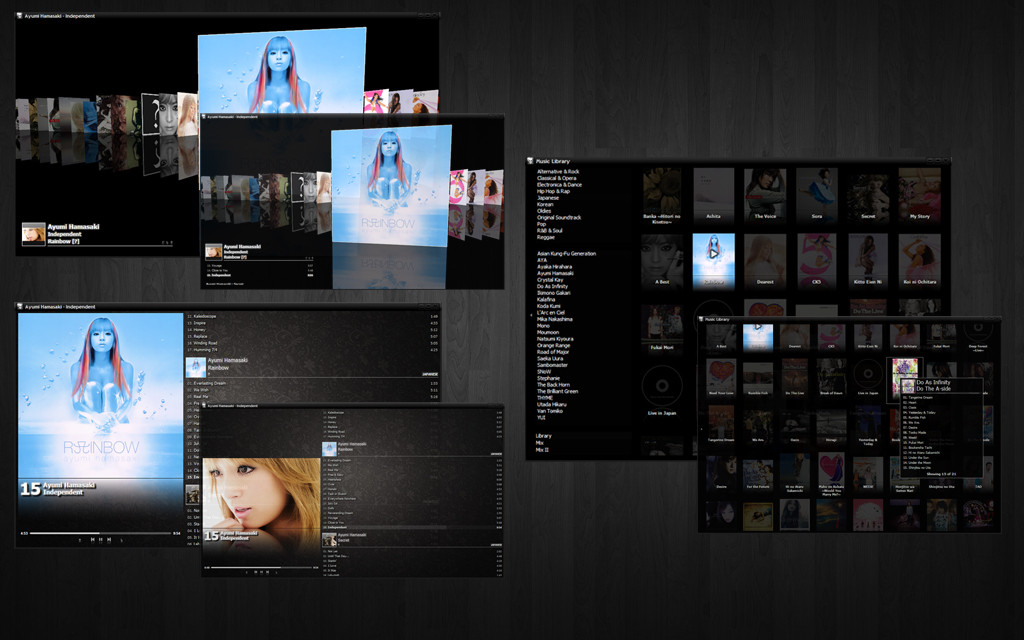
eeeFoo is a Panels UI 0.13.9 config, so this will not work with any foobar2000 version greater than 0.9.5.2. You can find version 0.9.5.2 here .You can use this with Panels UI 0.14.x but you will need to make a simple change to the config. Please read the readme.txt for more info.
The main window has two views: coverflow and playlist. The coverflow view has a small playlist that you can show/hide. In the playlist view, you can toggle between the album cover and artist image by clicking on it. Both views can activate a popup window that has the playlist switcher and album list (which you can hide/unhide as well) and a graphical album browser.
Hope you like it.
Related content







Comments: 27


I just installed this and it looks beautiful and everything...
But I cannot bring up the main menu anywhere or find a button that can access it (file, view, edit). The menu that allows you to go into the preferences and switch between themes.
Do I need to right-click in a different location or something :/?
👍: 0 ⏩: 1
Ah, nevermind.
The power of ctrl+p lol
👍: 0 ⏩: 0

But it´s another problem now.. In the library there is two different selections - one for genre and one for artist... if i click on a artist, nothing happens. Shouldn´t just the album for that specifik artist be displayed by albumcovers? For example; If I choose Angels and airwaves should all albums by this group be displayed and no other artist. Right?
👍: 0 ⏩: 0

Hi
I really been looking for a theme like this. But I have some config-problems. I get everything right except the cover art. I´ve tried all the alternatives listed among this comments, but I can´t get it right. It´s just a black screen (where the covers should be).
I think it could be the "cover display-notepadfile" that I don´t apply as I should. When I´m in the "Foobar2000 preferences > Chronflow > Cover Display" and hit "Compile/Apply" I can´t just copy/paste. I have to create a new one to be able to modify it? :S
I´m a little bit confused.. Would you like to describe this more accurate and detailed if possible?
I appreciate it
👍: 0 ⏩: 0

I had similar problems to Wiskim but I figured out what it was that was preventing images from appearing.
For the album art: place it in the music's folder and call it 'folder.jpg' (or other format)
Same thing for the artist image: place and label it 'artist.jpg' (or other format)
P.S. big fan of the theme. You've done very well. If you can add a spectrometer to fill the space right under the Track\Artist\Title space, it'd be sick. Keep up the good work.
👍: 0 ⏩: 1

man, i cant even add music or anything, and the background is plain, i wanted the floral patterns
its nice but just doesnt work (and yes ive done everything correctly) and i cant open up properties
👍: 0 ⏩: 1

Are you new to foobar? I don't see how my config could cause any problems with adding music to the library [If it is.... well "uh oh" 
Send me a msg with the exact details and what you've done so far. Some screens would help a lot as well.
👍: 0 ⏩: 1
sent a message
btw i didnt mean to be mean of anything, its an amazing skin, just that i cant get this beauty working properly
👍: 0 ⏩: 1
no offense take~ I hope you got this config working
👍: 0 ⏩: 0

thanks. i've solve the problem by modifying the top three lines to $puts(cover,$replace(%path%,%filename_ext%,)folder.jpg)
👍: 0 ⏩: 0
soory but it doesn't work. you can see my screenshots on [link]
👍: 0 ⏩: 1
hmmm... if you don't keep an album cover in the same directory as its corresponding album, then you might have to change the conditional statement with "cover" variable in it.
Go to the graphical browser's settings [right click pane where all the album images are supposed to be and select "settings"] and you'll find it right at the top. I hope this works.
👍: 0 ⏩: 0
Though I can see album arts in the main playlist window, I can't see them in the music library window. How can I fix this problem?
👍: 0 ⏩: 1
hmmm i think it's a bug from my poor programming... I don't think the pvars aren't set.
Try adding the line to the top of the Music Library configuration (right click the Music Library titlebar and select "settings":
$setpvar(librarySelect,1)
Hit Apply/Ok. If that works, go back and delete that line and hit the Apply/Ok.
If that doesn't work, show me a screenshot of the problem.
👍: 0 ⏩: 0


Thanks for sharing, mate.
I tell you, I'm jealous about anyone who can make such Foobar configs.
The coding is too complicated for me. 
This one is a very cool looking config, although, as you mentioned, PanelsUI isn't supported anymore. Amazing!
I will set it up tomorrow.
👍: 0 ⏩: 1
Yea it's a shame the foobar developers didn't have a similar component in place when they broke panelsui. The default ui and columnsui are nice, but I found them restrictive.
👍: 0 ⏩: 1
Can't say anything about that. But in my opinion, PanelsUI layouts were more stylish than the other layouts.
But i have seen some similar with ColumnsUI lately. Now PanelsUI isn't anymore, everybody has to focus on ColumnsUI.
👍: 0 ⏩: 0


Awesome, gonna try it out when i get home. Looks great tho
👍: 0 ⏩: 0