HOME | DD
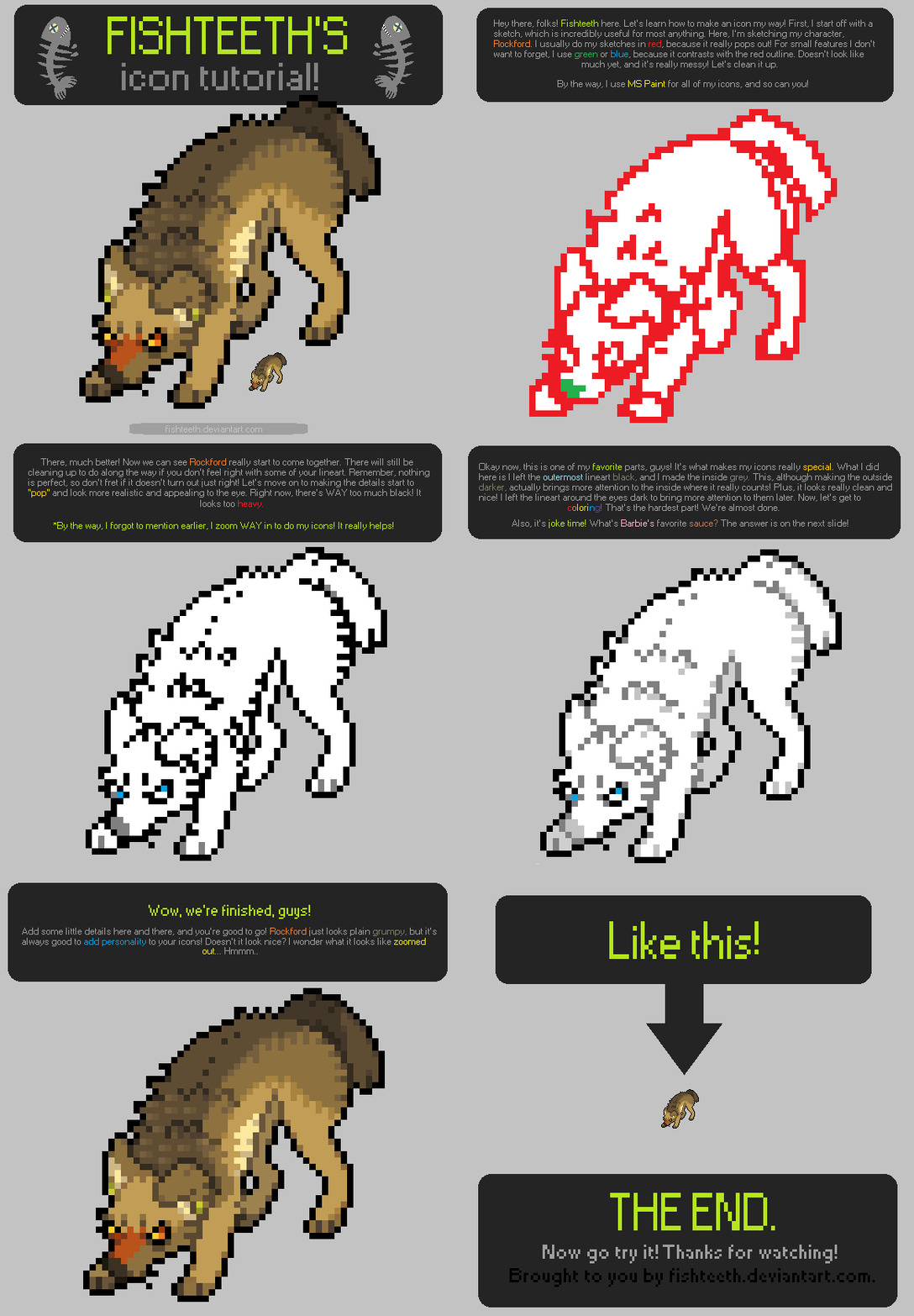
 Fishteeth — ICON TUTORIAL.
Published: 2012-03-19 12:15:04 +0000 UTC; Views: 22723; Favourites: 1370; Downloads: 903
Redirect to original
Description
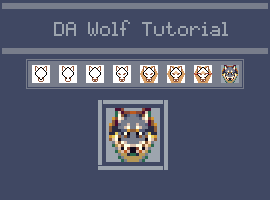
Finally, and icon tutorial! This is ANIMATED!(If you used this tutorial, show me what you made! I'd love to see it!)
I've decided to share my secret with you guys, 'cause I love you all! I hope this doesn't stop me from getting commissions, lol. Anyways, I hope you enjoy it! c: It sure took me a while to make it. xD Get out there and make your own icons! Show me what you got!
I was inspired by someone, but I forgot her username! ;o;
(c)
Related content








Comments: 187

thanks a lot! i used this to make my current icon >
👍: 0 ⏩: 0


Dang I actually stumbled upon this tutorial by chance and I decided to try it. Hot darn has it made a difference! ;D
Haven't made an icon for myself yet using this style, but I did use it to make this one! <3
Thanks a ton! <3
👍: 0 ⏩: 0

this really helped me figure out how to do my icons
👍: 0 ⏩: 0

Will it work if I start it out black and then color it?
👍: 0 ⏩: 0

Nice! But how do you get the background to be transparent? it's always tricky for me.
👍: 0 ⏩: 1


If you still need help with that you can also use Paint Tool SAI
Make a very bottom layer any color, Make sure you can't see it through your icon. (best to use a color not in your icon)
Then click the 'eye' button so you can't see the colored layer anymore.
Click save as. Save it as a .png a message box will pop up with 2 options.
Click the bottom one that says "32bpp ARGB (Each pixel have Opacity)"
And the colored layer you couldn't see anymore will be transparent.
👍: 0 ⏩: 1
Thanks for the help! Really! But my computer updated to windows 10 and it will not let me open Paint Tool Sai. So I am stuck with normal paint, it also deleted my Photoshop so I cant make anything transparent anymore. But thanks for the future advice for when I get it fixed!
👍: 0 ⏩: 1

Omg this was so helpful ^^ Thanks for the time in making this tutorial!
👍: 0 ⏩: 0

Just tried it out. You can see it as my profile picture. ^^
👍: 0 ⏩: 0


Thanks so much for this tutorial! <3
I made this adorable icon:
👍: 0 ⏩: 0


Made this 
Thanks ^^ this tutorial is amazing!
👍: 0 ⏩: 0


You press the red X on the top right and then click 'save' and then your done 
👍: 0 ⏩: 1

I meant what kind of file do I save it as. Haha sorry I didn't state the question right. I tried to save it as a normal file (24- bit bitmap) but those icon files won't work with the Deviantart files. Thanks for the help though. : )
👍: 0 ⏩: 1
Oh, OK! xD welcome
👍: 0 ⏩: 0


Try saving as a png after removing the bits you don't want.
👍: 0 ⏩: 0

U could by downloading Paint.net then picking the wizard wand then select the white space then press the delete button. Sorry but thats the only way i know. Paint.net is for free and u could download it from google 
👍: 0 ⏩: 0


how do you make all your icons without the white square?
👍: 0 ⏩: 1
U could by downloading Paint.net then picking the wizard wand then select the white space then press the delete button. Sorry but thats the only way i know. Paint.net is for free and u could download it from google
👍: 0 ⏩: 0

thanks you!
look at my icon i made :b
i watched your tutorial

👍: 0 ⏩: 0

is their any other thing i can use as animating gif gear only allows 10 frames.
👍: 0 ⏩: 2
U could use gifmaker.me it allows more than 30 frames
👍: 0 ⏩: 0

Iaza.com and chose 'frame animation' C:
It's free and online, so no need for download or anything x3
👍: 0 ⏩: 2
yes my icons look much better now because i can make them transparent
👍: 0 ⏩: 0
thank you!!!!
it REALLY helped!
👍: 0 ⏩: 1
thank you it really helped!!! your awesome fishteeth!
👍: 0 ⏩: 0

I made one [link]
EEEEEEEEE- this tutorial really is awesome! T^T
thankyou for sharing!<3
👍: 0 ⏩: 0
how to you make it animate together and put it as a icon?
👍: 0 ⏩: 1
Do u want it to blink or move its tail. Wepl theres an easy way. U could first save ur 1st frame then erase the part u want to animate then draw it again as u want. Then save As ( not save ) the ney drawn picture as no.2 then go to gifmaker.me then upload the frames and chokse the speed
👍: 0 ⏩: 0

How do you make it transparent and without a white background in MSPaint on Windows 7? >_>
*is shot*
👍: 0 ⏩: 2
| Next =>