HOME | DD
 GavinAsh — The Corner Ribbon
Published: 2011-03-07 06:41:58 +0000 UTC; Views: 36085; Favourites: 211; Downloads: 5423
Redirect to original
Description
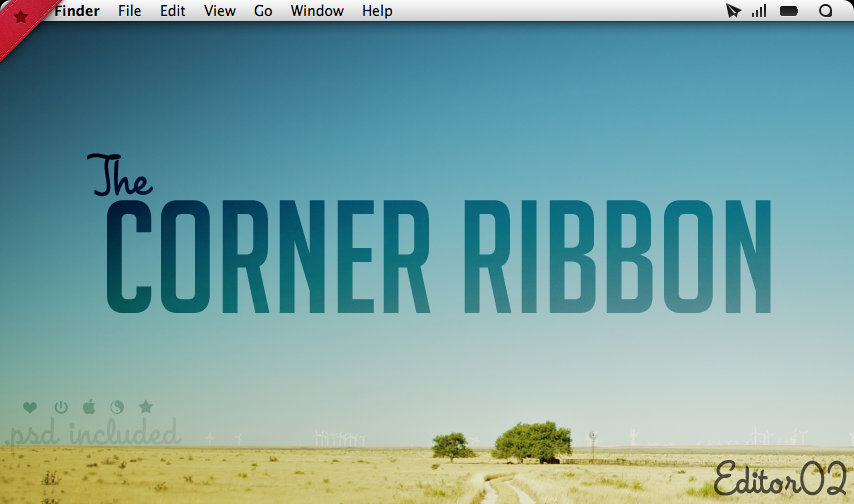
- The Corner Ribbon -Version 2 to my "Corner Bookmark" [link]
The first version was thrown together rather quickly, so I spent much more time on this newer version.
To start, I used a higher quality source file for my design which a link to can be found in the download. I also have provided a .PSD for simple modding, and colour changing if red isn't your style.
There are several different menubar icons included; Apple logo, heart, ying-yang, stars, editable text, and a power icon. Again, with the included .PSD it is simple to add your own.
On top of that, for those not fully experienced with customisation, there is a really short and simple guide/video on how to add the Corner Ribbon, and how to get the "mnml" traffic lights.
Wallpaper used in all the previews is "Blue Skies" by Fiftyfootshadows @ [link]
It is included in the download.
Hope you all enjoy, and if you do, be sure to favourite and leave a comment down below. Thanks!
______
And if you are on windows? No need to Fear, ~danieliop is here! Now this is available as a skin for Rainmeter on a PC: [link]
Related content






Comments: 104


All the .psd files are included for you to extremely easily change the colours
👍: 0 ⏩: 0

Great work!
In the "In Action" preview that comes in the Corner Ribbon folder, I was wondering what icons you were using on the bottom left of your desktop? :]
👍: 0 ⏩: 0

I would love it, but it covers the exit button on my windows, and I am a perfectionist.
👍: 0 ⏩: 1
Yeah, that depends on the size of the screen a bit. That was my issue with it too

👍: 0 ⏩: 0

Loving the wifi signal bars - source please?
Nice job on the ribbon - reading back and seeing its function, it's a neat replacement, but I don't use geektool.
👍: 0 ⏩: 0

So Cool 
Can you tell me the name of font used for "The"?
👍: 0 ⏩: 1
So sorry buddy. Its a font that you need to buy :/
[link] - Made by House Industries, Its called House A Rama - League Night
👍: 0 ⏩: 1


Geektool, instructions available in the downnload
👍: 0 ⏩: 1

i wish the ribbons were a little bit bigger. They look quite small on my desktop

👍: 0 ⏩: 1
I know what you mean. Do you have one of those large displays? Normally I'd offer to whip up a larger one, but with no reference to scale by, and little to no time on my hands, it may be difficult :S
👍: 0 ⏩: 0

What's the font used for "Corner Ribbon" in the preview?
👍: 0 ⏩: 1
Big Noodle Titling - [link]
👍: 0 ⏩: 0


Hey Man. Unfortunately I cannot do this because I chose to make the different icons instead, it would be most time consuming to make several colour mods for each icon. This is why I included the .PSD file so it is easy for anyone to make their own colours. If you have photoshop, feel free to mod as you wish. If not, let me know what colour you want for which icon, and I'll make it for you
👍: 0 ⏩: 1

Glossy grey 
👍: 0 ⏩: 1
With what icon, and do you have a picture that I can sample the colour from? That way its exactly what you want
👍: 0 ⏩: 1
Just like that [link] the apple icon
👍: 0 ⏩: 1


Thanks, for the nice comment and for the fav
👍: 0 ⏩: 0


Not a problem. Have fun with it!
👍: 0 ⏩: 0

Hello sir.
Where can I get your airport icon?
Best regards.
👍: 0 ⏩: 1
Airport Menubar Replacement icon: [link]
👍: 0 ⏩: 1


I'm humbled. Thats for the generous comment!
👍: 0 ⏩: 0

I really love your ribbon, I'll give you my next ss with your corner ribbon
Maybe you could add some more colors
👍: 0 ⏩: 1
Wow thanks. Regarding the colours, I have considered it, but I decided that it would take a lot of time to mod many different colours each with the alternate icons.
I did however, make sure to include the .psd for those with Photoshop, so creating their own personalised colour mods will be easy and not time consuming.
If you don't have photoshop, I'm happy to do requests.
👍: 0 ⏩: 0
| Next =>