HOME | DD
 griffsnuff — Dusk

Published: 2016-04-22 23:40:10 +0000 UTC; Views: 5012; Favourites: 614; Downloads: 0
Redirect to original
Description
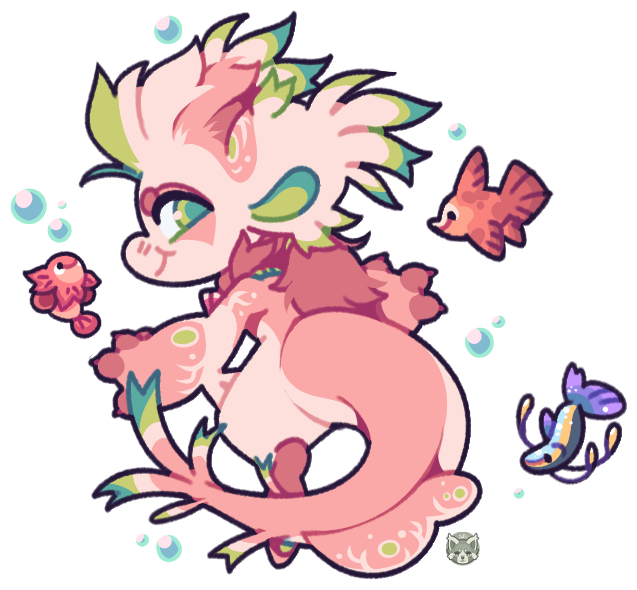
 one of my fishies
Related content




Comments: 41

I love the lineless style, especially with her bright colors! Does this style take longer to do, or is is easier than your usual style?
👍: 0 ⏩: 1

The same
👍: 0 ⏩: 1
Makes sense >u<
I just can't stop looking at the colors, I am very tempted to make this my screensaver just so I have an excuse to can stare at it more ^^'
👍: 0 ⏩: 0


Ah shes my fave <3 this is amazing, so so so amazing
I love this style!
👍: 0 ⏩: 1
Youre welcome! I also wanted to say I read one of the comments you left giving a bit of help on "how to" so thank you for that! It was very helpful (especially not having photoshop)
👍: 0 ⏩: 0


do you have a guide on how to do that papercraft effect? I'd so love how to do that cause this is so cute and cool 0':
👍: 0 ⏩: 1
easist way is to draw it lineless and then add a drop shadow effect in photoshop and add a texture to it x3
👍: 0 ⏩: 1
how are drop shadow effects created? or do you just like manually put them in? that's the only way I've been able to do it ; w ; so it creatures super uneven lines and stuff
👍: 0 ⏩: 1
doubleclick on the layer with the drawing and choose shadow, or you can draw it yourself on a layer behind the art. Ooooor you can copypaste the shape of your drawing, make it black and move it a few pixels down behind the drawing and lower the opacity x3 tons of ways to do it even if you dont have photoshop
👍: 0 ⏩: 1
ooohh, I found it, thank you so much omg, this is going to make things so much easier ;; w ;;
👍: 0 ⏩: 0


Love this style~!!! It looks just like paper!
Another great work, Griff!
👍: 0 ⏩: 0


aaa i love it! its so smooth 
👍: 0 ⏩: 0

Dude omg looks like you made it from contsruction paper
that's badass LOL
👍: 0 ⏩: 1

Had to zoom in to see it, guessing it's because I'm way early or something. It's lovely, like everything else you make. I especially like the colors.
👍: 0 ⏩: 0