HOME | DD
 gvsb —
Ditto
gvsb —
Ditto
Published: 2008-05-24 07:56:02 +0000 UTC; Views: 35566; Favourites: 65; Downloads: 4076
Redirect to original
Description
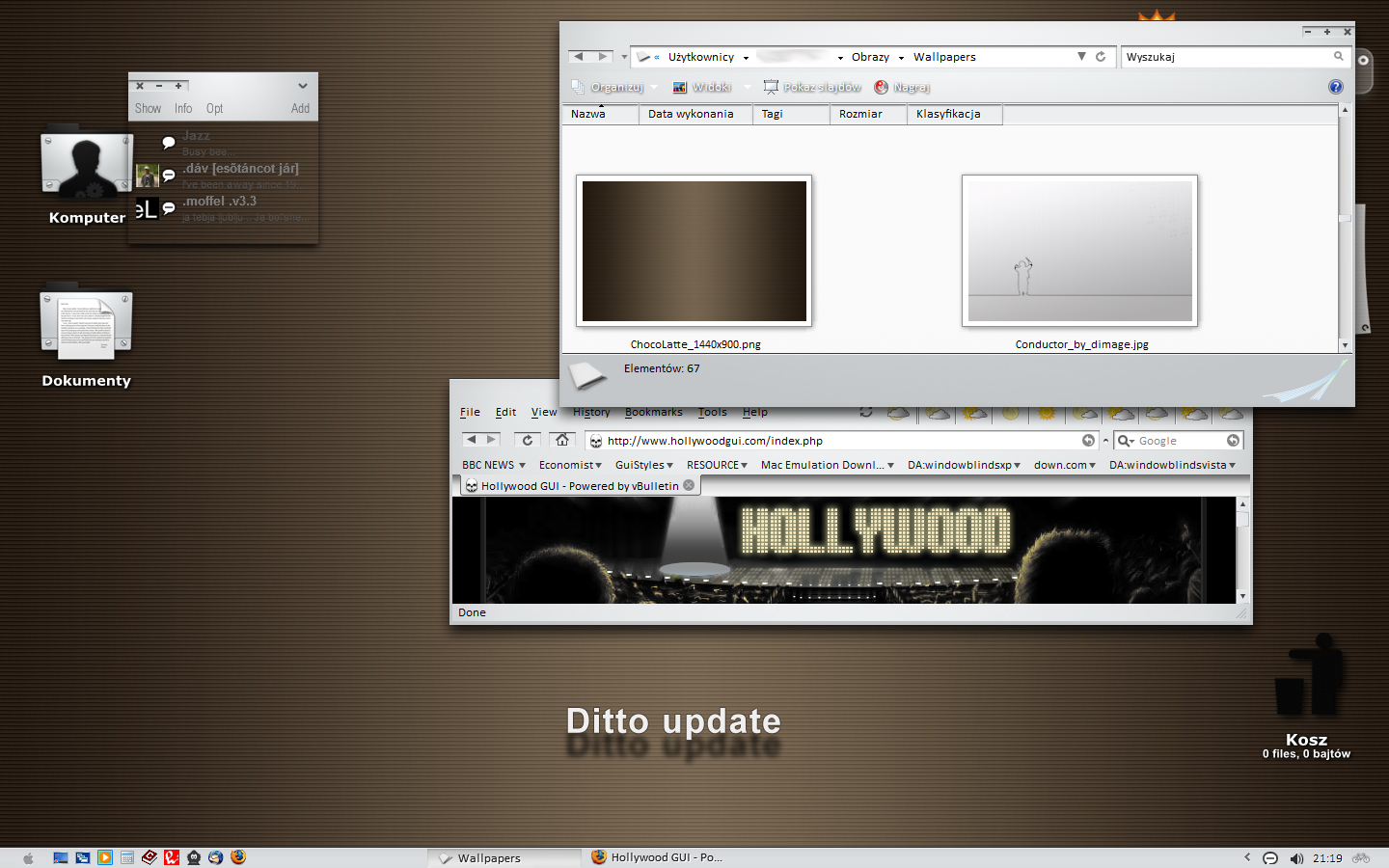
Ditto is a windowblinds6 vista and firefox theme designed by luk/gvsb.An XP version by iiswiis is right here: [link]
In a way it is a tribute to my favorite minimal themes out there: primarily to Gerrit's Aluminium, Toner's Neon, and Stefanka's AquaSE. Wren icons have also been an inspiration.
It would not be out, if it wasn't for my good pals' support: thank you iis and Mrrste!

Included are wb6 theme and a firefox skin.
Miranda is here: [link]
Wallpaper by iiswiis
!!! Update !!!
Here's what's been changed:
1. modified startbutton (apple now is beveled when pressed)
2. bicycle to the right of the taskbar (why the hell not?)
3. new scrollbars and buttons
4. new tab buttons
5. Internet Explorer fully skinned
6. fixed caption text: does not overlap glyphs
7. fixed background for back/fwd buttons of the explorer.
8. New tab background.
I wish to thank Leuchstoff and Mrrste for pointing out bugs and providing solutions.

For technical and other issues read the readme file (I won't bore you with that here
 ).
).This theme is designed to work with Vista, so some XP elements will not be skinned.
Notify me if you find any bugs, and check back, because I might be updating the theme some time in the future.
Enjoy!
luk
Related content


Comments: 87


All of your themes are great, but could you at least start offering the option of a Windows flag instead of an Apple for the start button? If I wanted to run Mac OS I'd just install that instead. Thanks.
👍: 0 ⏩: 1

what do you mean "at least?" So a wb theme, mirada, and firefox skins are not enough anymore?
👍: 0 ⏩: 0

i love this theme! although i dont know how to install it :/
i have extracted it, but i cant find out how to set it as my theme.
any advice? it would be greatly appreciated! as i am sick of the vista theme!
👍: 0 ⏩: 1
thank you
It's a windowblinds theme, so you will need windowblinds6 application to install it. You can get it from stardock.com (it's payware, but well worth your money).
👍: 0 ⏩: 1

awesome look man!
do you think i could change the apple into a windows logo? if so, could you tell me how to?
👍: 0 ⏩: 1
thank you.
you will need skinstudio6 (free) and an image editing application.
open the theme in sks6, go to Edit Startmenu/Edit Horizontal Taskbar/Start Button/button. this is the image you need to modify, i.e. open it in Photoshop or other application (Pain will do) and change all of the apples to the logo of your choice: create one or "borrow" on from some theme. (oh, and make sure they are evenly spaced or the image will shift on mouseover, pressed, etc.).
👍: 0 ⏩: 0

very nice skin indeed, but i may make mod to mine to add a windows logo instead of apple, if i do so, I will let you know
👍: 0 ⏩: 1

lol at people who said this looks like ubuntu. looks nothing like it. this is an excellent blind. awesome stuff. thanks for making this man!
👍: 0 ⏩: 1
always a pleasure to read a comment like this!
thanks pjdark and enjoy!
👍: 0 ⏩: 0

Everything works find in my Windows XP, just the close min max buttons on the right side, will you make for the left side, gvsb ?, please, thank's.
Oh don't you want to make a styler toolbar too ?
Appreciated, looking forward
👍: 0 ⏩: 1
Well, now that I have updated the vista theme I am thinking of making a fully working XP version (i.e. with styler). I need to time to do that though, so check back in a while.
Thanks for your comments
👍: 0 ⏩: 1
Yeaah !!, oh I can't wait, he he, thank's a lot gvsb !
Oh and don't forget for the OB skin, he he, if it's not too much
👍: 0 ⏩: 1
I don't do OB skins as I don't use the application. sorry.
👍: 0 ⏩: 0

thank you! nice to hear (read) that
👍: 0 ⏩: 0

thanks.
👍: 0 ⏩: 1

gvsb, I LOVE this skin!! I\'ve always really liked the minimal skins and you really did a great job on this!! I have one question. The ONLY thing that\'s giving me trouble is the Start Menu - All programs, it\'s black (I have XP). What would I need to do to make it work on XP? Love your work here though! Thank you very much.
👍: 0 ⏩: 2
First of all, thank you kindly!
As for an XP version, someone would have to redo the theme in skin studio5. I would be happy to assist such an effort.
Normally, the menu should be ok in xp as well, but apparently, this time skinstudio6 has had other ideas about that part of the theme. sorry about that
👍: 0 ⏩: 0


Looks nice. Personally I have been using Linux lately, though I dual-boot XP/Linux on my laptop. This theme is nicely done though. I like Vista but found it to be WAY TOO BLOATED. For instance, I had minimal apps plus Vista Ultimate installed and it was around 60GB. Linux with Compiz and LOTS of apps etc installed was around 6GB on same system. But if you have a 500GB hdd who cares how big it is.
Anyhow, Nice share. Thanks.
👍: 0 ⏩: 1
Thank you kindly. Glad you like the theme!
👍: 0 ⏩: 0

świetne! sam chciałem się pobawić w \"skin\'owanie\" ale jakoś zawsze brakowało na to czasu 
👍: 0 ⏩: 1
Dzieki.
co do ciemniejszych tonow, sprawdz galerie. Jest tam wersja vista Photopro: to ciemna skorka.
👍: 0 ⏩: 1
Tak już sprawdzałem
Namawiam abyś spróbował swioch sił w stylu coś a la transculent, na pewno będzie ciekawie : )
pozdrawiam.
👍: 0 ⏩: 0


turned out great, buddy! And, yes, the progress bar looks absolutely good now in the final version
👍: 0 ⏩: 1

Very cool, although I use Mac, it looks very nice on my parents machine (but they don\'t know yet 
👍: 0 ⏩: 1

Looks very similar to the system theme for Ubuntu Linux.
👍: 0 ⏩: 1
ok. I'm familiar with the name ubuntu, but I have never seen it in action.
👍: 0 ⏩: 1
You should try it, it's a fine system, of course I only use windows because gaming in linux is a pain.
👍: 0 ⏩: 0

probably just the colour of the wallpaper and the grey taskbar.
GNOME grey and brown tones = Ubuntu.
👍: 0 ⏩: 0

świetna robota
tylko mam mały problem WB nie chce mi zmieniać wyglądu okien... wiesz może jak temu zaradzić ?
👍: 0 ⏩: 1
dzieki.
Musialbys bardziej opisac co sie dzieje. ciezko tak powiedziec bez blizszych danych. wyslij mi notke stad.
👍: 0 ⏩: 1
no niestety tak to wygląda jak zaakceptuję (jakikolwiek temat) [link]
wygląd okien zmienia się na klasyczny i nie wiem co z tym fantem zrobić... jak masz jakiś pomysł będę wdzięczny
[jakiej wersji WB używasz?]
👍: 0 ⏩: 1
| Next =>