HOME | DD
 jaimicvs — Rakim
Published: 2011-09-09 17:53:54 +0000 UTC; Views: 47962; Favourites: 74; Downloads: 6881
Redirect to original
Description
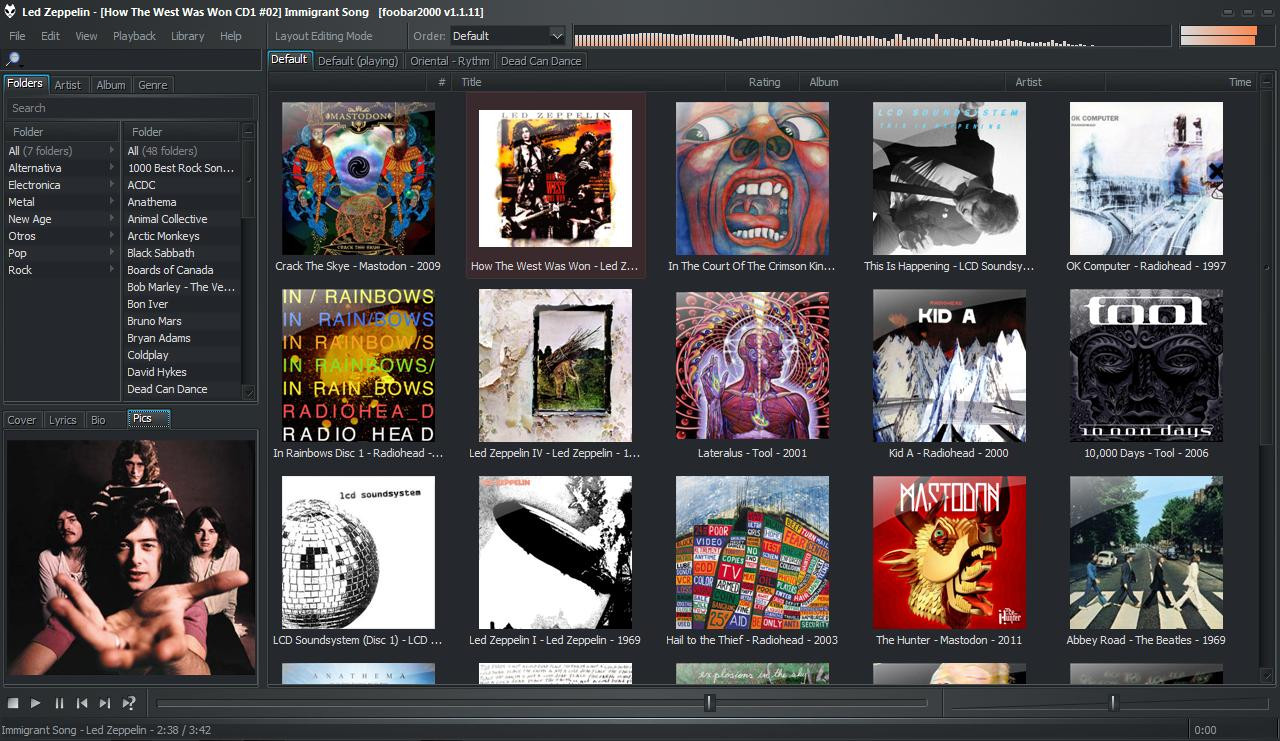
Previously named "Simple & Useful". Now with a wider left column and various little fixes.I wanted that Foobar2000 were more easy to use... basically more easy for the search of songs and artists. So with the Facets component I made a list for folders (because I order my music folder like genre/artist) and other for artist, albums, and genre. (* You can configure Facets if you want that clicking or double clicking on a item changes the playlist. (File > Preferences > Media Library > Facets).
Below the lists, a useful panel with Lyrics, cover, Biography (text only) and Biography pics only. (* If you double click on the pictures of Biography you can change the type of picture between Artist pictures - Album cover. It's great because you can download both, allowing to save easily the covers for the album's folders.)
******************************************
INSTALLATION
1.- How to install the Theme:
File > Preferences > Display > Default User Interface > Import Theme
2.- Components required (links to the latest version)
Facets: [link]
EsPlaylist: [link]
Biography: [link]
Quick Search: [link]
Lyrics: [link]
To install components: File > Preferences > Components > Install
3.- Visual Style to look exactly the same: Concave VS by `GeorgeHarrison
[link]
******************************************
Hope you like it
Related content




Comments: 45

👍: 0 ⏩: 0

👍: 0 ⏩: 0

👍: 0 ⏩: 0


I am presently using this skin with Foobar2000 and love it! I do however have one issue which I need to resolve and that is I would like to know which setting to use to prevent "embedded cover-art" from being installed in each of my files when Foobar2000 adds a new location. I am a new user and when I added my music drive "E" so that Foobar 2000 would index my music files everything worked without any issues aside from all of my music tracks now having embedded cover-art which I did not wish to have installed! Fortunately I have several back-up copies available to correct this with once this issue has been resolved.
Can you please advise where to make the change in the preferences panel to turn off embedded cover-art so that this will not happen again!
👍: 0 ⏩: 0

dumb question, how do I enable bitrate display?...thank you
👍: 0 ⏩: 0

How do you change it so that everything is dark like in the picture above? Right now it's basically a default foobar2000 theme..
img02.deviantart.net/f46b/i/20…
👍: 0 ⏩: 1

alperyesiltas.deviantart.com/a…
That's the style for windows 7
👍: 0 ⏩: 0

Dumb question.. but how do we see the actual playlist songs? All I see are album covers. I cannot select individual tracks.
👍: 0 ⏩: 0

Its been a while since I've coded with fb2k... where to I change the settings for the album display in the main window? On mine, the albums are spread too far apart with the titles offset to the right, rather than below. I know theres somewhere to change all this, but can't find it in prefs....
Not sure if you even check up on your comments any more, I'll probably figure it out before you get back here oh well

👍: 0 ⏩: 0

Me quedo este. El más ligero y el más funcional. Gracias

👍: 0 ⏩: 0


Thank you for theme)
Sorry, but I don't understand, why is style of Gui-elements are not the same like on your screen (I mean color's n fonts of tabs, buttons, etc.).
I have WinXP SP 3
[link]
👍: 0 ⏩: 1
double click the orange text - name of the album.
👍: 0 ⏩: 0

Installed this theme just now. I recently switched to foobar, as my winamp crashing every 3 tracks was a nightmare. Very much a newbie to installing themes for this player, but had no problems with this at all. Really happy with my foobar now, thanks for sharing this. Great job. )))
👍: 0 ⏩: 0

the links to your components are all dead
but i DO enjoy going to japanese websites that have a negative rating on my virus scanner
so thanks for that
👍: 0 ⏩: 1
They are not dead... for unknown reasons, the direct link to the file is not supported for some browsers. And the japanese site never has made me problem.
👍: 0 ⏩: 0

Totally love this theme. Thanks so much! Would love to see a "Style" tab in the lists, for those of us that also use Discogs.com tagging, which uses styles to refine from basic genres. Been trying to figure out how to do this myself but no luck yet!
👍: 0 ⏩: 1
ok, I totally misunderstood you. If you want a tab, you just have to
1 - enable edit in View > Layout > Enable Layout Editing Mode
2 - right click in the tabs > Add new tab > Name it as you want.
3 - copy and paste any of the others facets like, genre, or albums(right click > "copy UI element" and then "parte UI element")
4 - Disable Layout Editing Mode
Now you have a duplicate list, just right click on the header of the list > Columns > Preferences
In the facets preferences you can add the pattern or tag that you want... so add style putting this = Name: style; pattern: %style%. Then Ok.
Finally, again right click on the header of the list > preferences > columns > style.
The end
👍: 0 ⏩: 0

This is AMAZING! It is completely functional, does everything I wanted and looks great. Just one question: is there any way to make the left column wider and the bottom box higher? The small size makes them a bit hard for my eyes.
Thank you sooo much!
👍: 0 ⏩: 1
Just enable edit in View > Layout > Enable Layout Editing Mode
Then Right click right between the two columns and uncheck "Lock Left Pane Width". Now you can change the width as you like. Do the same to edit the top and the bottom pane.

👍: 0 ⏩: 0

All of the components but one loaded for me...I got an error for foo_quicksearch.dll, saying it wasn't compatible w/ my version of Foobar (1.1.1). any ideas?
👍: 0 ⏩: 1
just download the latest version of the component here [link]
👍: 0 ⏩: 0
i got an error that foo_quicksearch.dll wasn't compatible with my version of foobar (version 1.1.1). any ideas?
👍: 0 ⏩: 0

This is just what I was looking for. There is one thing I need help with however. How do you increase the width of the left column? I would really like it to be a little bigger. Any help would be appreciated.
👍: 0 ⏩: 0

This is great, except for one thing. It's showing one of the album art covers for many of my mp3s. And yes, I have been using foobar for a long time now, and I've had the same mp3s which I personally added the album art to. The correct one always showed up for every mp3 until I installed this skin, so something about it is causing the same album art to show up for mp3s in which it's overriding the actual album art. Anyone have any ideas as to what is causing this and how I could fix it?
👍: 0 ⏩: 0

I don't see anything that says "Import Style" in foobar.
What version are you using?
👍: 0 ⏩: 1

Import "Theme".
But what I see after installing this theme has nothing to do with the picture above...
👍: 0 ⏩: 0

Hi, i cant manage this skin to work as it was desired 
[link]
👍: 0 ⏩: 1
Right click in any part of the EsPlaylist > Grouping > Preferences > Clik in the option you want to edit > Edit
And then, in "Title" write: %album% - %artist% - %date%
Sorry for the late answer
👍: 0 ⏩: 0

Can't manage to get this work! Foobar doesn't load the skin, no matter how many times I push Import Themes
👍: 0 ⏩: 0

Hi! very easy setup for me! never able to customise foose properly..
perfect for me except I would like to make the 4 lists column (left column) larger, anyone can tell me how can I do that?
👍: 0 ⏩: 0


The layout was loaded partially because the following required components could not be found: "Facets", "Biography View", "EsPlaylist", "Lyrics Show Panel v3"
👍: 0 ⏩: 0

I have a question, how do I change the colour?
👍: 0 ⏩: 0


Well, I have a question: "File > Preferences > Display > Default User Interface > Import style" << I just can't find the import button
👍: 0 ⏩: 1

It's called Import Theme in the Theme Managment box in the Default User Interface. Get the newest foobar2000 perhaps?
👍: 0 ⏩: 0

best DUI looks have seen until now, congratulations, and once again, Concave VS allows those wonderfull look
👍: 0 ⏩: 1

