HOME | DD
 katokoart — Bow tutorial
by-nc-nd
katokoart — Bow tutorial
by-nc-nd
#bow #dagettingstarted #digitalart #digitalpainting #tutorial #digitaltutorial #tutorialphotoshop
Published: 2020-06-27 09:02:36 +0000 UTC; Views: 1451; Favourites: 34; Downloads: 4
Redirect to original
Description
❀ FACEBOOK ❀ TWITTER ❀ INSTAGRAM ❀ NEWGROUNDS ❀ PATREON ❀
.•°✿°•..•°✿°•..•°✿°•..•°✿°•..•°✿°•..•°✿°•..•°✿°•.
So I decided to tryout something new. I hope it will help you :3
Before staring out. I used vertical symmetry. It's a really helpful tool to help you make your drawing symmetrical. I would recommend doing every single step in a new layer. I used Adobe Photoshop CC but I think that it can be drawn in any drawing software
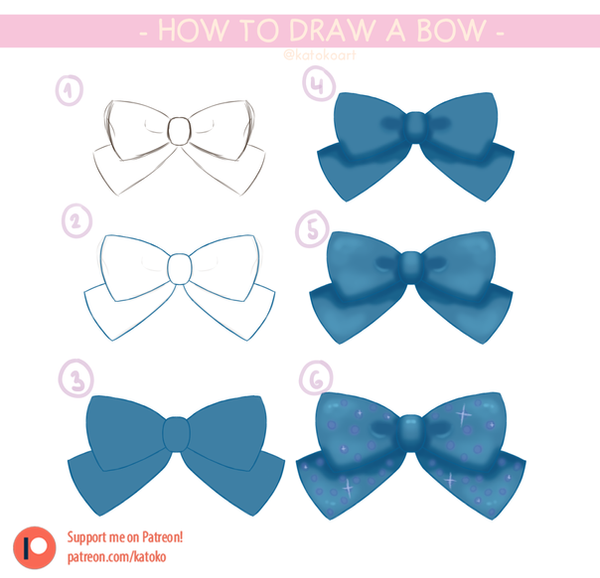
- ① Make a rough sketch. Don't worry about messing it up since it's just a base.
- ② Lower the opacity in the layer with the sketch and draw over lineart. They have to be straight as they will serve as outline of the bow.
- ③ Colour the inside with a colour of your choice. This will serve as base colour.
- ④ Chose a darker shade of the base colour and shade.
- ⑤ Choose a lighter shade of the base colour and add some highlights.
- ⑥ By choice add some details.
For patrons a psd file and 2 videos will be additionally released.
.•°✿°•..•°✿°•..•°✿°•..•°✿°•..•°✿°•..•°✿°•..•°✿°•.
Click here to submit a suggestion ´・ᴗ・`
Click here to view my other art ´・ᴗ・`
Click here to buy a print ´・ᴗ・`
Click here to read about commissions (✿◠‿◠)
Click here to see my price list (ㅇㅅㅇ❀)
click here to read about requests / free art (.❛ ᴗ ❛.)
I am OPEN to commissions,art trades and collabs!
.•°✿°•..•°✿°•..•°✿°•..•°✿°•..•°✿°•..•°✿°•..•°✿°•.
I would like to thank you all in advance for your feedback and support ⊂(♡⌂♡)⊃
DO NOT USE / TRACE / EDIT / REPOST / SELL / RENDER my artworks in any way, please.