HOME | DD
 knotsme — Weekly plan improved
by-nc-nd
knotsme — Weekly plan improved
by-nc-nd
Published: 2010-01-31 12:44:30 +0000 UTC; Views: 997; Favourites: 3; Downloads: 168
Redirect to original
Description
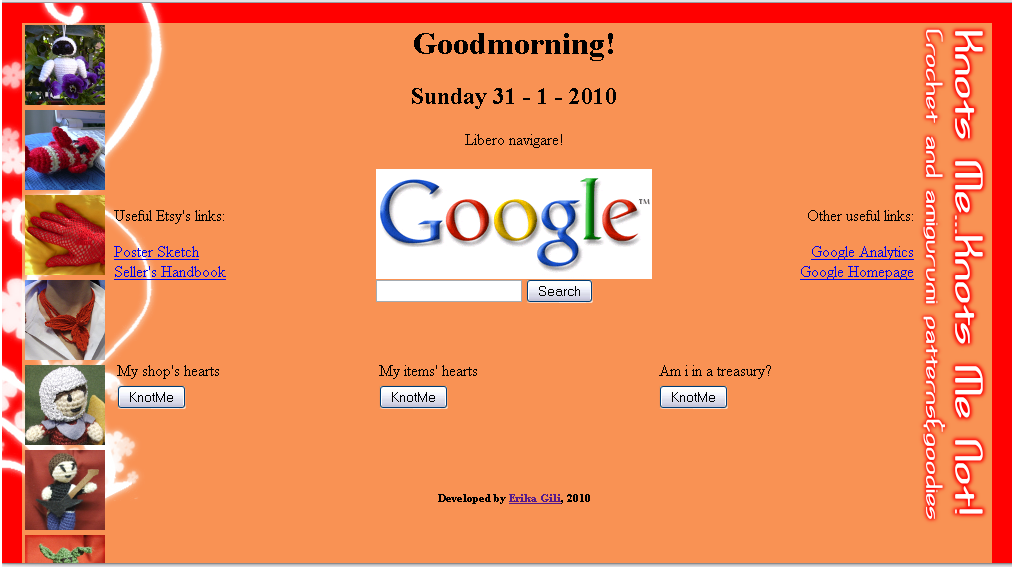
This is a tool i hope will help a lot of Etsy Sellers It's a little html page with javascript that you can use like the homepage on your browser and helps you to plan your week.
The script greets you, tells you the day and what you have to do that day. Like lots of Etsy sellers, i've made a schedule to come up with all the things to do. For example, on monday i have to update the blog, on tuesday i've to surf Etsy, and so on. This tool tells me exactly what i have to do. But i didn't want to loose my Google home page (i've always something to search!), so i've added a Google form ^^
☺ First, download the file clicking the download button near the image: you'll get a .pdf file
☺ Save it in a new folder, where you'll save also the background image. This passage makes easier the writing of the position of the image into the code.
☺ Then open the .pdf file and copy all the code in a text editor, like NotePad.
☺ Write the schedule of your week: find the lines where i written WRITE HERE WHAT YOU HAVE TO DO ON MONDAY, and instead of it write you plan for every day of the week.
☺ Find WRITE HERE THE path OF THE BACKGROUND IMAGE, and write instead of it the name of the image. Note: you can write only the name if the image is saved in the same folder of the file.
☺ Find HERE YOUR ETSY USERNAME, and write instead of it exactly only your Etsy username. You can see these buttons in the image (where is written "knotme"): they will lead you to the Craftcult's Heart-o-Matic, and the Craftopoly's Treasury Hunt.
☺ Well, now save the Notepad file with the extension .html and double click on it: it will be opened in your browser, and you can test it.
☺ To have it like your homepage (i will be really glade!), Tools -> Options of your web browser, and use the current page like home page. Tadaaaa!

If you have problems or advices for me, contact me!