HOME | DD
 lefty-2000 — Blender Rig For Jenny
#themoviesgame
Published: 2016-06-05 18:56:53 +0000 UTC; Views: 1078; Favourites: 1; Downloads: 8
Redirect to original
Description
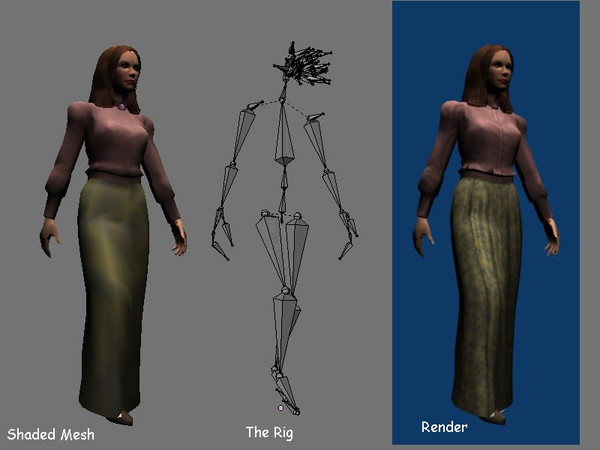
Anyone can do it.There may be a better way to do this, but I have found a procedure to combine all the various mesh pieces
of a Movies Game character into a single posable object in blender. The "Jenny" character is composed of the
following pieces:
1. generic_facialskin.msh
2. hair_20s_f11.msh
3. cos_f_wes_1.msh
If you import these three files into a blender scene, the import script generates three objects, each with
a mesh and an armature. The armature for the first file is most complete. It has bones for the entire
body, plus additional bones for the facial features. The other two armatures are the same except for the
controls for the facial features. For the conveniece of the animator, we would like to have only one
object with one mesh and one armature.
The process described here involves breaking all of the pieces down and then recombining them.
The first step is to import all of the msh files listed above into a blender scene and then saving it, then
erase everything and start with a clean slate.
The second step is to append all of the mesh objects from the blend file you just saved. In my case, they
were named OBJ.000 through OBJ.006. These can be joined together into a single mesh object using the
control-J command. Select two objects, then apply control J. The pop-up asks to confirm if you want to
join the meshes and clicking on "join selected meshes" causes it to happen. Repeat until all six of the
mesh objects have been joined into one object.
The third step is to append one of the three armatures to use as a skeleton for the figure. I used the
armature from generic_facialskin.msh which was imported into blender with the object name 1094395392.
Select the mesh object, then the armature and use control-P to parent the mesh to the armature. When it
asks "Parent to?" select "armature" and when it asks "Create vertex groups?" select "nothing."
That's it. The rig is ready to go.
Related content





Comments: 2

My goal is to make movies in blender drawing on the vast catalogue of 3d assets in The Movies Game. That is why I wanted to be able clean up the model and cast it in a form that is convenent for animatiing in blender.
👍: 1 ⏩: 0

Good job.
When animating in Blender, it's a bonus to have the head and costume connected at the neck. That way the neck stays with the costume. For exporting back into the movies game, since you may want to also animate the costume there, you can combine the textures into a larger one and so the export script will accept the objects being joined. Blender allows single objects to have multiple materials and to have multiple images mapped to, but the Movies game only allows one material and uvmap for any single costume object. What is easy for Blender is harder for the Movies game.
Are you planning to use Blender for an upcoming movie?
👍: 1 ⏩: 0