HOME | DD
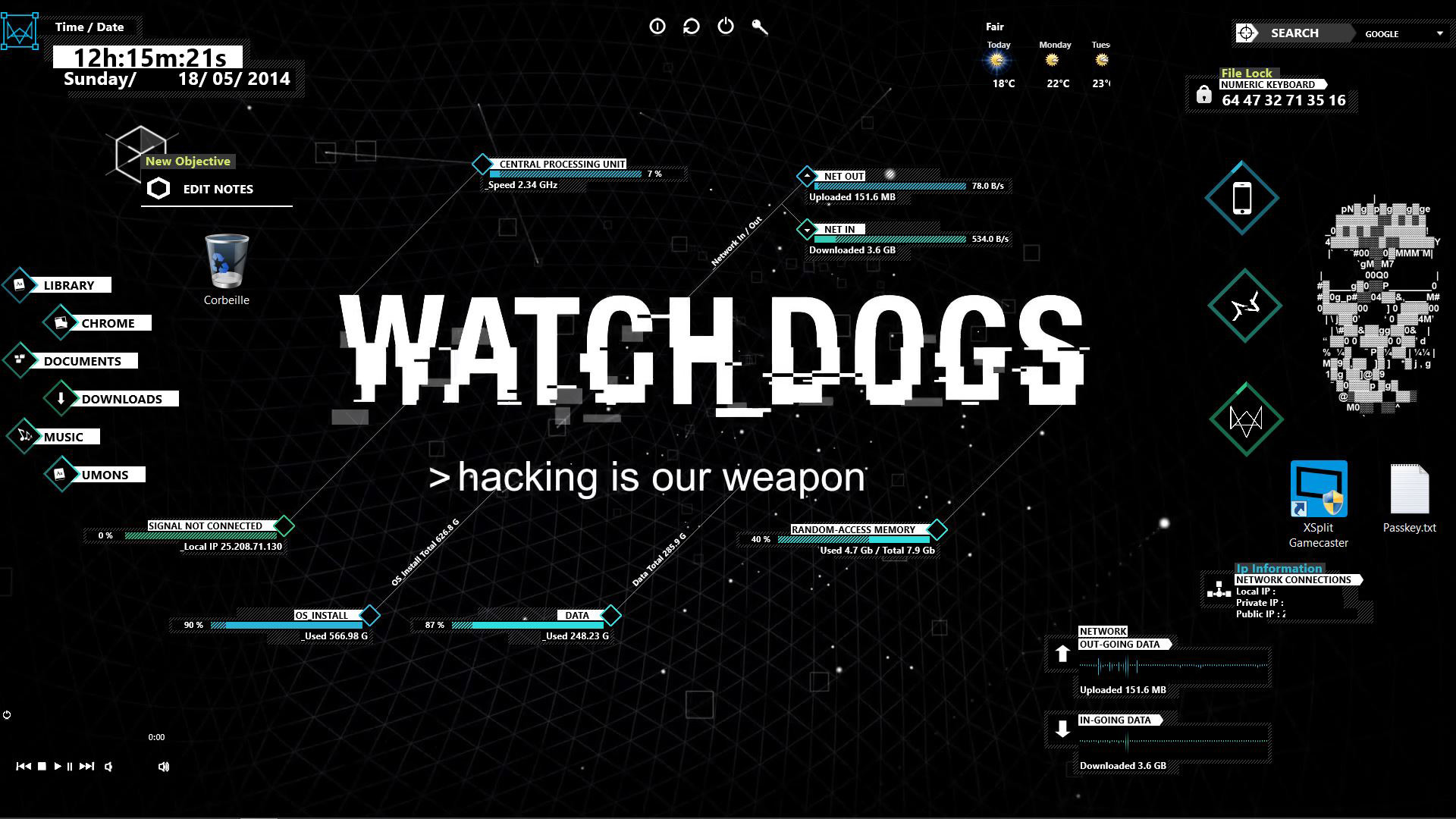
 LeRoiErrant — Watch Dogs theme
Published: 2014-05-18 11:31:47 +0000 UTC; Views: 66403; Favourites: 219; Downloads: 17428
Redirect to original
Description
Here is a Watch Dogs theme for Rainmeter that I've made with a preexistent theme that you can found here www.youtube.com/watch?v=IqGUlw…I really hope you enjoy it !
Don't forget to download the latest version of rainmeter :Â github.com/rainmeter/rainmeter…
If you have a Issue, here is the solution: replace the "#SKINSPATH#" with "%UserProfile%\Documents\Rainmeter\Skins\wd\" or wherever the files are stored. works for me after replacing in each .ini and .inc files. watch out for the "#SKINSPATH#\\Watch_Dogs" and make sure there is only 1 "\" between the "wd" and "Watch_Dogs".
Thanks to OneDraco13 who find this solution
Related content





Comments: 63

👍: 0 ⏩: 1

👍: 1 ⏩: 2

👍: 0 ⏩: 0
👍: 0 ⏩: 1

👍: 0 ⏩: 0

👍: 1 ⏩: 1
👍: 0 ⏩: 0

👍: 0 ⏩: 0

👍: 5 ⏩: 1

👍: 0 ⏩: 0


I HAVEN'T GET THE THEME ...
HOW TO DOWNLOAD THE THEME...?
👍: 0 ⏩: 0

Thank you for the theme, but my PC is in Win8.1 and when I load the theme it doesn't work dose the path of the film matters?
👍: 0 ⏩: 0

so basically you might want to update the file by just adding wd in every path file.
as you seem to have forgotten that in your path's, so all I get are just text and white blocks as the textures are not loaded.
might also be that the update's changed stuff from when the time you made this (so updating might not hurt ether way, rather change it once yourself then having hundreds of people doing it right?)
Along with that the "wheel" thing is not working at all even after I added the wd\ part to the code, so I guess its made a tad more complicated then the other parts.
Not very sure if the "file lock" thing is broken or working, what is it supposed to do? I can punch in numbers but nothing seems to be happening when I do so, is it just decoration?
👍: 0 ⏩: 0


Can someone please explain step by step how to install this properly? I don't understand any of this! 
👍: 0 ⏩: 0

I tested it, but the wheel profiler don't work even after replacing #SKINSPATH # with %UserProfile%\Documents\Rainmeter\Skins\wd\. Can someone tell me what to do? (sorry for my english)
👍: 0 ⏩: 0

Hi (I'm French) I have problem with Disk 3 and Disk 4 (they are unaffected) because I call they G:/ and M :/ but I don't know how I could change the letter in your rainmeter theme
Sorry for my bad english and thank you for youre response
👍: 0 ⏩: 0


Love this theme, just got 1 question.
Does the filelock serve a purpose, or is there a way it can actually lock files?
👍: 0 ⏩: 2

download an app that can lock files and link the icon to that exe, it should lock files after clicking.
👍: 0 ⏩: 0

there is no purpose sadly. but you can make it so when you pull up the keypad that can be used for extra clickable buttons...all they do is just show the clicking animation right now but you can make them open links and files
👍: 0 ⏩: 0


can you please make it laptop friendly? my resolution is 1366x768 and it looks rather huge, or any way to modify it? im kinda new to this sooo...help please? 
👍: 0 ⏩: 1
dont use everything, and for the smaller ones, use only the wheel (can collapse to small diamond but takes up space), the others without the lines (they all collapse to the diamond with percentage, but still take up space), if you want the clock that is fine because it collapses (but is limited on placement space) use only a couple of the markers if you want them(unless you want skull then only use the skull). then its iffy on screen space left for notes....if you want the network graph or bar, better off with the bar because it is small on the screen and can be collapsed....pretty much anything with a small diamond can be collapsed to save visual space.
👍: 0 ⏩: 1
b-but i want them all to be showed up xD thanks for taking your time giving me this tip,what i meant was all of them looks big for me and it's not about saving space but i want them to be smaller so my desktop would look much cleaner
ps. sorry for my bad english
👍: 0 ⏩: 1
onedraco13.deviantart.com/art/…
I see what you mean about the cramped space. I could see what I can do about shrinking it down some atleast on the clara and skull...the clock and uptime could use a shrinking. everything else should be fine unless you want more space...
👍: 0 ⏩: 0

Skin is just obfuscated to shit to me.
Any fix for this?
The illustro skin is the only skin that loads.
👍: 0 ⏩: 1
right-click one of the illustro skin items you will get a menu (variants, illustro (theme item is from), settings, manage skin) etc. click manage skin and a window opens. on the left side is active showing a list of folders. you should see "wd" on the list inside that is itunes, watch_dogs. inside both there are more folders...anyway when you go in each last folder there are .ini files you double click them to show them on the desktop. warning though if you dont correct the resource paths you get white boxes. to correct them, go to your rainmeter folder (default is in documents but if you changed the location its different). inside that is a "skins" folder inside that is "wd". inside this is 2 folders but pay attention to "watch_dogs". move this folder to the "skins" folder now back to the manage skin window, make sure all the tems from wd you tried opening before are gone from the desktop first (right-click each it each white box from wd that was opened and click "unload skin"), there is a "refresh all" button now the "watch_dogs" folder shows outside the wd folder. now go into the "watch_dogs" folder list for the items you want to open like before, everything should work.
👍: 0 ⏩: 1
A simple extract of the Watch_Dogs to the skins folder, and it's patched.
👍: 0 ⏩: 1
Yeah but wasnt sure if this was first time of using rainmeter or not plus when you install the skin, it doesnt always open at first so even moving the folder lone might not have worked for you so I gave the whole step by step how to open and close skins
👍: 0 ⏩: 0

I'm new at using rainmeter. so when i load the watchdogs theme at rainmeter it doesn't load at all. it's like nothing happened. can you please tell me what to do step by step? thanks in advance

👍: 0 ⏩: 1

on your multitasking tab, the tab where everything is open you will see the icons where the time shows, just hit the show more arrow and click on the rainmeter icon, there u can load/unload skins by either-
double clicking on the one you want to load/unload
or clicking on one and on the right click load/unload
You need to do this for most skins hope it helped i was the same when i started to.
👍: 0 ⏩: 0


I found the error! The problem most peopel have is not with #SKINSPATH# but with the references in your layout. It references too WATCH_DOGS\... and not wd\WATCH_DOGS\... and thus it can't find the folders it should load.
👍: 0 ⏩: 3
Sorry this message was ment to go to zdammadz
👍: 0 ⏩: 0
on your multitasking tab, the tab where everything is open you will see the icons where the time shows, just hit the show more arrow and click on the rainmeter icon, there u can load/unload skins by either-
double clicking on the one you want to load/unload
or clicking on one and on the right click load/unload
You need to do this for most skins hope it helped i was the same when i started to
👍: 0 ⏩: 0
even with the wd\WATCH_DOGS\ the wheel doesnt work, thats because for some odd reason the resource folder needs to be in the wd folder for it to work
👍: 0 ⏩: 1
yaa right the weel didn't get that to work either :<
👍: 0 ⏩: 1
thats where you move the resouce folder to wd then change the #SKINSPATH#\Watch_Dogs to #SKINSPATH#\wd
👍: 0 ⏩: 0

I can't install it the skin doesn't want to load
(Sorry im french ^^)
👍: 0 ⏩: 1

Tu as bien téléchargé la version de rainmeter que j'ai mis dans la description ?
👍: 0 ⏩: 1

Marche pas pour moi non plus, aucun layout se charge et si on prend les objets 1 par 1 ils sont tout blancs.
Tu mentionne remplacer le skinpath mais pas l'endroit où sont stockés les fichiers .ini et .inc, je les cherche justement car je n'en voit nulle part.
👍: 0 ⏩: 0

I love this skin, I am really hooked up with the game atm, but I have a problem with the disk skins
I have 1 SSD and 3 HDD's
the SSD is not displaying and from the other two HDD's only two are displaying correctly, look this screenshot: prntscr.com/3n4dh0 can some one give me a hand with this? thanks
👍: 0 ⏩: 1
| Next =>