HOME | DD
 LoztProphet — VistOSX ShellStyle
Published: 2006-05-08 00:36:19 +0000 UTC; Views: 27568; Favourites: 14; Downloads: 13360
Redirect to original
Description
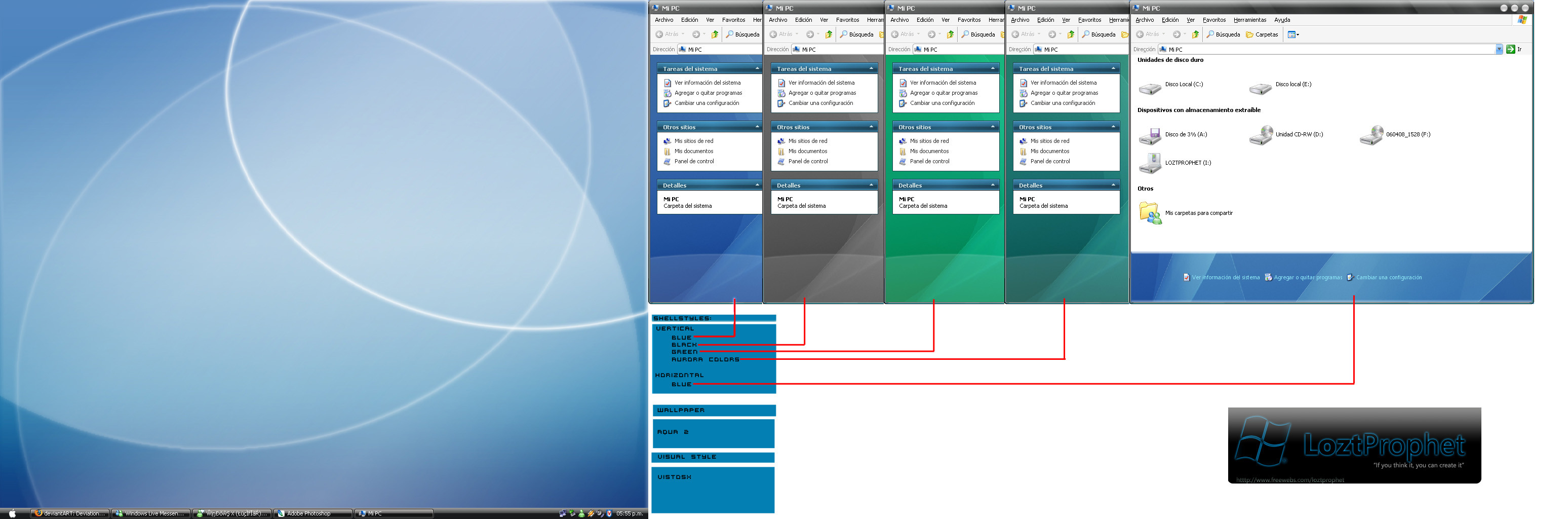
This is the ShellStyle for the VistOSX [my first one]There is 5 diferents ShellStyles.
Vertical
- Blue [Aqua normal color]
- Black
- Green
- Aurora Colors
Horizontal
- Blue [Aqua normal color.]
Enjoy!
--------------------------------------------------------------------------
HOW TO INSTALL
-------------------------------------------------------------------------
Download the shellstyles...
unrar it on c:\windows\resources\themes\VistOSX\Shell\
To change the color of the shellstyle just copy the shell.dll in the Folder: NormarColor [if you have the VistOSX with Apple StartButton]
or in the folder: VistOSX2 [if you have vista startbutton]
Remember to save the original Shell.dll on the NormarColor or VistOSX2 folder.
-------------------------------------------------------------------------
if i wasnt clear... dont be afraid to ask

--------------------------------------------------------------------------
To Comple the Theme you can download this stuff:
-Visual Style:
[link]
-Wallpaper:
[link]
-VistAmp Classic [Winamp 2.x Skin]:
[link]
Related content


Comments: 17

Do we have theme for Firefox / Thunderbird, if not any plans for the same ?
-=nk
👍: 0 ⏩: 1

The icons on your styles with the Video and Picture Tasks is in the front of the title. I would think it should be behind the title. I can send you a screenshot if you'd like.
👍: 0 ⏩: 1

yes... send me an screenie... plz
👍: 0 ⏩: 1


how to install the shellstyles?? by the way, nice combinations..!!
👍: 0 ⏩: 1
extract the folders into : "x:\windows\resources\themes\VistOSX\shell\" then create a folder named: "NormalColor" put the shellstyle.dll file with the color you will use.
//x: is the windows drive, normally c:.
enjoy. The VistOSX VisualStyle has a new update. check for it.
👍: 0 ⏩: 0

It's the shellstyle. It isnt the VisualStyle. And im havent time right now. Perhaps to june i finish the Complete Shellstyles and the VisualStyle with more Color Schemes.
👍: 0 ⏩: 0

omg someone must make a VS with your shellstyle colors!.....its been said before too

👍: 0 ⏩: 0

Looks nice, but you should also add a top vertical shellstyle and a right horizontal shellstyle. And you should make all horizontal shellstyle-backgrounds available for vertical shellstyle.
👍: 0 ⏩: 1

nice work and I really like the VistOSX Style, but I don't know how to use it's Shell folders.
When I put the folder named "VistOSXShellStyle" in the "VistOSX" in "C:\WINDOWS\Resources\Themes\VistOSX" the color scheme still VistOSX only.
Could u tell us how to use your downloading file?
👍: 0 ⏩: 1
After download the .rar File. Unzip the 2 Folders on : "x:\Windows\Resources\themes\VistOSX\Shell" ["x:" is the windows default drive; you need to create the folder "shell"] then in the "shell" folfer create a folder named "NormarColor" and copy the ShellStyle.dll what you will use.
👍: 0 ⏩: 0

Hey man this looks really nice. Haven't tried it out yet, but this looks pretty badass - good work.
👍: 0 ⏩: 0