HOME | DD
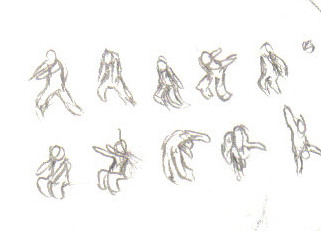
 Morya — salto
Published: 2006-09-24 12:52:04 +0000 UTC; Views: 132; Favourites: 0; Downloads: 19
Redirect to original
Description
+demi rondade. half rondade. ( backflip on one hand )faut télécharger / you have to download
Related content


Comments: 8

I think it could use a couple of frames on either side of the point where he's catching himself on his hand, and a slightly deeper compression on him in that key. It would give him more bounce on that point.
Have you tried Easytoon? I consider it ideal for exactly this sort of practice animation, though it's hard without a tablet.
👍: 0 ⏩: 1

Oh! ok, the mouvement is cut too much. i don't let breath him between the frame.
my anim looks scrapy because i really draw the pieces like this on a simple paper.. for the fun.
I was trying to catch the Key-pics, like this it's a bit hard to process. : /
Yeap i've tried it recently. Ver 1.9.1 unforunatly, on the gif my animation loks as a rewind and yesterday i've understand why, because why this programe i have to know how i'll process before. For my 3rd try i'll make a real storyboard complete and maybe easier to understand...
Sry for the quality.
[link]
[link]
👍: 0 ⏩: 1
One thing you can do with those Easytoon pieces is to set the Interval from the preset of "20" to something faster, which more closely approximates real-time framerates. Under "View" in the top menu you can find "Interval", and a field with a number that presets to "20", which means it holds each frame for 20/100 of a second. By setting that to "8" (or 8/100) you get a framerate of 12.5fps, which is close to actual animation framerates (12/24fps). This makes your playback faster, and gives you a better idea of where to insert tweens to slow down the action.
👍: 0 ⏩: 1
Ahhh! yeah
I think I see what you mean, i've change this setting one time but not to "8/100".. i've really use it but only as "5/100" ( for try ). Thanks*
So the render should be better like this. [link] ?
3rd try, execpt the anatomic error and the sketcky style, I think that's good.
Yep-
👍: 0 ⏩: 1
Much better timing, I think. You might try expirimenting with the impact frames... I was really surprised when I realised that it's better to draw less frames and have the character move farther in order to get impact moments to really snap.
👍: 0 ⏩: 1
lol, guess that you totally right.
I don't know if you know mugen.
It's a program where you can make you own 2D fighting game, there you can also found and other programme call MCM (mugen character maker ). This one show the animation step of the character. From Ryu of street fighter to, i don't know, ... to and other 2D fighting game, a very interresting study of movement really.
I think that i should continu to focus myself as you said on the impact Frs, and cycle ( Walk and run, jogg. . . )
I have the dynamic notion ( if I heard exactly ppls ) buti'm an illustrator my step into the world of animation gonna be hard.
( lastest work for exemple [link] it gonna be very very very hard v__v)
👍: 0 ⏩: 1
Yeah, I know a little about Mugen. Another good way to study fighting game animation is to check out [link] , where they have a TON of great game sprites. You can then open those in something like ImageReady and get a good look at the individual frames.
👍: 0 ⏩: 1
Oh yeah, I see maybe after i'll be able to move the character as you in a 3D angle/views during a battle.
( can't load the pics.. they didn't exist :[ don't worry i'll find an other way )
check this out if you've a minute to lost [link] :]
👍: 0 ⏩: 0