HOME | DD
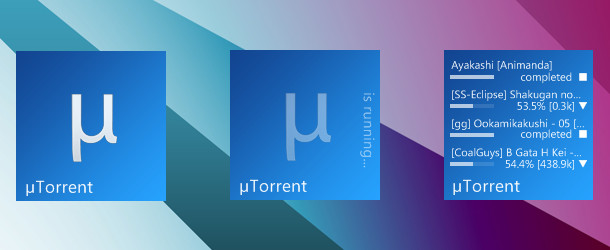
 nardoxic — HUD uTorrent for Rainmeter

Published: 2010-06-27 20:59:59 +0000 UTC; Views: 145743; Favourites: 379; Downloads: 48245
Redirect to original
Description
Featured at nerdsmagazine.com/rainmeter-th…
credits to ~kal-el84 , ~katsu3477 for the graphics / glyphs
made by ^fediaFedia mod by ~nardoxic config by ~r3ginald
*** disable webui.token_auth in Advanced, configure if using µTorrent 2.0 or newer i47.tinypic.com/2dhu3w4.png
HOPE YOU LIKE IT!
Related content













Comments: 271

👍: 0 ⏩: 0

Also, the icons are just decorations, unless you edit the .ini to make them like shorcuts.
👍: 0 ⏩: 0
The only thing that I haven't been able to get working is the upload meter. Help please.
👍: 0 ⏩: 0
working with uTorrent Pro 3.5. Just follow this guide.
For those of you having issues. You certainly did not follow the instructions.
1. Unzip the folder, drag the HUD Torrent folder to Documents\Rainmeter\Skins\. Once it's there, open uTorrent and go to preferences.
2. Go to the WebUI tab and turn it on. Then create a username and password in the tab. Then click Apply.
3. Expand Advanced, then go to Web UI, enter the username and password you just entered in WebUI tab and also check the box under connectivity that says "alternate listening port (default is listening port) 8080.
4. Then CLICK on Advanced, scroll all the way down till you see webui.token_auth, choose false and click okay. Job done.
5. right click on the utorrent skin and left click the edit skin.
6. then under [variables] change the line that starts with url= to url=yourusername:yourpassword@127.0.0.1/gui/?list=1 (the yourusername and yourpassword are the same as was used for the WebUI) make sure to save the text doc you just edited.
👍: 0 ⏩: 0


for some reason don't ask me why, i tryed to replace the ip adress with "localhost" and look it works now. Thx dude nice skinn
👍: 0 ⏩: 1

It works, however I get constant WebParser: RegExp matching error (-1) for items [ITEM1] - [ITEM5] (5 consecutive errors)
👍: 0 ⏩: 0

Seeding seems to have the same status code as downloading, that is why seeding torrents are showing, webparser can't make a difference between them.
If you only want to see downloading torrents, either stop seeding, or switch seeding torrents to forced seeding.
I also had 201 (the status code) elsewhere too, so I changed the REGEX2 to "(?siU),201,\"(.*)",\d*?,(\d*?),\d*?,\d*?,(\d*?),(\d*?),(\d*?)" basically adding just another comma to 201, to fix stringindex issues.
nardoxic
Thank you for this skin, I really suck at regular expressions, and was searching forever for a skin to tweak that included a regexp with 201 when I've finally found yours!
👍: 0 ⏩: 0


read some of the comments above
👍: 0 ⏩: 0

It only shows 3 random torrent? Tabs doesn't work either as any buttons.
👍: 0 ⏩: 0

it's nmot displaying the torrent name but instead it's displaying where the torrent is being saved in
what is the problem?
👍: 0 ⏩: 0

the uploading meter is not working, any idea why?
👍: 0 ⏩: 1

in utorrent, go to Advanced (in options), look for: webui.token_auth and change it to false
👍: 0 ⏩: 0


Doesn't really work with µTorrent 2.2.1. I just looks like this: i.imgur.com/D0OZI6a.png
I can't press any buttons and it doesn't show what the torrents are named and I have put webui.token_auth to *false.
👍: 0 ⏩: 0

Are the computer, settings and clock icons supposed to work?
👍: 0 ⏩: 0

I am using uTorrent 2.2.1 and don't see a "remote tab" section , what should I do to make this HUD work on it ?
👍: 0 ⏩: 1
I'll do a research on that mmm k
👍: 0 ⏩: 0


Thank you very much. Works great. For those of you having issues. You certainly did not follow the instructions.
1. Unzip the folder, drag the HUD Torrent folder to Documents\Rainmeter\Skins\. Once it's there, open uTorrent and go to preferences.
2. Go to the remote tab and turn it on. Then create a user name and password in the Remote tab(this will register you with utorrent and you user name must be unique). Then click Apply, it will ask for a secret asnwer, enter that.
3. Once that's created, expand Advanced, then go to Web UI, enter the username and password you just entered in Remote tab and also check the box under connectivity that says "alternate listening port(default is listening port) 8080.
4. Then CLICK on Advanced, scroll all the way down till you see webui.token_auth, choose false and click okay. Job done.
5. right click on the utorrent skin and left click the edit skin.
6. then under [variables] change the line that starts with url= to url=yourusername:yourpassword@youripv4 address/gui/?list=1 the yourusername and yourpassword are the same as was used for the utorrent remote (to find your ipv4 address> click the start button then type "cmd" then press enter, a console will open then type"ipconfig" scroll back up till you see the internet connection that you use to download and locate your ipv4 address. it should look like 192.168.0.1 with the last number being the one that can be different. ) make sure to save the text doc you just edited.
👍: 0 ⏩: 4

don't forget to add the port number after your ipv4 address, mine was 8080
👍: 0 ⏩: 0

You can skip step 2. Remote access is not needed, only Web UI under Advanced.
👍: 0 ⏩: 0

thanks for explaining it 
👍: 0 ⏩: 0

Thank you very much. Works great. For those of you having issues. You certainly did not follow the instructions.
1. Unzip the folder, drag the HUD Torrent folder to Documents\Rainmeter\Skins\. Once it's there, open uTorrent and go to preferences.
2. Go to the remote tab and turn it on. Then create a user name and password in the Remote tab. Then click Apply, it will ask for a secret asnwer, enter that.
3. Once that's created, expand Advanced, then go to Web UI, enter the username and password you just entered in Remote tab.
4. Then CLICK on Advanced, scroll all the way down till you see webui.token_auth, choose false and click okay. Job done.
👍: 0 ⏩: 1

it doesnt work, i did everything the pic showed and even tryed others like this but they didnt work either please help
👍: 0 ⏩: 1
1. Unzip the folder, drag the HUD Torrent folder to Documents\Rainmeter\Skins\. Once it's there, open uTorrent and go to preferences.
2. Go to the remote tab and turn it on. Then create a user name and password in the Remote tab. Then click Apply, it will ask for a secret asnwer, enter that.
3. Once that's created, expand Advanced, then go to Web UI, enter the username and password you just entered in Remote tab.
4. Then CLICK on Advanced, scroll all the way down till you see webui.token_auth, choose false and click okay. Job done.
👍: 0 ⏩: 0
I cant make it work, i typed in my username and pass like the photo showed and the settings too but still, pls help!!!
👍: 0 ⏩: 0


can i modify this skin to works on bittorrent? if yes can you tell me how? thks!
👍: 0 ⏩: 1

i've configured it just like u said but it still aint showing my dwnloads on utorrent, thanks in advance!
👍: 0 ⏩: 0


oh sorry how can I delete comments ? (I didn't see that they were online cuz I posted them from the bottom.
👍: 0 ⏩: 0
Should I be able to switch between the tabs on the top of the skin ? I can only access the first one...
👍: 0 ⏩: 0
hum, should I be able to switch through the different tabs on the top of the skin ? because I can only access the first one ("home" I think)
👍: 0 ⏩: 0
hum, should I be able to switch through the different tabs on the top of the skin ? because I can only access the first one ("home" I think)
👍: 0 ⏩: 0

I'm almost changing from vuze to uTorrent just to use sthis skin man...
👍: 0 ⏩: 0
| Next =>