HOME | DD
 neodesktop — Leopard Glass v2
by-nc-nd
neodesktop — Leopard Glass v2
by-nc-nd
Published: 2007-08-01 14:50:44 +0000 UTC; Views: 109419; Favourites: 96; Downloads: 58799
Redirect to original
Description
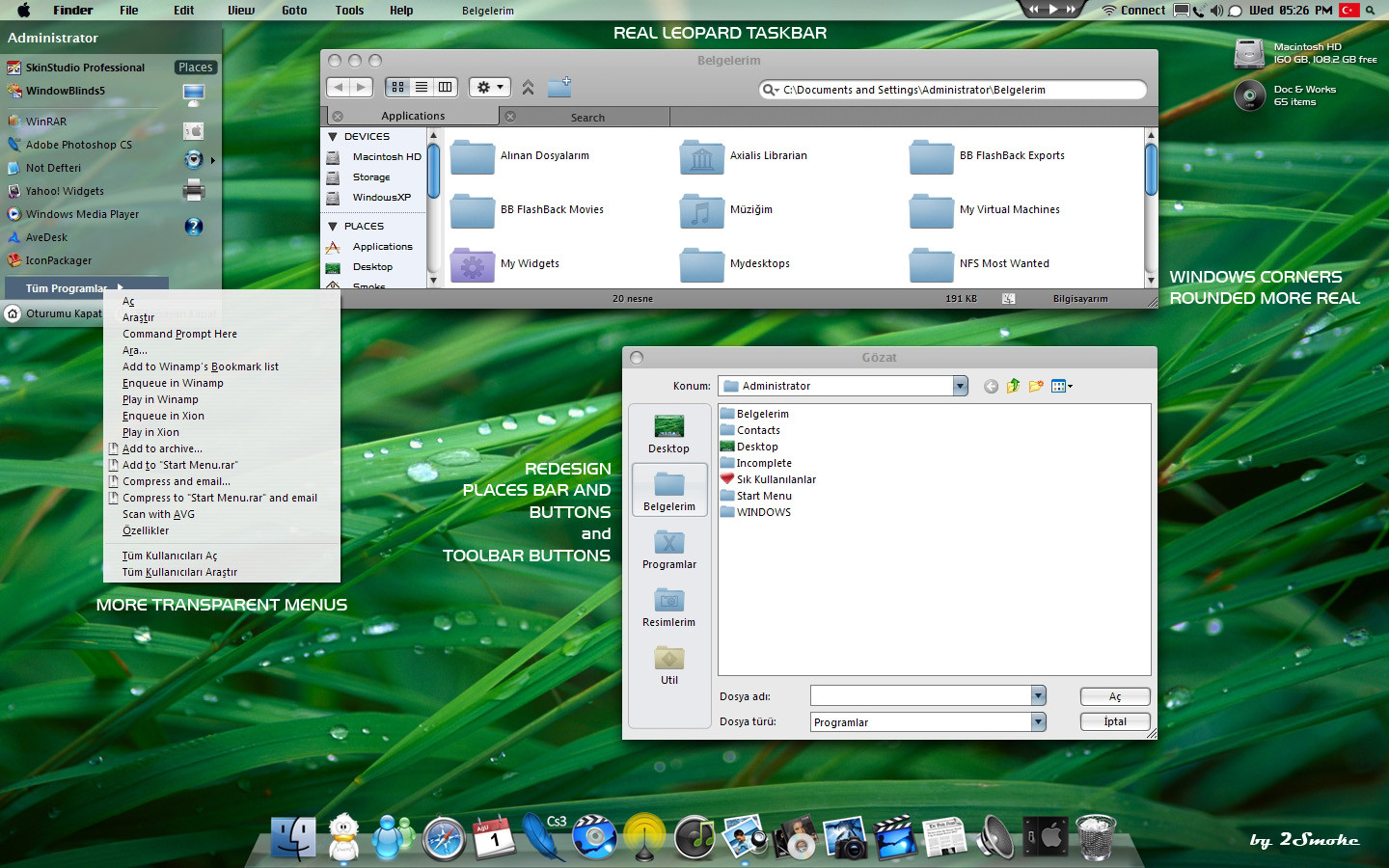
Leopard Glass v2-------------------------
What's change ? Please look this screenshot

-----------------------------------------------------------
Taskbar Clock is TCLOCK [link]
Leopard Dock skin is RocketDock [link]
Taskbar font chicago.ttf include this pack..
enjoy !
please write your comments..
Related content







Comments: 74


Ok I've downloaded it and unzipped it with winzip. I'm not sure where to extract it and what to do after that, help?
👍: 0 ⏩: 0


Dude, Windows XP only goes up to SP3.
👍: 0 ⏩: 0

where did you get the wifi, monitor and other system tray icons??
👍: 0 ⏩: 0

Just one question.
Why does that... Windowlike icon appear instead of the "Show All Icons"-button?
It looks horrible and I want to get rid of it.
👍: 0 ⏩: 0


It Beautiful!
Can you give me the links for the FinderBar you're using please!
Please send to: cy_is_azn@yahoo.com
👍: 0 ⏩: 0

Could someone please post a mirror for this?
My stupid ISP wouldn't let me get this off DeviantArt.
👍: 0 ⏩: 0

hey for me nothin is workin ..its say now boot nothin happend
👍: 0 ⏩: 0

sorry i posted this message on the wrong thing earlier.
ok, i need a little help with this one.
i was able to download and extract files from the .rar file. but what do i do from there?
plz help, and thanx ahead of time.
--ethan
👍: 0 ⏩: 0

i know you have answered a similar question many times, but could you tell me what font you used for the desktop icons.
out of the whole theme they are what caught my eyes the most! the & character looks so cool!
👍: 0 ⏩: 0


It works on WindowBlinds 4??
Cause is the only WindowBlinds that works on my computer...
👍: 0 ⏩: 0


Nice theme but I cant get the left side bar like you showed in the picture. I mean the bar containing PLACES/DEVICES?SHARED AND RECENT FILES in explorer.
Thanks
👍: 0 ⏩: 0


this is excellent! this skin can hold me over until i buy a MacBook ... thanks!
👍: 0 ⏩: 0

Is there any way to make the taskbar (semi)transparent?
👍: 0 ⏩: 0

hey bro nice theme what is the font you are using for the desktop icons its amazing 
👍: 0 ⏩: 0

Great skin. I posted in the wrong version earlier -.-
Any chance for a right-side min/max/close button version? Pleeaaaseee? =]]
👍: 0 ⏩: 0


The skin is awesome but i cant use it because of the heigh of the tittle bar, it's too big, but i like how it looks in general. Nice work
👍: 0 ⏩: 0


eline sağlık 2smoke
bu tema şu senin kullandığın daha parlak temaya benziyor
👍: 0 ⏩: 0

Hello neodesktop. This theme is beautiful. But I was curious as to why an "aqua" and "graphite" version weren't created?
I'm not sure if this has been pointed out but the scroll bar is blue or aqua and the buttons are flat and graphite in color. ThinkSecrect has provided numerous high quality screen shots of Leopard. [link] You can see from this that your scroll bar is accurate but the buttons are still round and aqua. Are there any plans in the future to make this more accurate?
👍: 0 ⏩: 0


I noticed an Adium icon on your dock. Is that just the icon or the real program?
👍: 0 ⏩: 0

COULD YOU DO A VERSION WITH A NOT SEE THROUGH TASKBAR PLEASE =] OTHER THAN THAT I LOVE THE THEME =]
👍: 0 ⏩: 0

hey the skin is amazing
👍: 0 ⏩: 0


I'm using your skin but my toolbar looks like crap, haha. Are you running StylerTB? Mind sharing which skin you're using with this theme? Thanks a bunch!
👍: 0 ⏩: 1
Thank you. I guess I overlooked it when looking through your deviations.
Great job, love your work.
👍: 0 ⏩: 0

Pretty cool, works nicely, even with photoshop / adobe applications, which is quite a rarity with WB themes.
Good stuff.
👍: 0 ⏩: 0

ikinci defa yazdığım için kusura bakma.
fakat pencere başlığı fontu bozuk gösteriyor, windings türü bir font var ve başlıklar okunmuyor.
kolay gelsin, gerçekten çok kaliteli bir çalışma...
👍: 0 ⏩: 1

lucida grande isimli fontu yukle sistemine cok kolay bulunuyor zati.
👍: 0 ⏩: 0

Cool skin..!! And as I see for the fie manager you enabled tabbed browsing. How did you make this buddy? An additional tool??
👍: 0 ⏩: 0


Terrific...the best skin ever !!! Congrats friend!
Is there any possibility of standarizing the scrooling bars to graphite color instead of blue aqua???
Also if we can have an animated progress bar (meter) it will be very nice, I would said perfect.
Keep going,
👍: 0 ⏩: 0

Just something I have experienced: In Photoshop CS3 i can't close/minimize/maximize) opened files using the ample buttons. I have to close them using the File>close command each time. I hope you can fix that somehow!
(I also like the rounded Taskbar of Version one better than this one...still fucking nice theme!)
ah and one last thing. When you open Folders with images for example the foldertype overlay isn't really shining through:
see here: [link]
but despite from that things it's pretty much perfect
👍: 0 ⏩: 1

hand,man! the same problem i found in Photoshop CS3
👍: 0 ⏩: 1
| Next =>