HOME | DD
 PC2012 — Run Dialog StyleHack
Published: 2011-08-18 17:07:30 +0000 UTC; Views: 2109; Favourites: 12; Downloads: 180
Redirect to original
Description
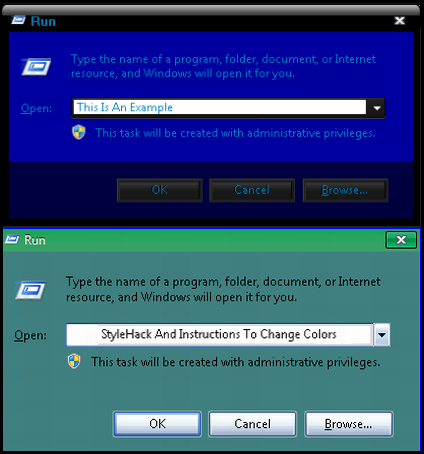
Run The Run Dialog StyleHack and Import ImagesThen Do The 4 Things Below...
4 Things You Have To Change By Hand
Fonts, Colors & System Metrics > Fonts & System Metrics>
BtnFace:Color
1) (Pick Color )
Explorer & Shell > Shell > TaskDialog > PrimaryPanel >
2) ( Remove Property FillColor:Color ) ( Remember To Remove This Or It Won't Look Right )
Explorer & Shell > Shell > TaskDialog > FootNotePane
FillColor:Color
3 ( Pick Color )
Explorer & Shell > Shell > TaskDialog > ContentPane
FillColor:Color
4 ( Pick Color )
Tip:
If The Font Color Is In Conflict For Easy Readability
Go To...
Fonts, Colors & System Metrics > Fonts & System Metrics
Change BtnText:Color Or Change WindowText:Color
By PC2012
Note:
Someone Else Had The Idea
Others Improved upon it
I added all the elements so there is less work.
Win7 Style Builder Does not remove properties
so ... that is one thing that has to be done by hand.
And Picking The Colors You Want ...
You have to do that yourself
Related content




Comments: 11


Thanks for using my blue night resources as the hack example bud i noticed you let my mate razoredge16 upload allot of style hacks on v.c. main site and you used my Halloween resources in 4 different style hacks i just wanted to let you know you did a awesome job i tryed them out just to see what they would look like and i liked it !
👍: 0 ⏩: 1

Thanx for the support. That Halloween theme had a lot of unusual tweaks to it. I made a clear background on the Halloween Red Glow Clock which still looks cool although a little more conservative. The Halloween Start Menu is a nice gray. What I like best about the Style Hacks is they save a lot of time.
I have not done any more style hacks
now because I think I have covered all the bases. Actually I am removing some ... like the ones with Check Mark Backgrounds... Trying to get a cleaner look with clear backgrounds.
👍: 0 ⏩: 1
Yeah the Halloween i worked on off and on for 2 weeks and 3 days i try some ideas i had and added my own unique style tweaks to it some i discovered myself most in that theme i just try allot of different ideas i had and some worked others didn't lol you know how that goes and i agree with you there is not much more as far as style hacks go that you have not covered yet at least none i can think of anyway
👍: 0 ⏩: 0
Someone else did the write up
I tried to put the info into
a stylehack as well as a txt file
so as to remember how to do it.
Too back you have to delete
the one property color by hand.
Too bad WSB does not let you delete
stuff.
👍: 0 ⏩: 1
Yeah i agree it would be nice if WSB let you delete stuff maybe i will ask PandaX if he could add that feature someway in wsb version 1.6
👍: 0 ⏩: 1
That would be cool... even though delete is not needed that much...
usually I can just change the settings
on most things to neturalize them..
👍: 0 ⏩: 1
Yeah i know but i think it would be more convenient lol
👍: 0 ⏩: 0