HOME | DD
 pricechi — Pixel art tutorial 2

Published: 2012-08-22 04:45:27 +0000 UTC; Views: 52219; Favourites: 1293; Downloads: 441
Redirect to original
Description
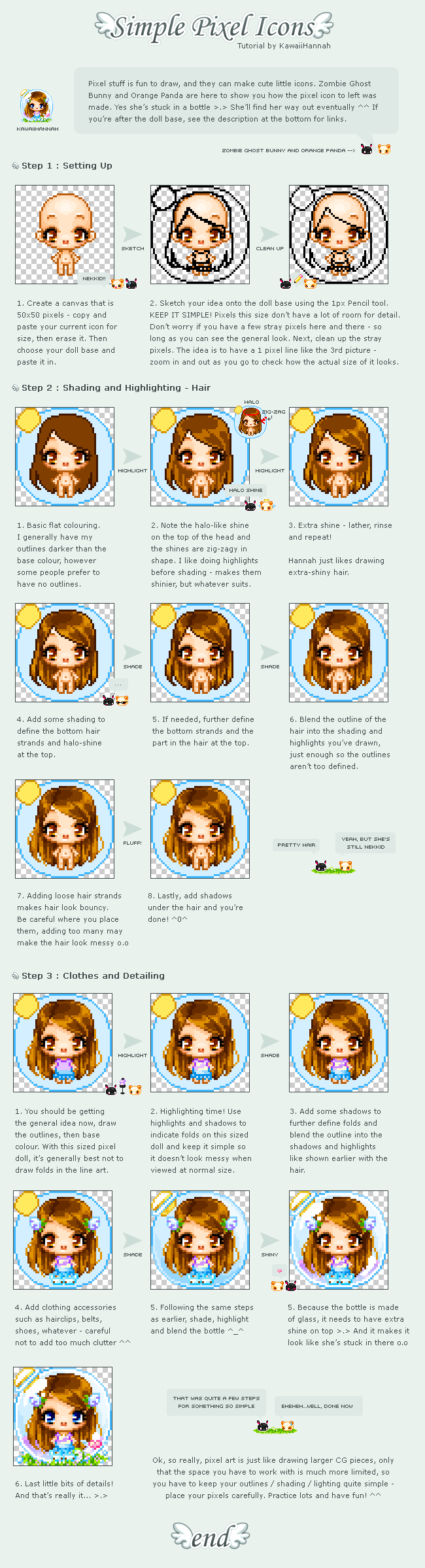
There are a million pixel art tutorials out there, so I tried to make mine informative, not repetitive.Hope it helps in some way! - Download to view in full!
Thank you all so much for all the comments in my previous pixel art/ icon tutorial! * U * I made it for my watchers originally and I'm glad more potential pixel artists (and artists alike) go to see it too. Feel free to ask any questions or if you want me to help with your wips!
And here's a download link to FireAlpaca: firealpaca.com/ and Gimp: www.gimp.org/
And here's a link on tumblr: cagedcloset.tumblr.com/post/29... Because I might clear my gallery in future. Do save it if you need it!
✧ Tumblr
Related content
















Comments: 47


Do you prefer to use sai for your pixel art? I use Photoshop, but Im not sure which is more preferable, I have and use both
👍: 0 ⏩: 0


I want to make a picture about 800x1000ish and still want it to be pixelized..
I can't seem to make it pixelized without changing the canvas size to 80 x 100..
It's so annoying, have any ideas?
👍: 0 ⏩: 1

I do! But i've yet to try it out... I just spend an hour copy pasting big square blocks instead omg.
Draw in 80 x 100 first, then scale on photoshop with 'nearest neighbour'
superuser.com/questions/249985…
this one has an image> graphicdesign.stackexchange.co…
it's called 'alias' if you don't want it to... turn to fuzzy edges when you scale ; w ; hope it helps!
👍: 0 ⏩: 1

Thank u very much i'm trying to get a avatar and I think this will be helpful thanks!!
👍: 0 ⏩: 0


If you mean the size of the pixel, you can simply draw on a larger canvas! 50x50 is icon size. You can refer to my first tutorial, and apply the same techniques but using a larger brush.
👍: 0 ⏩: 1

Well, what I wanted to do was make a bigger image, and then resize it down to 5ox5o on painttool sai. How do I do this?
👍: 0 ⏩: 1
Do you mean this? [link] (100% is original zoom, 800% is 8 times larger)
👍: 0 ⏩: 1
Wait-I'm trying to do the transparent background, but it doens't work. Help?
👍: 0 ⏩: 1
I'm not sure if your SAI can save transparent bgs (mine can't).
1. Erase the background to make it transparent [link]
2. Save in .psd (filename.psd)
3. Open gimp/photoshop/firealpaca, and you'll see that the background is checkered.
4. Save in .gif or .png in that program.
That's what I do.
👍: 0 ⏩: 1
the only thing is, is that I can't see the background underneath the picture.
My SAI can save it, pretty sure...
👍: 0 ⏩: 1
Here's another method! [link]
It allows your brush to work like an eraser to manually remove the background. Save in .png.
👍: 0 ⏩: 1
the problem is, I can't SEE the background
👍: 0 ⏩: 1
Could you send me a screenshot of your piece in sai + layers?
👍: 0 ⏩: 1
how do i do that without posting it? :/
👍: 0 ⏩: 1
upload here! [link] then copy the url.
👍: 0 ⏩: 1
[link]
there o3o
i know all the steps aren't completedf but still wtf? D;
👍: 0 ⏩: 1
ahhh hmm i'm not too sure about that... I made the bg transparent here. [link]
You can try right-clicking and saving it, then open it in sai and see if the bg is still transparent?
👍: 0 ⏩: 1
huh...i think i tried that but let me double check
👍: 0 ⏩: 1
Yes yes yes it works!
See my icon? 8D
👍: 0 ⏩: 1
Glad it works now! Your icon is cute~
👍: 0 ⏩: 1
^^ thanksies
i just ADORE yours though!
If you don't mind me asknig, do you use a bigger canvas? What size canvas can be resized? 8D
👍: 0 ⏩: 1
I always stick to 50x50 for icons - resizing makes pixel art look wonky. I zoom in to 800% to pixel since 50x50 is pretty small.
If you do want to resize however, photoshop's resize option will preserve the pixel location instead of anti-aliasing the image. [link]
👍: 0 ⏩: 1
If you don't mind me asking-what program other than photoshop do you use? Because I'm trying to make good pixels (I've just started out) but I cwn't see to be able to get a whole "sitting down" body in a 50x50 frame
👍: 0 ⏩: 1
I only use SAI to pixel. You can use photoshop, firealpaca, and graphics gale too. The body is probably too big for the 50x50 square?
👍: 0 ⏩: 1
Daum. o.o
It is...I can't make it small enough.
👍: 0 ⏩: 0

Hooray! Another tutorial from the master of pixel art! We bow before your expertise. 
👍: 0 ⏩: 1
Nooooooo thank you uhuhuhuuhu ; w ; hope it's helpful!
👍: 0 ⏩: 1

Thank you! o u o/// Last of the pixel tutorials I think, so won't be spamming yer inboxes.
👍: 0 ⏩: 1