HOME | DD
 PudPon — Eye Tutorial [ Read desc ]

Published: 2014-12-17 20:31:33 +0000 UTC; Views: 838; Favourites: 27; Downloads: 5
Redirect to original
Description
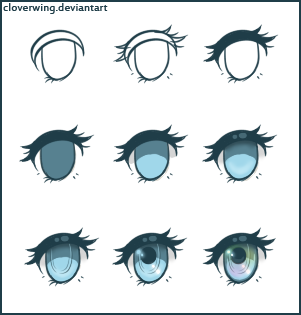
So I have horrible handwriting with a tablet so I'll just say them here.This is for Paint Tool SAI
I'm not sure if it works with other programs.
1. Make the outline of the top eye
2. Color it in / Fill it in with bucket and fill the empty parts that didn't get caught
3. Make the bottom part and make the actual eye almost like a oval
4. Fill in the main color
---After this make all the layers Clipping Group
5. Make a shadow on the top and blur it downward
6. Put a slightly darker color about the shadow
7. Put a really light color above the darker color then, get the same color as the dark color and go around the whole eye
8. Put a darker color in a shape of an oval in the middle then get a lighter color and put it in the center of it
9. Make the layer Lumi and take the lighter color, make a circle around the outside of the pupil with spaces inbetween, then, make a circle at the bottom and then outline the top of the circle and make Opacity around 50% maybe less and add the light to it
This is for coloring the outline of the eye
1. Make the outline of the eye Preserve Opacity
2. On that same layer get a really dark color of the color you were using to color the eye
3. --Same Layer-- Press ctrl F
4. Make a new layer that's a Clipping Group
5. Get a Lighter color and put it on the edges of the eye outline
6. Blur it in
And boom! You're done!
If you have any questions feel free to ask. owo