HOME | DD
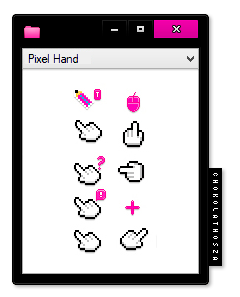
 Raindropmemory — PIXEL GIRL Cursor Set
by-nc-nd
Raindropmemory — PIXEL GIRL Cursor Set
by-nc-nd

Published: 2010-04-13 06:03:58 +0000 UTC; Views: 91533; Favourites: 708; Downloads: 17301
Redirect to original
Description
Hello~! Long time no see.This is cursor I create a while ago, some icon is not pixel perfect though.
Have fun!

HOW TO INSTALL:
1) Download it
2) Extract the file
3) Inside the extracted folder, you'll see several cursor files, but there is a TEXT file named 'Install' Right click on it, and choose 'install' at the popup menu.
4) Then go to 'Mouse pointer' section in Control Panel, there you'll see the drop down box for you to choose this cursor.
That's all!
Related content















Comments: 190

👍: 0 ⏩: 0

👍: 0 ⏩: 0

👍: 0 ⏩: 0

👍: 0 ⏩: 0

wI used for a whole year now so cute! Came back for more icons!! Maybe you could make autoscroll for this icon pack, I use autoscroll a lot but only Kute icons have autoscroll
👍: 0 ⏩: 0


Just a question when does some of them appear i only get the link one the girl and the typing one if you understand
👍: 0 ⏩: 0


It's easy!
Right click the zip file and you should see something like 'extract the / uncompressed file' etc.
👍: 0 ⏩: 1

EEK Thank you!! <3 Bless your face

👍: 0 ⏩: 0

/love it <3, love it <3, love it <3, more works like this please!, so well done! :3
👍: 0 ⏩: 1

This is Awesome! i will try it! 
👍: 0 ⏩: 1
👍: 0 ⏩: 0


Youre very welcome!
Long time no speak, i hope youre doing well!

👍: 0 ⏩: 1
Thank you~
Hope you're doing well too!
👍: 0 ⏩: 0

So cute, I'm using *-* You make the cutest customization apps *-*
👍: 0 ⏩: 1
👍: 0 ⏩: 1


Thank you~! 
Maybe in the future. Thanks for suggestion.
👍: 0 ⏩: 0


So cuuuuuuuuuuuuuuuuuuuuuute.. I love it so much! *-----*
👍: 0 ⏩: 0


oh god this is super cute, thank you for making this!
👍: 0 ⏩: 0

How can I make it so that the cursor doesn't change even when I click on a link?
👍: 0 ⏩: 0

Sorry, but I don't understand how to install this. Can you please explain?
👍: 0 ⏩: 1
Ok!
1) Download it
2) Extract the file
3) Inside the extracted folder, you'll see several cursor files, but there is a TEXT file named 'Install' Right click on it, and choose 'install' at the popup menu.
4) Then go to 'Mouse pointer' section in Control Panel, there you'll see the dropdown box for you to choose this cursor.
That's all!
👍: 0 ⏩: 0

Ok!
1) Download it
2) Extract the file
3) Inside the extracted folder, you'll see several cursor files, but there is a TEXT file named 'Install' Right click on it, and choose 'install' at the popup menu.
4) Then go to 'Mouse pointer' section in Control Panel, there you'll see the dropdown box for you to choose this cursor.
That's all!
👍: 0 ⏩: 1


when operating the cursor handwriting??? some options don't work :/
that is what I can do?
options that do not work:
handwriting
move
unavaliable
precision
👍: 0 ⏩: 1
Everything works fine. But Those cursor action(as you said above) is *rarely* happened in our everyday usage, that's why you don't see it.
If you want to test, try right click on top bar of web browser you currently use, there...the 'move' command, click it and you'll see the cursor change, for example.
👍: 0 ⏩: 0

Does this work for mac? 'Cause it's really cute and I want it QAQ
👍: 0 ⏩: 1
Er...I think not. OSX cannot change cursor.
👍: 0 ⏩: 1
| Next =>