HOME | DD

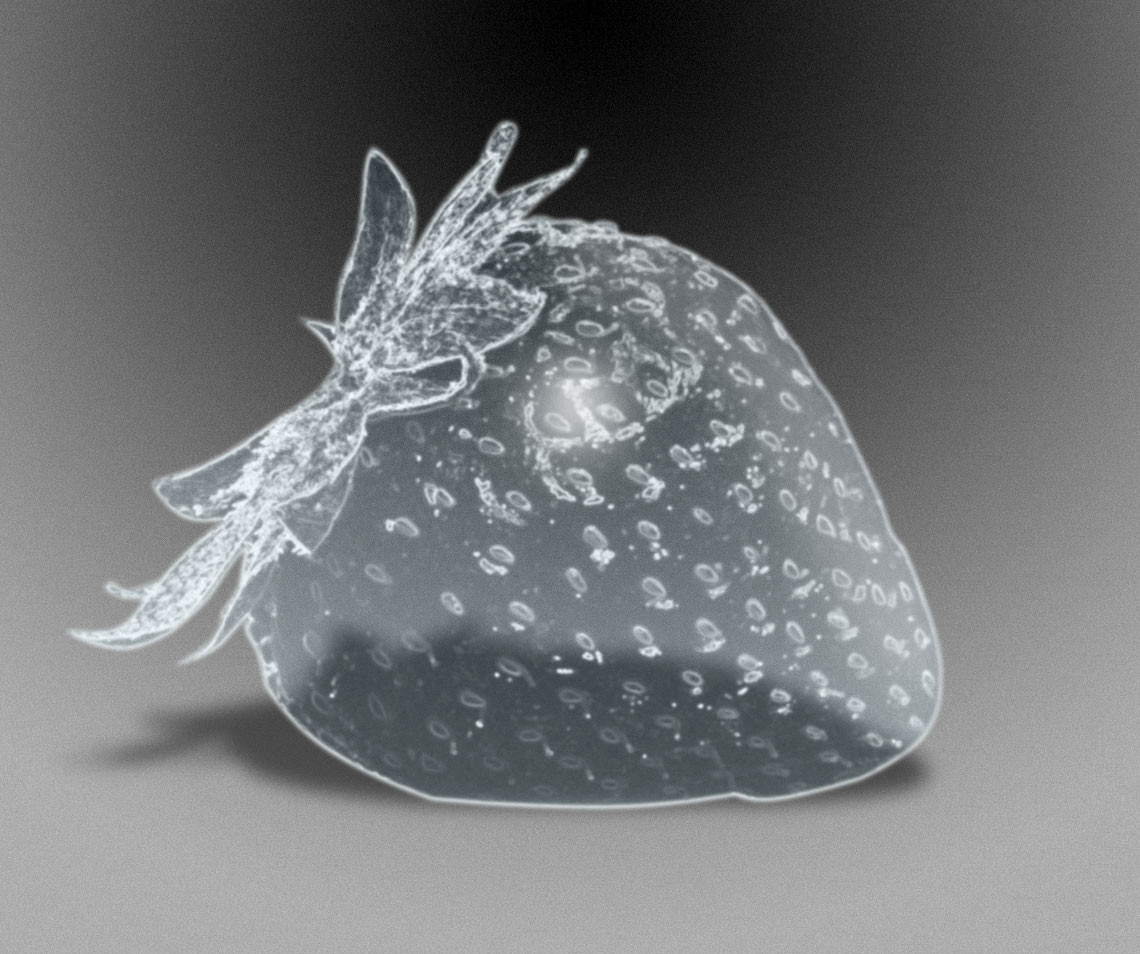
rev-Jesse-C β€” Glass tutorial

Published: 2006-04-27 13:15:38 +0000 UTC; Views: 14062; Favourites: 168; Downloads: 3915
Redirect to original
Description Turn an object into glass or ice


to get the tutorial please click the "download to desktop" button, this will download a zip files called Glass.zip - in this file there are the image files and html file
Related content
Comments: 95

rev-Jesse-C In reply to ??? [2014-01-11 21:17:30 +0000 UTC]

Β 

πŸ‘: 0 ⏩: 0

SilverSummerSong [2013-11-25 21:46:30 +0000 UTC]

Used yet again xDΒ 

πŸ‘: 0 ⏩: 1

rev-Jesse-C In reply to SilverSummerSong [2013-11-26 14:14:00 +0000 UTC]

thats really nice! Β 

πŸ‘: 0 ⏩: 0

ahmad-y [2013-10-25 07:42:18 +0000 UTC]

thanks ^_^ ..Β 

πŸ‘: 0 ⏩: 1

rev-Jesse-C In reply to ahmad-y [2014-01-11 21:17:38 +0000 UTC]

no problem Β 

πŸ‘: 0 ⏩: 0

carlamlightel [2013-06-30 02:35:09 +0000 UTC]

thank you

πŸ‘: 0 ⏩: 1

rev-Jesse-C In reply to carlamlightel [2014-01-11 21:17:47 +0000 UTC]

no problemΒ 


πŸ‘: 0 ⏩: 0

daysideria [2012-10-16 19:40:23 +0000 UTC]

Very interesting tuto, it has helped me there [link]
Thank you very much !

πŸ‘: 0 ⏩: 1

rev-Jesse-C In reply to daysideria [2012-10-25 17:23:44 +0000 UTC]

glad it helped

πŸ‘: 0 ⏩: 0

iamnicklezzz [2011-04-24 10:28:06 +0000 UTC]

hmm isn t it this tutorial ???

Wirth 1000.com, How I Created Bubble Berry :[link]

πŸ‘: 0 ⏩: 1

rev-Jesse-C In reply to iamnicklezzz [2011-04-24 17:58:47 +0000 UTC]

some beggers nicked my tutorial idea i wrote this 5 years ago oh well i guess it happens.

πŸ‘: 0 ⏩: 0

Marcosv3 [2010-10-10 20:48:03 +0000 UTC]

amazing, realistic

πŸ‘: 0 ⏩: 1

rev-Jesse-C In reply to Marcosv3 [2010-10-11 17:03:10 +0000 UTC]

thank you

πŸ‘: 0 ⏩: 1

Marcosv3 In reply to rev-Jesse-C [2010-10-12 19:56:49 +0000 UTC]

youre welcome ^^

πŸ‘: 0 ⏩: 0

Marcosv3 [2010-10-10 20:47:50 +0000 UTC]

perfect

πŸ‘: 0 ⏩: 0

patchesofheaven74 [2010-03-07 22:40:09 +0000 UTC]

could this be used for GIMP, or Corel painters essentials 4?

πŸ‘: 0 ⏩: 1

rev-Jesse-C In reply to patchesofheaven74 [2010-03-08 02:53:20 +0000 UTC]

hiya,

i'm sorry i dont know - you could try

πŸ‘: 0 ⏩: 1

patchesofheaven74 In reply to rev-Jesse-C [2010-03-09 03:45:27 +0000 UTC]

ok well. what program did you use for this?

πŸ‘: 0 ⏩: 1

rev-Jesse-C In reply to patchesofheaven74 [2010-03-09 05:25:16 +0000 UTC]

this is a photoshop tutorial

πŸ‘: 0 ⏩: 1

patchesofheaven74 In reply to rev-Jesse-C [2010-03-09 14:02:54 +0000 UTC]

alright thank you. This has to be the easiest, bestest (lol yes bestest) tut ever!

πŸ‘: 0 ⏩: 1

rev-Jesse-C In reply to patchesofheaven74 [2010-03-09 17:19:12 +0000 UTC]

haha well i try i dont see the point in making the difficult

πŸ‘: 0 ⏩: 1

patchesofheaven74 In reply to rev-Jesse-C [2010-06-02 19:08:00 +0000 UTC]

ok well it's been a while since i downloaded it and I got a free trial thing so I can try it out. WHen I open up the file (after extracting it) I can only see the pictures and not the words for the tut. I opened it up fine last time but I can't remember how. any ideas what I should do? thank you for your time.

πŸ‘: 0 ⏩: 1

rev-Jesse-C In reply to patchesofheaven74 [2010-06-02 19:38:27 +0000 UTC]

thats very odd - its only a html document have a look here ([link] ) for an on-line version

πŸ‘: 0 ⏩: 2

patchesofheaven74 In reply to rev-Jesse-C [2010-06-02 20:07:36 +0000 UTC]

oh sorry i have another question. x/ ya i know lots of questions...sorry.
on this step
6. Invert the edges layer by pressing control + I, desaturate (image>>adjustment>>desaturate) and set blending mode to Screen
where would I find blending mode?.

πŸ‘: 0 ⏩: 1

rev-Jesse-C In reply to patchesofheaven74 [2010-06-02 20:24:22 +0000 UTC]

the blending mode is located in the layer palette (bottom right of the screen) in the drop down list - it probably says Normal at the moment

πŸ‘: 0 ⏩: 1

patchesofheaven74 In reply to rev-Jesse-C [2010-06-02 20:26:55 +0000 UTC]

ok thanks. you've been sooo helpful.

πŸ‘: 0 ⏩: 1

rev-Jesse-C In reply to patchesofheaven74 [2010-06-02 20:31:59 +0000 UTC]

haha - i try

πŸ‘: 0 ⏩: 1

patchesofheaven74 In reply to rev-Jesse-C [2010-06-02 20:38:04 +0000 UTC]

Lord I feel like an idiot... mind if I just send you a note so I don't keep clogging your tut's page?

πŸ‘: 0 ⏩: 1

rev-Jesse-C In reply to patchesofheaven74 [2010-06-02 20:39:26 +0000 UTC]

no feel free

πŸ‘: 0 ⏩: 0

patchesofheaven74 In reply to rev-Jesse-C [2010-06-02 19:51:34 +0000 UTC]

thank you so much!

πŸ‘: 0 ⏩: 0

AnSweetPrincess [2009-09-13 20:07:32 +0000 UTC]

I used here: [link]
Hope you like it
And thank u again

πŸ‘: 0 ⏩: 1

rev-Jesse-C In reply to AnSweetPrincess [2009-09-15 10:50:43 +0000 UTC]

woo that ace!

πŸ‘: 0 ⏩: 0

AnSweetPrincess [2009-09-13 06:18:45 +0000 UTC]

Thank u so mcuh for the awesome tuto
I was searching for something like this

πŸ‘: 0 ⏩: 1

rev-Jesse-C In reply to AnSweetPrincess [2009-09-13 07:20:52 +0000 UTC]

thank you glad you found it useful

πŸ‘: 0 ⏩: 0

nitch-stock [2009-06-29 13:44:18 +0000 UTC]

Got to give this a try. Thanks for collecting my pork...

πŸ‘: 0 ⏩: 1

rev-Jesse-C In reply to nitch-stock [2009-06-29 13:45:44 +0000 UTC]

be very useful for dark things

πŸ‘: 0 ⏩: 1

nitch-stock In reply to rev-Jesse-C [2009-06-29 13:56:02 +0000 UTC]

Have you ever checked out The Asylum ? You have a nice creepy gallery.

Have you ever checked out

πŸ‘: 0 ⏩: 1

rev-Jesse-C In reply to nitch-stock [2009-06-29 14:07:20 +0000 UTC]

I'm a member of the asylum - havent submitted anything in a while as i dont think most of my recent dark work has been much good.

πŸ‘: 0 ⏩: 1

nitch-stock In reply to rev-Jesse-C [2009-06-29 16:54:28 +0000 UTC]

Thats cool. I didn't see a stamp or clubs you belong to so I was curious. I just got added on as an admin there. Its a great club to belong to.

πŸ‘: 0 ⏩: 1

rev-Jesse-C In reply to nitch-stock [2009-06-29 18:55:18 +0000 UTC]

woo congrats i know who to come to now

πŸ‘: 0 ⏩: 1

nitch-stock In reply to rev-Jesse-C [2009-06-30 00:36:28 +0000 UTC]

πŸ‘: 0 ⏩: 0

briannechughes [2009-01-16 06:38:34 +0000 UTC]

simply amazing! ridiculously helpful!!!

πŸ‘: 0 ⏩: 1

rev-Jesse-C In reply to briannechughes [2009-01-16 10:28:24 +0000 UTC]

hahaha - well thanks - hope it is useful!

πŸ‘: 0 ⏩: 1

briannechughes In reply to rev-Jesse-C [2009-01-17 01:54:07 +0000 UTC]

very! I'm using it on a smilodon!

πŸ‘: 0 ⏩: 1

rev-Jesse-C In reply to briannechughes [2009-01-17 06:55:11 +0000 UTC]

ahh the good old saber-toothed cat

πŸ‘: 0 ⏩: 0

ms-manuscript [2008-11-22 06:32:53 +0000 UTC]

Amazing tutorial, very well done. Thank you very much, it's very useful.

πŸ‘: 0 ⏩: 1

rev-Jesse-C In reply to ms-manuscript [2008-11-22 07:57:31 +0000 UTC]

thanks - glad u found it useful

πŸ‘: 0 ⏩: 0

runningstreem [2008-01-26 08:11:08 +0000 UTC]

Grate tutorial. I am using some of it in a pic I am working on right now.

πŸ‘: 0 ⏩: 1

rev-Jesse-C In reply to runningstreem [2008-01-26 08:23:37 +0000 UTC]

thank you - hope it helps!

πŸ‘: 0 ⏩: 0

esao [2007-05-09 08:35:14 +0000 UTC]

here is my work i was using some steps of your tutorial. -> in the "glassy-wall" in the back

[link]

πŸ‘: 0 ⏩: 0


| Next =>