HOME | DD
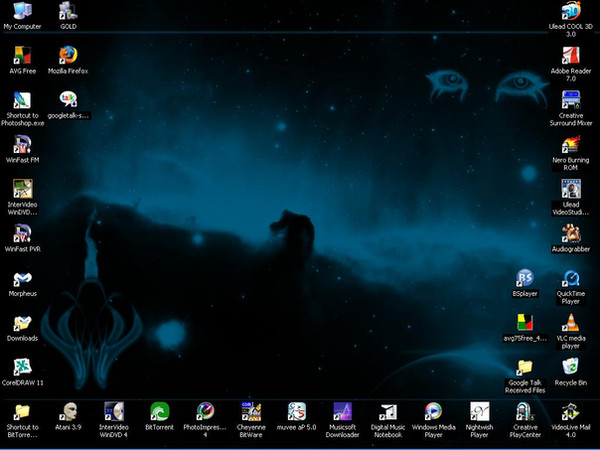
 Rhor — April 2008 Desktop

Published: 2008-03-31 03:58:58 +0000 UTC; Views: 9417; Favourites: 7; Downloads: 1448
Redirect to original
Description
Very basic desktop, but functional.Related content







Comments: 33


Thank you. That screenshot is outdated, but you can check out my new icons: [link]
👍: 0 ⏩: 0

Thx buddy so much, Rhor. I've known you since i used your Rhor's Icon Pack (i liked them right the first time ^^). And your desktop is so so so so and really really fantastic. It seems simple but really clear, clean, something fresh but the color is beautifully blue. That's my favorite. I would be very grateful if you could teach me making a desktop like this (Since i saw your desktop I have found mine really ugly T_T and it is such a mess that i cannot make it better). Thank you in advance.
My yahoo: the_final_cigarette
P.s: Some of your icon packages are unable to download because the NOT FOUND ERROR shows up every time i click the download link.
👍: 0 ⏩: 0


one day i so want to be able to make the grade of icons that you do..-smiles-..you are really good
👍: 0 ⏩: 1
well, i dont think im making great icons, but the ones i did, it just took the time to know what i would like to see on my pc.
blue is my fav color, my principal tool is fireworks, wich is not that great and complex as photoshop is, so at the end is a matter to find what you really like, and draw it.
anyway, if you need my very poor assistance, write me to my email, i will be happy yo help.
👍: 0 ⏩: 1
Dear Rhor,
Could you please send me your full icon pack? I am really interested in them. And i wanna know what your dock name is (on your desktop) and what software you use to change the icon in windows 7 (iam using Windows 7)
👍: 0 ⏩: 0

Hi...could u tell me which player is on the top right of ur desktop
👍: 0 ⏩: 1

Hello Rhor,
Thank you for the effort in explaining this to me.
It's all still gibberish but I will get this software and see if I manage to do anything.
I will still wait for the template whenever you get the chance.
Otherwise any good software you would recommend to have links organized?
👍: 0 ⏩: 0
Hello Rhor,
Congratulation on your desktop, mine is a right mess
I would have no clue at how to make those containers so i wonder if you make these mods available to download or you could explain hot to add them by ourselves.
Thanks

👍: 0 ⏩: 1
Thank you for the comment.
Those containers are simple to draw. Right now I have no access to my files, so I cannot give you the template, but I can try to explain to you how its done.
I use Fireworks, but since the concepts are very basic, Im sure you can use any vector editing software.
Four squares, rounded edges at 40%, transparency set to 60% depending on what background you use, then you draw a small vector with the same roundness as the edges from the containers and then you place it, then copy and copy and rotate and copy again, and thats it, hehe.
You can use boolean operations to make the edges instead of drawing them by copying the containers and then just cut the middle sections.
I hope it helps.
Its good to have everything organized, that way I dont need to use Google Desktop or alike, thus saving resources and time.
Amen!
👍: 0 ⏩: 0

Hi Rhor, I absolutely love this desktop.
What program and theme did u use to have that application launcher on your desktop. I would love to set my desktop this way?
Thanks
👍: 0 ⏩: 1
It's just a modified wallpaper with containers, I don't use any special software.
And the theme is a modified version of VistaVG from Vishal Gupta.
👍: 0 ⏩: 0


And it is very functional as you can see, hehe.
👍: 0 ⏩: 0


it's grom vista or xp ?.....that's nice my friend!.....
👍: 0 ⏩: 1
Es XP, uso una version modificada de VistaVG, gracias por el comentario.
👍: 0 ⏩: 1
no de que.....muy buenos trabajos!
👍: 0 ⏩: 0

Well Desktop! You have this Visual Style complete or is in BETA stage? I take this opportunity to speak their icons.
I love it all, I have permission to use them and modify them for their own use?
👍: 0 ⏩: 1
It is complete, it's just a modified version of VistaVG. I've been using it for several months now with no problems. And yes, you can use the icons, they are free. Just two favors I ask, don't sell them, and when finished, let me see your work.
👍: 0 ⏩: 1
Thank you for permission granted 
I want you understand this way:
Most of the icons are in PNG, so in my case it is not possible to use them without a program part (Rocketdock, ObjectDock). I do not want to use your icons with PNG, I use them in ICO format, because I switch my system by their icons. However, I will not only changes in the format but in the images that comprise. To modify their icons rabil a publisher full of icons; Art-Icon Pro 5.20. The images I want to use with your icons will be in this format.
Ex: 16x16
32x32
48x48
Only need to use your icons viewing this way, the images of icons that want to remove are:
Ex: 96x96
128x128
256x256 ...
Reason: These images above are too large and heavy to appear in a simple, 15-inch monitor
Finally, I am worshiping their work, their icons are perfect and slightly modified. I look forward ancioso to use your Visual Style changed.
Thanks!


👍: 0 ⏩: 1
I understand now, and I will give you a piece of advice, use Axialis IconWorkshop to do a batch conversion from PNG to ICO, that will save you a lot of time.
👍: 0 ⏩: 1
Thank you, but the IconWorkshop is easy to use? It's free?
👍: 0 ⏩: 1