HOME | DD
 riumplus — JPEG2000

Published: 2006-01-22 13:20:57 +0000 UTC; Views: 1306; Favourites: 6; Downloads: 31
Redirect to original
Description
Compression is a weird thing. There's more than one way to compress data. Here's a not-so-brief-but-not-so-indepth look into it that hopefully should be written so anyone can understand it. It might be a little long, but I've tried to shorten and simplify it as much as I can while still getting the basic message across. Feel free to skip to the second-last paragrah.
Without compression things would be rather, well, different. Lots of things would be slower. A small 640x480 true-colour image would take up 921,600 bytes, or nearly 1 megabyte. This would make the entire Internet almost exclusively text-based, since even with broadband downloading images would take forever. These files save each and every pixel, one after another, never skipping or missing a single one. An example of these formats are TGA, TIFF and BMP.
Images often have lots of similar colours bunched together. For instance, someone's face has the same similar tint of skin colour. A blue sky is a large area consisting of mostly the colour blue. A cartoon-styled drawing from, say, early Disney has lots of areas that are almost exactly the same colour. A single-coloured background to an image is single-coloured. Using these areas of similarity, it's possible to represent these images in a different way but so that they display the exact same content. This is done for groups of pixels in the same row - if a bunch of pixels can be represented differently because they're almost the same, then that bunch of pixels just gets referred to once instead of a bunch of times. The end result is an image that is smaller (file size-wise) than the original, but still looks exactly the same. An example of this is 24-bit PNG images (which is also what this deviation is) and GIF (only for images that have a maximum of 256 different colours in them). This since the end result is exactly what you started with, this kind of compression is also used for all sorts of other purposes, usually as ZIP/RAR files. So, you could technically add ZIP/RARred versions of TGA/TIFF/BMPs to the list. The compression normally isn't anything overly shocking compared to some of the methods I'll talk about later on, but if it makes the images 500KB instead of 1MB, it's a pretty good thing to use.
Working further on these facts of bunching together similar colours, the human eye doesn't notice some small details. If there's a large area of black and then one very small area that's almost-but-not-quite-black, you can often get away with making the entire area just completely black. The human eye is also naturally drawn to certain areas of an image - you're more likely to look at someone's face than you are at the background. Unless if the background is the main point of focus, in which case it's reverse, but there's always some areas your eye is drawn to more than others. If there's a speckled ground, like from concrete, you won't mind too much if the pattern of the speckles is slightly different from what it was in real-life so long as it's still speckled. So, this technique works by breaking the image up into little squares all the same size and then throwing away the information that you're less likely to notice, or by ever-so-slightly changing the image so that it compresses better. Normally a quality slider indicates just how much data to throw away - throw away too much and you get . There's a few file types like this one out there, but the best known and most widely used file format that uses this technique is the good ol' JPEG. This varies in compression even more than the method of compression described above, but on average a 640x480 image should be around 90kb - ten times better than the original uncompressed image.
There's also a different (and arguably better) way of compressing images. When JPEG decides which information to keep and which to throw away, it does so by breaking up the image into little squares. When you throw away too much information, the images become blocky and pixellated - I'm sure everyone knows what poorly compressed JPEGs look like and how ugly they can get.
 For this different method, instead of restricting the defined area to small squares in a grid pattern, these blocky 'squares' can appear anywhere in the grid they want. What's more, they aren't a fixed size - they can be very large or very small. The individual colour components that make up all images (red, green and blue) don't have to use the same areas. Because of the way this has so many less constants, when the compression is set too high and the program has to throw away a LOT of information, instead of making the images look blocky and pixellated it just blurs the image. A blurred image is much more appealing to the human eye than a blocky image. While there is more overhead in having to specify many more aspects of the shapes, the end file is usually smaller since it requires less shapes to make up the same data. An example of this compression is JPEG2000, or JP2, which is a new standard which I am personally in favour of. But I wish more people had the ability to view the images in their browser in webpages, like how they view normal JPEG images in webpages today.
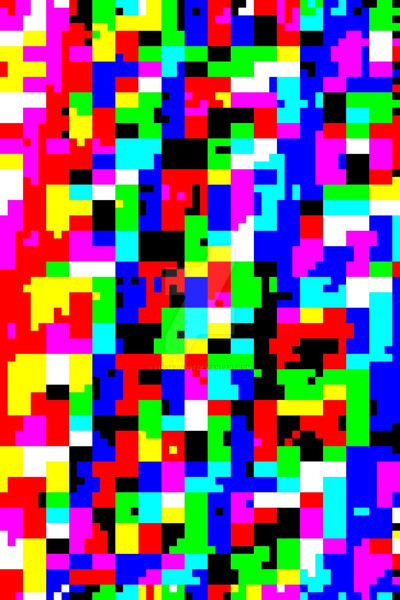
This image is an example of the JPEG2000 compression when set into overdrive, or what the compression pattern actually looks like. See how there's no 'blockiness', just smooth gradients and curves everywhere? That doesn't happen in normal JPEG compression; the confined limits of the blocks and grids causes a blocking/pixelating effect to occur. Also notice the different patterns used throughout the image, along with the different-sized areas. when saved as a BMP (no compression at all), this image takes up 921,654 Bytes (You might notice that it's slightly larger than the number up above - that's thanks to the header data telling the program how to display the image). When compressed as a lossless 24-bit PNG file (as small as possible without throwing away any data), it brings that number down to 465,368 Bytes. If I saved as a JPEG, then it would be only around 148,101 Bytes (again, larger than what I mentioned above, but this time because JPEG works best on actual photographs with noise and sharp edges, not on computer-generated test shapes with smooth gradients). But if I saved it as a JPEG2000 file, it's only 3,022 Bytes. Granted, this is an extreme case biased towards JPEG2000, but you get the idea. That's a ratio of around 305:1!
If I could upload images to deviantART as JPEG2000 files, I would be very happy. But it's no use if other people can't also view these images on their computer. It's one of those things like flash files - if no one has a browser capable of viewing them, no webmasters will even try implementing it. Most webmasters need at least 10% of their audience to be able to use a feature before they can even begin to consider the possibility of using that feature in the future. There exist JPEG2000 plugins for Internet Explorer and Mozilla/Firefox/Netscape/Opera/Gecko -based browsers. Even if you never come across a JPEG2000 image, just having it installed on your computer will make webmasters slightly more likely to use it in the future.
Related content







Comments: 4

That's really interesting. And fairly easy to understand lol. Good explanation =]
And the picture is trippy. lol

👍: 0 ⏩: 0


that's like an LSD trip without the LSD....
Yellow Submarine anyone? >.>
👍: 0 ⏩: 0