HOME | DD
 RolRain — 7Mix
Published: 2009-04-14 18:24:07 +0000 UTC; Views: 11639; Favourites: 25; Downloads: 1823
Redirect to original
Description
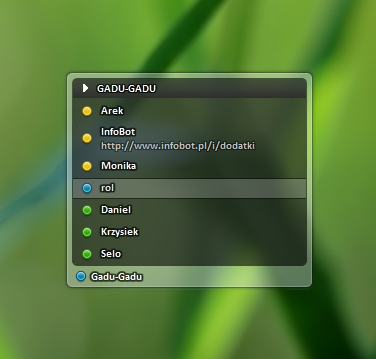
7Mixtheme for Modern Contact ListMake sure you have enabled "Aero Glass (Vista)" in Options/Contact List/Window.
Comments are welcome!
Enjoy

Related content









Comments: 21

can you help me with colors?)
green is icq, blue is gg, what else?)
👍: 0 ⏩: 1

it's something like yellow is online, blue invisible and green away

👍: 0 ⏩: 2
one more thing. Which font and text effect used? thanks
👍: 0 ⏩: 1
font Calibri, effect Contour heavy (color black, visible 200)
👍: 0 ⏩: 0
oh, thanks) check your notes btw
👍: 0 ⏩: 0

Woah, what code tags did you use to get such a big 7Mix title?
👍: 0 ⏩: 1


nice theme. i like it. can you give us the link to the iconpack that you're using, please?
👍: 0 ⏩: 1
Icons are included in \7Mix\Icons.dll

👍: 0 ⏩: 1


For some reason, the last contact on my buddy list is being displayed on the border (where "Gadu-gadu" is in your screen shot). Any idea what's going on?
👍: 0 ⏩: 1
Look at Options/Contact List/Status Bar[tab]/Borders.
You should set there 0,0,0,0 values.
👍: 0 ⏩: 0

This looks so cool - and I use Miranda... does it work with xp
👍: 0 ⏩: 1
Yea, it works but without blur effect.
👍: 0 ⏩: 0

how to install the them .. . write me to david_pinkio@hotmail.com
👍: 0 ⏩: 1
Just copy directory to %miranda%\Skins where %miranda% is your Miranda IM path (eg. C:\Program Files\Miranda IM). To work you also need to have clist_modern plugin.
👍: 0 ⏩: 0