HOME | DD
 Scream81 — Sidebar
Published: 2010-02-08 10:25:59 +0000 UTC; Views: 49484; Favourites: 99; Downloads: 12590
Redirect to original
Description
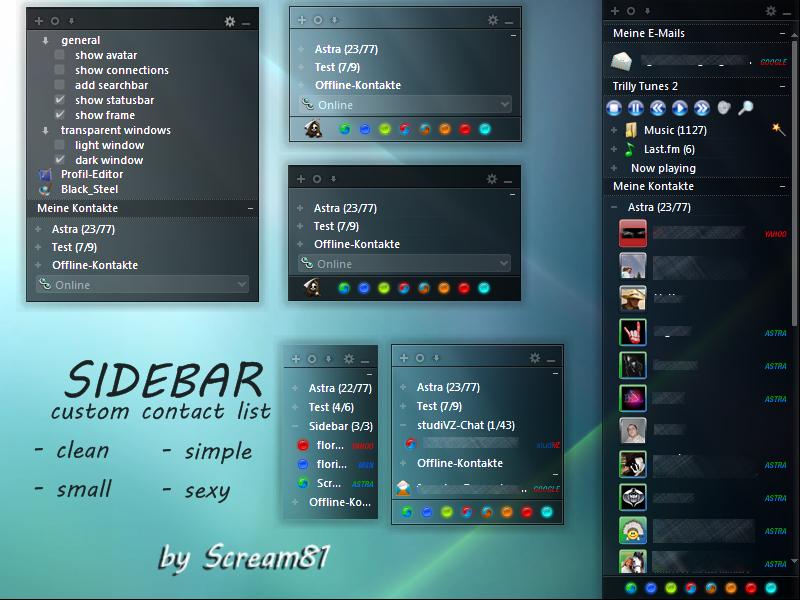
Here is the Trillian Astra custom window Sidebar !It's a transparent small, clean, sexy and flexible Contactlist that fits great in Vista and Win7.
This is based on MSP07's awsome Miranda Skin here: [link]
You can show/hide the frame, searchbar, statusbar, panels connectionsbar... to make the contactlist you like,docked, incredible small and nice looking or whatever..
Installation Instructions:
Extract the Sidebar folder from the zip archive to your trillian skins folder (Usually: C:\Program Files\Trillian\skins).
Remember, this is an Astra Custom Window and must be selected under the custom window section, not the skin select section.
Related content






Comments: 65


Thank you man, that's exactly what I've been looking for!
👍: 0 ⏩: 0

I absolutely <3 this!
Bad light sensitive eyes and need everything skinned dark. It'd be epic to work a collaboration with you, but I don't know anything about the .xml side of things.
👍: 0 ⏩: 1

There are many dark themed skins out there to use as base skin (Cordonata5, Bleach5, Cobalt Black5, Avion Pro, Windows Dark...).
Just grab one of these and modify the graphics to your liking as first step...
👍: 0 ⏩: 0

A question: the windows chat can be aero too?. Thanks!
👍: 0 ⏩: 1
Ups, sorry. maybe the answer is not.
👍: 0 ⏩: 0

There any way to make the chat windows look like this? Transparent and wotnot?
👍: 0 ⏩: 1


using it now on T5 but waiting to see what you come up with for a look with Trillian 5 on this
👍: 0 ⏩: 1
I doubt the look will change much with T5... why should it?
You can have a look at this, a not yet finished update for Sidebar: [link]
👍: 0 ⏩: 1
it was more then a thought really lol if it doesn't it's fine as is

👍: 0 ⏩: 0

[link]
I have the same Problem. My Contacts at the OVerlay with the Mouse is too white. Can i delete this?
Thanks
👍: 0 ⏩: 1
Also is ja irgendwie klar..du benutzt einen weißen Skin als Basis.. Ist natürlich ungünstig.
Ich könnte dir einen anderen Skin empfehlen, z.B. Avion Pro 5, Bleach 5, Cobalt Black 5, Cordonata 5...
Die haben alle dunkle oder schwarze Themes.
Oder du kannst die neuere Testversion von Sidebar mit dem weißen Skin versuchen die du hier findest: [link]
👍: 0 ⏩: 1
SideBarX ist sehr schön und genau das was ich gesucht habe. Danke Dir!
👍: 0 ⏩: 0
I have the same Problem. The Overlay over the Contacts is too white. Can i delete this?
[link]
👍: 0 ⏩: 0

Even with Avion Pro, I cannot get it to look anywhere near as good as yours. How do you make it transparent? How do you get it such a nice blue? Please help, this looks so amazing but I can't figure out how to make it as good as your pic!
👍: 0 ⏩: 1
hmm it is trasparent by default. In your preferences-skins, is there the alpha transparency disabled? enable it please to get it transparent. I'not sure of the blue, this skin is monochrome...no color. Else I'm using the Astra Default Servoce icons... nothing special actually.
👍: 0 ⏩: 0

Hmm i allready follow your instructions but how come the only thing that change is the main Windows?
The chat windows the notify windows doesn't change at all? Can you help me? Coz i like this Skin very much.
👍: 0 ⏩: 1
It is just a custom window. That means a replacement for a main window of trillian, here the contactlist!!!
So you've done it right, there is not more, sorry!
I'm not sure if I ever will make a full skin out of it, cause the Chatwindow can't be transparent. So it wouldn't look cool.
👍: 0 ⏩: 1
Hmm how about white text in black chat windows? like default avion skin that'll look good.
Well kinda hope you develop this skin cos i simply like the clean transparent black theme ^^v
Best regards
👍: 0 ⏩: 1
You could also try the cobalt black 5 skin with tiny interface as baseskin for Sidebar. (can be found in the trillian forum, skin section:[link] )
That also gives you a really small, clean, simple and black chatwindow!
👍: 0 ⏩: 1

sorry for the late reply scream81, i had been reaaaaaly busy. i think it didnt work before cuz of an old beta build back then or maybe i just didnt know i had to restart trillian. trillian used to apply the skin on the fly with a nice loading dialog but the dialog is now gone so perhaps i forgot to try restarting. anyways here's a few reports...
~bugs~
mousing over things, e.g. a contact will result in a crazy highlight that obscures the contact's name. wtf? i mean the skin looks fabulous but this is a serious usability issue. it's driving me nuts!
also when you rename a contact, the cursor thingy is gone. you have no method of knowing where you're typing into. it's not a deal breaker, its just annoying.
~suggestions~
fully transparent, "no interface look". i hacked the pngs to do just that but i must have messed up something cuz now it wont let me resize my contact list window and stuff. basically no frames, no dark background...etc. like this
[link]
[link]
in the umbrella corp screenshot you can see the annoying highlight censoring out the contact's name unintentionally.
anyways keep up the good work! i was gonna drop trillian cuz of all the ugly skins but then i found yours... haha.
👍: 0 ⏩: 1
Thats what I said in the reply: " Not with the default skin, cause it is a light one, but with Avion Pro 5 ... I can't change it to look good with default skin, they are too different."
It will always look like shit with the trillian 5 noskin, thats what I said.
Please try Avion Pro skin, the beta 7 postet in my profile.
As for the suggestion: You've seen it yourself. Having no background at all leads to problems! no resizing and so on...
You can try it with a small transparency .. 5 % or something, not full.
Also the default icons look bad. you should use an other iconpack (look in the trillian forums for the iconpack selector)
👍: 0 ⏩: 1
I am so sorry, I was just outta bed...
Also I had no idea what I was doing with the transparency, I got it all messed up so that now "Dark Background" and not "Dark Background" got mixed up.
Can you please take the few minutes to edit the files and post it on deviantART? Also perhaps 1% would work better? I guess...
Just curious, but can you post your current Trillian configuration? I mean I'm sure everyone would love to know what the pros use haha.
I'm especially interested in that "Avion Pro 5" which produced no results on deviantART OR Google and the icon pack.
Thanks!

👍: 0 ⏩: 1
Oh crap maybe I should stop replying to people in the morning. Just downloaded the Avion Pro 5 skin, I wish I could EDIT my above reply...
To elaborate, how can I get/make an icon pack with all the official icons? I dont mind having to download all the clients and install them in my Virtual PC and extract the icons from there, I just wanna know the "packing" aspect.
Thanks!!!!
👍: 0 ⏩: 1
You can find the tool I've mentioned, "Iconpack Selector" here: [link]
But Trillian 5 is still in Beta, so the only fully compatible packs are "Astra Defaults" and "BeerCap Icons".
There is also the pack "Original Service Icons" included which has the official icons. Looks really cool but is missing the new services from Trillan 5 beta.
And my Trillian configuration is nothing special, most of the time I use Avion Pro 5 with tiny tiles contactlist. Thats it.
👍: 0 ⏩: 1
Ok I downloaded Iconpack Selector but all the files it links to are dead.
[link]
Gives me the 404 error...
I even registered and signed in just to make sure it isn't because of that but still nothing.
Can you please link me a mirror to the "Original Service Icons" please?

👍: 0 ⏩: 1
sorry it was an older version on server. Please download again, should work now.
👍: 0 ⏩: 0
Um... Scream81, is this gonna be ported to 5 when it reaches stable release or will this skin die like the rest? It'd be a real shame if this doesnt get updpated to Trillian 5. Just a thought.
👍: 0 ⏩: 1
but Sidebar works well in Trillian 5. Not with the default skin, cause it is a light one, but with Avion Pro 5 ... I can't change it to look good with default skin, they are too different.
👍: 0 ⏩: 0

looks good when u combine it with this skin. [link]
👍: 0 ⏩: 1
Yes this custom window was the kick off for the Avion Pro skin! [link]
👍: 0 ⏩: 0

Thank you so much for this! I've been looking everywhere for a skin just like this one. Goes great with my Rainmeter look on the desktop.
👍: 0 ⏩: 0


I can't get this to show up in custom windows screen. I unzipped to my skins folder as directed. I just updated to astra 4.2 tho
👍: 0 ⏩: 1
hmm.. normally it should work, what can I do? Check if there is a Sidebar folder in your skin folder. Maybe you have it unoacked to its own folder with the Sidebar folder inside?
👍: 0 ⏩: 0


So far the BEST minimalistic skin I EVER seen. Grongratz, you really did a good job

👍: 0 ⏩: 0


Perfect skin! Any chance you could tweak it a little to optimize it for a big screen tv? larger fonts, scrollbar etc? I'm not so good with coding but I suppose I could figure it out if I need to. Once again thanks for an awesome skin!
👍: 0 ⏩: 0

Beautiful skin. You're sure you won't make a theme of it?
👍: 0 ⏩: 0

This is easily the best skin I've seen for Astra. Window transparency aside, It'd be awesome if you could make a full theme. The only full skin that I really like currently is Cobalt, and that doesn't match very well with this.
👍: 0 ⏩: 1
maybe you should give Cobalt Black Magick a try... It's a dark version of Cobalt.
👍: 0 ⏩: 0

wow, this is pretty neat skin. Love it. Would be massive to make it into a complete theme, but as you've said, transparency doesn't work great in the chat window
👍: 0 ⏩: 0

Very nice, thanks a lot!
I would also love to see a full skin with message windows, that would be fantastic!

👍: 0 ⏩: 0

This is the greatest trillian contact window ive seen, any chance of it being a full skin with message windows etc
👍: 0 ⏩: 0
| Next =>