HOME | DD
 TreeClimber — LED
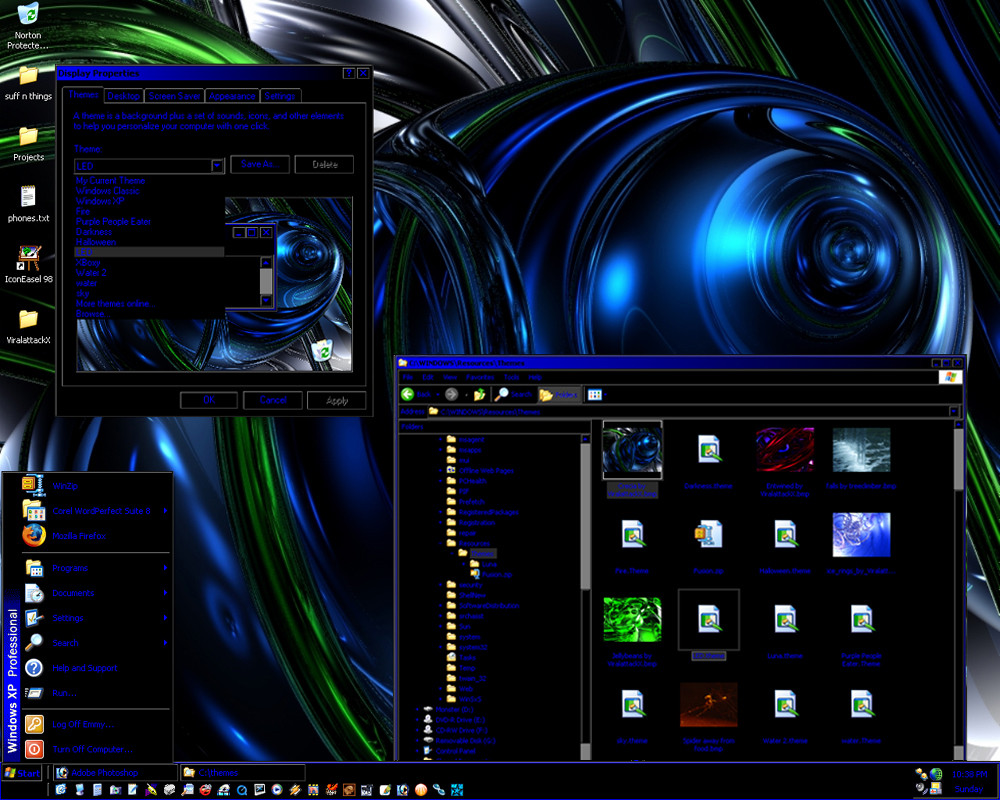
Published: 2005-09-12 05:50:53 +0000 UTC; Views: 17816; Favourites: 7; Downloads: 7501
Redirect to original
Description
Skin by: ME!Artwork by the awesome
How to make it work:
download the .zip file to your desktop (you can delete this file once the unzipping is done)
unzip the .zip file into C:\windows\resources\themes\ using Winzip
Now that the unzipping is done, right click anywhere on your desktop
click on Properties
If you're using XP, click on the tab that says "Themes"
Click on the themes scroll menu arrow and click on Browse
get into the directory C:\windows\resources\themes\ that you just unzipped the files into and double click on whichever theme you just downloaded from me
now click Apply on the bottom right and all is happy!
(the screen capture shows where most of these things are/should be.
If I remember right, for earlier versions of windows, the same process will be under the Appearance tab.
Related content










Comments: 10

This is an awesome theme. I've been using the original Windows XP classic theme since I got my laptop 5 years ago, and after installing this theme, it's like I have a brand new computer!!! Thanks for the install instructions also-it really made it easy for me to install it.
👍: 0 ⏩: 1
Thanks for taking the time to respond to my comment. I've been pulling my hair out because last week I had to do a system recovery on my laptop because it kept crashing. I lost a lot of info, including your theme, and when I tried to find it on deviantart, couldn't. Now that I have your on line name, it will be easy to find the download again.
Thanks
👍: 0 ⏩: 1

woohoo! glad I could be around more than once haha

👍: 0 ⏩: 0


Nice... but it should be listed under Themes, not Visual Styles. Visual Styles change the graphics dramatically. Some make XP look like a Mac's OS. You need either StyleXP or an unlocked uxtheme.dll file to use Visual Styles.
👍: 0 ⏩: 0

very nice theme 

also a sugestion: maybe you could better place you're themes in the Skins & Themes > Windows Utilities > Visual Styles category on DA
👍: 0 ⏩: 0

*Laughing* Actually.. just so you know XP has its own theme directory:
C:\windows\resources\themes\
All your themes can go into that directory, and windows can automatically find them that way, and you don't have to browse on your computer for the directory you said to create.
Awesome job on the theme!
👍: 0 ⏩: 2
I fixed it. I didn't know XP had done that - still very used to 98SE and/or ME...thanks.
👍: 0 ⏩: 0