HOME | DD
 war-machine — ExoSuit

Published: 2008-12-07 14:54:13 +0000 UTC; Views: 2507; Favourites: 20; Downloads: 26
Redirect to original
Description
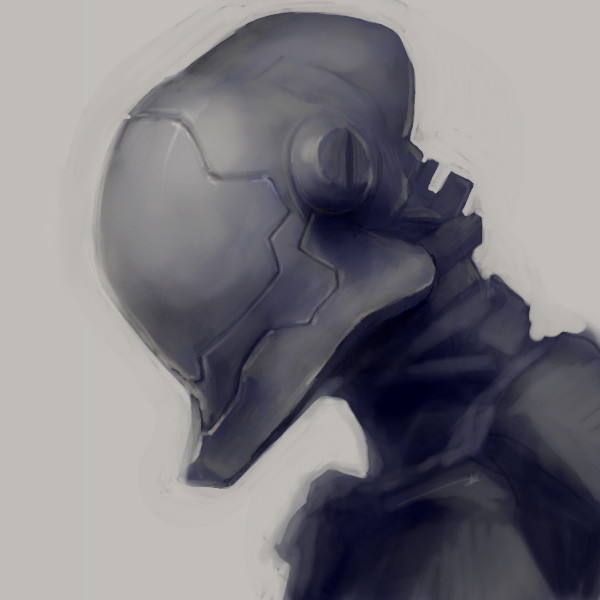
sigh face. left side of the armor rim is inconsistent with the right side anyhows, i finally figured out that my external harddisk is glitchy and has somehow started interfered with the tablet... must mean its reaching the end of its lifespan.. (NOOOOO MUST SAVE PORN!!!!) so after i finally got my tablet working i acted on 's comment... [link]
 "only a textured hard round brush was used for this illus~ The rest of the texture you see was an old cement floor from mayang.com while it was still around
 "
"if u were thinking 'wow kinda vague description for a brush which could have a bazillionmitrillion settings' then i say to you I KNOW RIGHT?!?!?!? THAT WAS SO HELPFUL UKIT THANKS!
 but seriously, (1) no one wants to give up their trade secrets and (2) it pushed me into exploring brush texture settings which i havent even glanced at before. i just started changing settings and laying stroke after stroke on the page until i looked up and started to see an image take shape so i kept going. mainly this is just a texture brush volume-practice/doodle thingy
i talk too much...
... probably because this image is taking its sweet time uploading... >_> damn batelco...
Related content






Comments: 11

btw bro....I was jsut wondering if you could help me out with something...I'm only starting to mess with photoshop, and I wanted to learn how to do the whole painting thing? I read the descrip where you were talkin bout brushes and the whole shizzang...wanna learn. Perhaps you can point me out a tutorial of some sort?
cheers man!
👍: 0 ⏩: 2

lol i totally feel like the 'tutorial level' now...
to get the joke check out: [link]
CLICK WATCH THIS MOVIE (or popup)
by egoraptor 
👍: 0 ⏩: 0
first of all: [link]
get one. its awesome. an intuos3 will do. or if u are strapped for cash a bamboo might be okay (but the intuos has much greater sensitivity. a go--- *GREAT* hobby investment!)
second: brush customization
[link] she links a good brush at the bottom along with an okay photoshop standard sketch/paint tutorial. that seems to be good for sketching and imbuing you image with some preliminary details and textures. u can ofcourse make your own custom brush in photoshop (as i did with this image)
this next link shows you how to do so in photoshop: [link]
this chick has an awesome array of tutorials in her journal courtesy of her & her husband. you MUST check it out. and u should probably watch her husband: he is an incredible professional painter. their tutorials will give you great insight to achieving what you actually want to paint by showing you what you need to use, with relatively few brush strokes (provided you open your mind to photoshop's almost unlimited options; theres heaps of exploring to do!)
also u can download brush packs on deviant art. just search for 'brushes' using the search bar or browse the categories to see the best brushes of all time. heres one i just found which im definately gonna try out:
[link]
and afew others:
[link]
[link]
[link]
[link]
[link]
[link]
once uve tried out afew you can go out and find your own or find some amazing 'texture' resources which u can import to photoshop and use to 'texturize' your own custom brushes. (JUST TO POINT OUT WHERE THAT OPTION IS: go to [link] look at the top left of the image @ the leaf she drew. directly underneath the 5th 'leaf-brush' in the tutorial is a window which lists brush customization options. immediately beneath shape dynamics and scattering is 'texture'! thats what you are looking for)
third: find more and more people to watch and learn from! ukit (whos icon i linked) is one, and id recommend watching everyone from their 'imaginary friends' syndicate as well! eventually you will train your mind to see a picture and immediately identify at least afew textured brushes amongst their plethora of brush strokes, thou the masters cover their tracks far too well!
imaginary friends apparently also publish their own magazine (wish i could subscribe!) check out `Artgerm 's page/journal for more info...
a look through the downloads section of their magazine site can reveal quite a bit: check out this easter egg: [link]
the topic listed as 'Issue 20 missing brushes' for example.
the artist in question who drew THAT image / contributed that brush pack is the legendary Marta Dahlig you. must. see. every. thing. she. has. ever. painted. period.
also check out: [link] its a great art site with online courses you could subscribe to (im too broke to do so
fourth: practice till you drop! no explanation or links required... thankfully!
👍: 0 ⏩: 1
Dude!! Thankyou so much!! I really appreciate you taking your tie to point me in a direction. I just took a photoshop class and learnt how to to the bare essentials to make up a friggin brocheure....*childs play* But thanks again!1
I just looked up the intous3...mannn...im shit broke...but I'm gonna get me one...soon....need to find me a shit load of freelance designing work to do 
I just saw the ninja vid...lol...Nah bro, youve given me a direction, its wat tutors do! And for that....thankyou sensi 
anyways bro...hit me back.Thanks again...i'll be seein those vids links over the next day or two....coz this stupid connection with batelco is makin my 3Gb computer weep its heart out....sighh...when will this ennnnnddddd??
👍: 0 ⏩: 1
39146565
glad i could help. next time skip buying the ticket back to this dump and but a tablet
and thanks for the fave, dave!
👍: 0 ⏩: 0
First of ALL...I think its an AWESOME doodle...even if the right side is a little out of porportion. I love the idea though...not your regular mecha there. And Secondly...YESSSSS FUCK BATELCO!!...coz of the bloody shit of a network...I cant upload my pics jsut yet and need to visit the cross-the-road inet cafe to check out the site
apart form that....for the love of Jenna Jameson....save that PORN!!!
👍: 0 ⏩: 1

(on halloween night, man answers the door and asks the question): "What r U supposed to be??!!" o_O...
(ExoSuit's response):"I'm supposed to be DONE BY NOW! u wanna move it along with the Uncle Tom routine??!!"
p.s. thats the first thing that came to my mind when i saw this pic, from Seinfeld's I'm telling u for the last time... >
👍: 0 ⏩: 1
lol yea i remember that rofl
how kind of you to drop by :]
👍: 0 ⏩: 0

nice design but maybe you should take more care of the background^^.
👍: 0 ⏩: 1
thanks, ill try harder next time
👍: 0 ⏩: 0