HOME | DD
 2beats — Step-by-step cg process

Published: 2008-09-13 22:18:54 +0000 UTC; Views: 10804; Favourites: 166; Downloads: 0
Redirect to original
Description
So just to be clear, this isn't really a tutorial. People have been asking for a step-by-step on how I paint for a while now, so here it is (very poorly done though, sorry!) :>Usually when I cg I only use the normal round brush at different opacities, mostly cuz I'm clueless as how to use the other brushes =_=;;; One of these days..must find a good tutorial! X( Moving on...
First I do a quick sketch of the character, then I slap on some grey tones, building volume by adjusting the brush opacity to about 30-40%.
When I'm satisfied with the tones, I start adding colour. I do this by changing the brush setting to Overlay, and applying colour directly to the layer. This particular drawing is all done on one layer (cuz it's pretty simple, but if it were a more complicated with a bg I'd have to work on different layers).
Then I switch my brush setting back to Normal, and start adding more details, smoothing things over, and making corrections. I use the eyedropper tool a lot for this~
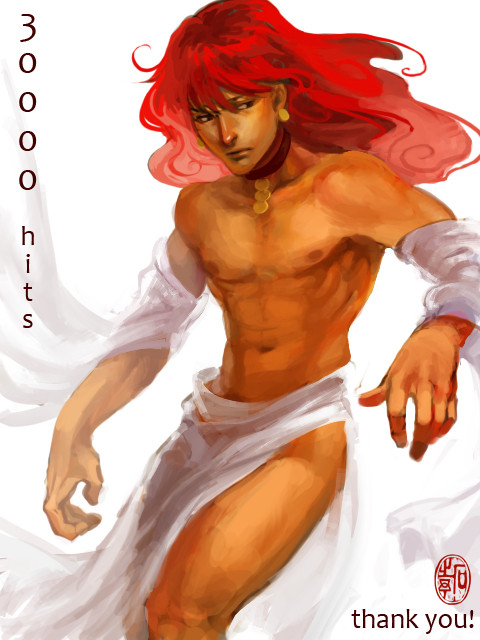
Lastly, I adjust the colour balance a bit, and add text and my sig. And I'm done~
Full-sized finished painting --> [link]
Related content





Comments: 20

This is a super efficient method and is great for adding true depth by working with actual value not just different hues.
My god I'm using this method forever.
👍: 0 ⏩: 1

Yup yup, a lot of cg artists do tonals first, and add colour afterwards. Good luck!

👍: 0 ⏩: 0

What if you put color on a different layer(in Overlay mode) on top of the gray tones? Will it hide the gray color with the other one making it look like shadows or something?
👍: 0 ⏩: 0


This is the first time I've actually read your comments about how you use your brushes.
Oi, it's your style and you're very good at it. It's a painter-ish style that is very appealing. Me likes.
👍: 0 ⏩: 0


OH cool!! so thats how its done, painting from greyscale to color. Thanks for this. This will definately help^^
👍: 0 ⏩: 0

so...you basicaly use 3 layers?
1 for lineart, another for gray and another for colours?
seems preety easy said that way...too easy -.-
👍: 0 ⏩: 1
I only use one layer~ : > And yup, pretty simple!
👍: 0 ⏩: 1
you only use one layer? but you already said that the colour was added on another layer...with overlay... so you do the lineart and the gray tones on the same? then how in the heck you delete the sketchy lines?
sorry for all this but i'm really interrested on that kind of art you make xD
👍: 0 ⏩: 1
Lol, s'ok~ I should've been more clear. I just switched the BRUSH MODE to OVERLAY, and painted DIRECTLY on the grey tones and lines, erasing and fixing as I go ^^
👍: 0 ⏩: 1
ah, now i got it!!! (seriously, you're really helping me out xD)
i guess i got it all, just have to try that (never really used a brush in overlay mode above grays...have to give it a try and see what happens....tyks again
👍: 0 ⏩: 0

hm....i can never seem to figure out how to use the overlay/multiply stuff ppl do on top of gray layers >_>;;;
👍: 0 ⏩: 1
Honestly I don't think I'm doing it properly lmao...
👍: 0 ⏩: 1

Looks totally cool 
👍: 0 ⏩: 1


who cares you useonly one brush? you make awesome works!
👍: 0 ⏩: 1