HOME | DD
 catluvr2 — How To Make CursorXP themes
by-nc-nd
catluvr2 — How To Make CursorXP themes
by-nc-nd
Published: 2006-03-10 20:40:42 +0000 UTC; Views: 2318; Favourites: 8; Downloads: 519
Redirect to original
Description
This is my first tutorial. Please let me know if it is helpful or not.So you want to make a CursorXP file! Very good.
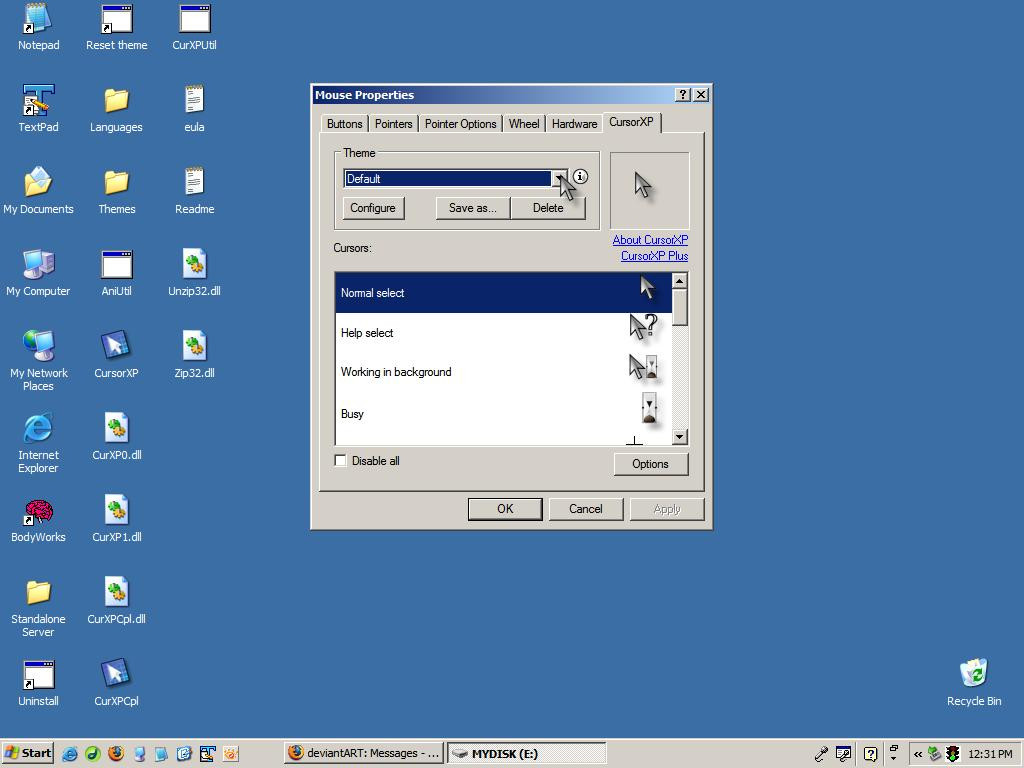
First, you must go to the area indicated in [link]
Then, you must select (New Theme), as indicated on [link]
After that, click Configure, as shown in [link]
Then, make your cursors. I prefer to use Microsoft Paint, as shown in [link] .
I also prefer to use the size 50 by 50 pixels. This also means that you could probably use many of my CursorXPTheme .png files as an avatar. Just make sure you credit me.
I prefer to zoom in a lot, as shown in [link] and [link] .
Then you must fill it with "magic pink" (hex code: #FF00FF (thank you, !)) as shown in [link] .
After that, draw your cursor, as shown in [link] .
Then save it. I prefer to save them with names that are very obvious, as shown in [link] and [link]
If you want to have an animated part, resize the picture so that it is a multiple of the original size, as shown in [link]
Then make the pictures equal in size, and save it, as shown in [link]
Now back to the good part. Click on the configure button indicated by [link] .
Then, click Import as shown in [link] .
Then import your graphic, as shown in [link] .
When you come to the animated one(s), [link] should help.
The finished product: [link] for the picture in the CursorXP window and [link] to download the finished product.
Related content






Comments: 26


Thank you!
Also, thank you for the 
👍: 0 ⏩: 1

Cool Catluver.
Got it bookmarked.
Maybe now I'll get off my stump and make something.
👍: 0 ⏩: 1


it's also know as:
R= 255
G= 0
B= 255
👍: 0 ⏩: 0
It's that purple area that you want to be transparent.
👍: 0 ⏩: 0


heheh quite usefull. but i would like to know the things i asked in some of the pics there,... also i sugest something... why do not you make tutoaials like this? ==> [link] and this [link] ??? it is more easy to read than opening a link to every pic... please... and you do not have to upload separate 19 pics
👍: 0 ⏩: 1
Well, it is my first tutorial.

👍: 0 ⏩: 1
i madew worse tutorials and imporved them...
👍: 0 ⏩: 1
Good job on it. 
👍: 0 ⏩: 1

I mean, I checked out your cursor. I like it.
👍: 0 ⏩: 1

