HOME | DD
 deborah3dle — easy waterdrop tutorial

Published: 2008-01-07 19:25:24 +0000 UTC; Views: 5821; Favourites: 116; Downloads: 74
Redirect to original
Description
I wasn't going to do this until near the end of the month, except I was prodded into it...and I don't even know if it's in the proper category
However....
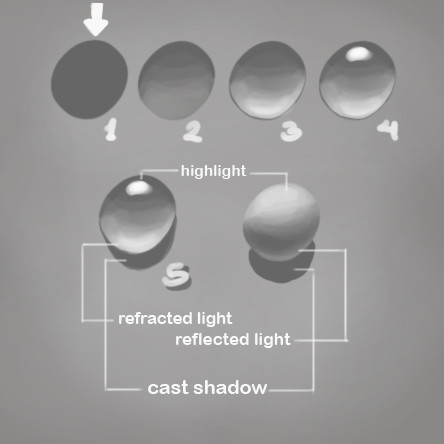
How to paint waterdrops in nearly any medium! This one is done digitally.
I also chose a bluish background. Choose any color you want.
So...
Step 1: Draw out your basic design (easy enough, as water drops tend to be circular to one degree or another.)
Step 2: Add a lighter, and darker color of the inside of the
waterdrop on opposite sides of each other.
This is determined by your light source, so it helps if
you determine your light source ahead of time.
The general rule is, the dark area indicates the
direction of the light source. So, for example, if your
light source is coming from the bottom, the dark
area will be at the bottom, and the light area will
go on top, opposite of it.
Step 3: Blend the light and dark sides. Don't worry if the
blending isn't perfectly smooth. And they don't have
to be perfectly even, either.
I usually try to make the lighter side just a tad
bigger than the darker side.
Step 4: Add white highlights. The brightest highlight goes
over the darkest area.
I also usually add a hint of white at the outer edge
of the lighter side, which helps with the sense of
light refraction.
This is a "standard" method of painting waterdrops, and it may take a little practice, esp. with the blending...but you can get some cool droplet effects with it.
If you're really into getting realistic water effects, I suggest you get a spray bottle and have fun observing the effects on anything that won't short out, run away, or needs watering.

ps Melanie, this will work with acrylics...you just need to keep your paints damp, or use an acrylic retarder...
*this also may be edited down the line*
Related content




Comments: 18


What program are you using? This particular tute was done with the older version of Corel Paint, which had a good blending application.
If you're using Photoshop (any version) allow me to direct you to the second tutorial of the same subject, but with photoshop tools. [link]
👍: 0 ⏩: 1

Yeah, I have photoshop and just took a look, but what tool do you use to blend colors, you use the eyedropper tool? That's what I don't get.

👍: 0 ⏩: 1
Using photoshop...after you lay down the basic colors with a hard brush, switch to the airbrush, or softer brush, to blend the colors together. You're softening the hard edges with a soft color application. You know you can also make a softer brush by adjusting the hardness and spacing of a hard brush, and by adjusting the flow, etc. Experiment to find out what will work better for you.
👍: 0 ⏩: 1
Oh, got it! Thank you very much.

👍: 0 ⏩: 0

holy crap!!!
this works so perfect, thank you so muchhhhh!!!!!!!!!!!!!
👍: 0 ⏩: 1
Good. 
👍: 0 ⏩: 0

Oh that's AWESOME! : DDDDDDDDDDD
Thank you Hagge!!!!!
👍: 0 ⏩: 1

Thanks for faving it too.
👍: 0 ⏩: 1
Yep!!! : D It's awesome!!! ^________^ And yes it deserved a fav ^^
👍: 0 ⏩: 0

Ah, so that's how it's done. Thanks for the tip! ... though... I don't draw much... Ah, I'll share it with my friends, then.
👍: 0 ⏩: 1
You're welcome! Thank you....
👍: 0 ⏩: 0

Thanks.
Have fun!
And as I said before, it's pretty versatile...
👍: 0 ⏩: 0

Very interresting and useful :3
Next step for me ----> Find a lot of references and praaactice
👍: 0 ⏩: 1
Yeah, just a bit of practice...it's actually pretty versatile, too.
Thanks for faving it.
👍: 0 ⏩: 0