HOME | DD
 DeviantMM — Conky Flag
Published: 2011-08-27 11:20:32 +0000 UTC; Views: 8552; Favourites: 41; Downloads: 760
Redirect to original
Description
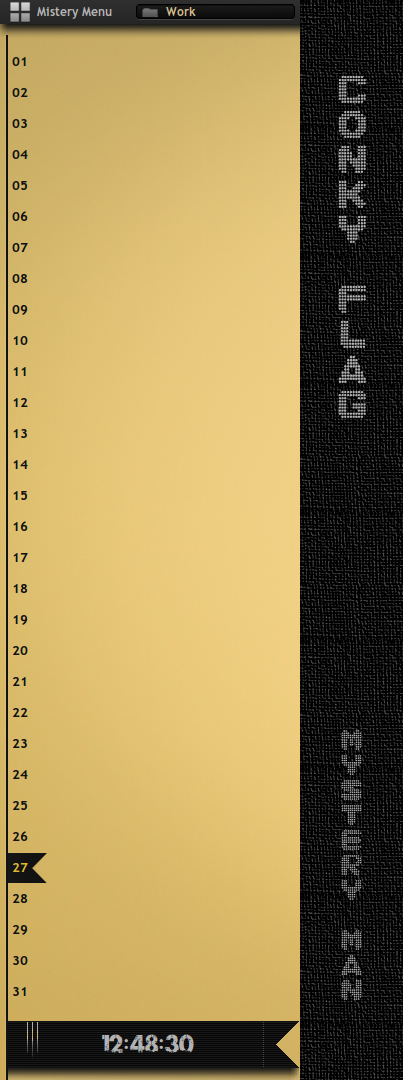
Conky Calendar and Clock - Vertical and Orizzontal.Related content









Comments: 28

Che bello,ma si potrebbe mettere in orizzontale vicino al pannello mhh?
👍: 0 ⏩: 1

Allora è un problema noto, ti spiego. Lo script e scritto per monitor 1920x1080p, non avendo altri monitor a disposizione mi viene impossibile creare degli script adattabili ad altre risoluzioni. Ora se vuoi ti posso aiutare a configurare lo script per il tuo monitor.
Per quanto riguarda il colore dei giorni devi cambiarlo nello script .lua conkycalendar, c'è una voce in merito al colore che puoi regolare, oppure si può modificare dallo script di conky.
Per modificare la posizione dell'immagine del giorno corrente in modo che si allinei, devi modificare a manina^^ di "-p" e "-s":
${if_match ${time %d}==01} ${image ~/.conky/day.png -p 3,12 -s 39x30} ${endif}
${if_match ${time %d}==02} ${image ~/.conky/day.png -p 3,43 -s 39x30} ${endif}
${if_match ${time %d}==03} ${image ~/.conky/day.png -p 3,74 -s 39x30} ${endif}
${if_match ${time %d}==04} ${image ~/.conky/day.png -p 3,105 -s 39x30} ${endif}
${if_match ${time %d}==05} ${image ~/.conky/day.png -p 3,136 -s 39x30} ${endif}
${if_match ${time %d}==06} ${image ~/.conky/day.png -p 3,167 -s 39x30} ${endif}
${if_match ${time %d}==07} ${image ~/.conky/day.png -p 3,298 -s 39x30} ${endif}
${if_match ${time %d}==08} ${image ~/.conky/day.png -p 3,229 -s 39x30} ${endif}
${if_match ${time %d}==09} ${image ~/.conky/day.png -p 3,260 -s 39x30} ${endif}
${if_match ${time %d}==10} ${image ~/.conky/day.png -p 3,291 -s 39x30} ${endif}
${if_match ${time %d}==11} ${image ~/.conky/day.png -p 3,322 -s 39x30} ${endif}
${if_match ${time %d}==12} ${image ~/.conky/day.png -p 3,353 -s 39x30} ${endif}
${if_match ${time %d}==13} ${image ~/.conky/day.png -p 3,384 -s 39x30} ${endif}
${if_match ${time %d}==14} ${image ~/.conky/day.png -p 3,415 -s 39x30} ${endif}
${if_match ${time %d}==15} ${image ~/.conky/day.png -p 3,446 -s 39x30} ${endif}
${if_match ${time %d}==16} ${image ~/.conky/day.png -p 3,477 -s 39x30} ${endif}
${if_match ${time %d}==17} ${image ~/.conky/day.png -p 3,508 -s 39x30} ${endif}
${if_match ${time %d}==18} ${image ~/.conky/day.png -p 3,539 -s 39x30} ${endif}
${if_match ${time %d}==19} ${image ~/.conky/day.png -p 3,570 -s 39x30} ${endif}
${if_match ${time %d}==20} ${image ~/.conky/day.png -p 3,601 -s 39x30} ${endif}
${if_match ${time %d}==21} ${image ~/.conky/day.png -p 3,632 -s 39x30} ${endif}
${if_match ${time %d}==22} ${image ~/.conky/day.png -p 3,663 -s 39x30} ${endif}
${if_match ${time %d}==23} ${image ~/.conky/day.png -p 3,694 -s 39x30} ${endif}
${if_match ${time %d}==24} ${image ~/.conky/day.png -p 3,725 -s 39x30} ${endif}
${if_match ${time %d}==25} ${image ~/.conky/day.png -p 3,756 -s 39x30} ${endif}
${if_match ${time %d}==26} ${image ~/.conky/day.png -p 3,787 -s 39x30} ${endif}
${if_match ${time %d}==27} ${image ~/.conky/day.png -p 3,818 -s 39x30} ${endif}
${if_match ${time %d}==28} ${image ~/.conky/day.png -p 3,849 -s 39x30} ${endif}
${if_match ${time %d}==29} ${image ~/.conky/day.png -p 3,880 -s 39x30} ${endif}
${if_match ${time %d}==30} ${image ~/.conky/day.png -p 3,911 -s 39x30} ${endif}
${if_match ${time %d}==31} ${image ~/.conky/day.png -p 3,942 -s 39x30} ${endif}
p indica la posizione x,y, s indica la dimensione dell'immagine lunghezzaxlarghezza.
- Se vuoi modificare la posizione di tutto il conky, vai nello script .conkyrc e modifica questi parametri:
- Per il calendario ${image /home/johannes/.conky/panel_24vx.png -p -5,0}
- Per l'orologio ${image /home/johannes/.conky/imgclock.png -p -22,970 -s 336x99}
ricordati p ed s.
Poi procederemo con il conkycalendar.
Quando hai finito passami il conkyrc ed il conkycalendar moddati per la tua risoluzione che l'aggiungo al pacchetto per il download^^.
👍: 0 ⏩: 0
Che risoluzione monitor hai?
Che tipo di problemi ti da? Non compare?
Perchè devi usare feh? E' un visualizzatore di immagini, non c'entra niente con conky???
👍: 0 ⏩: 1

La risoluzione è 1600 x 1050
Inizialmente compariva come un rettangolo nero nella parte sx dello schermo, ora compare ma i numeri non sono allineati, e sono bianchi. Così le immagini di backround. Feh l'ho rimosso cmq. Probabile sia io che continuo a sbagliare, conky non l'ho mai usato...
Ti ringrazio della risposta

👍: 0 ⏩: 0
Questo conky è stupendo! Veramente gran bel lavoro !
Purtroppo non riesco ad utilizzarlo su kde....Puoi darmi qualche consiglio?
La configurazione sembra già buona, e ho pure settato feh per replicare lo sfondo ed ottenere l'effetto 'trasparente', ma niente ha funzionato!
👍: 0 ⏩: 0

I noticed there is a file text name "Note.txt" and it contains text like a note for special days.....
Can u show what it is and how to get it work?
👍: 0 ⏩: 0
Ehehe, grazie Jacopo tanti auguti anche a te
👍: 0 ⏩: 1


👍: 0 ⏩: 1
umh purtoppo non uso windows, quindi non saprei dove mettere mano su rainmeter, mi spiace.
👍: 0 ⏩: 1


Very nice config but I can't manage to get it work. I put the folder in the .conky folder and copy the .conkyrc but all I can see is the hour in wierd font.
👍: 0 ⏩: 1
The font is Urban Jungle, [link] find it here.
For conky, what resolution do you have? The conky was developed to monitor 1920x1080p.
👍: 0 ⏩: 1
My resolution is 1600x900 so I correct it. There was a probleme cause I don't change the directory of the script it the .conkyrc so it was your directory and it couldn't be found.
I change the script and the .conkyrc to have only the line calendar, well now it's pefect for my desktop.
Thanks again, very nice job
👍: 0 ⏩: 1
Thanks, As soon as I have time to develop the same conky for other resolutions.
👍: 0 ⏩: 0

minimal ma con stile! BELLISSIMO!
mi indicheresti la procedura per installarlo?
👍: 0 ⏩: 1
Innanzitutto grazie.
La procedura per l'installazione è la stesa che per un comune conky. Prendi il conkyrc lo rinonimi in .conkyrc e la metti nella home. Poi prendi lo script del calendario Conkycal.sh e lo inserisci in una cartella chiamata .scripts. Apri il terminale e dai il comando:
conky
chiudi il terminale e ti ritrovi il conky avviato. Per avere il conky sempre attivo all'avvio vai su sistema/preferenze/applicazioni d'avvio ed aggiungi la voce conky e gli dai come percorso il posto dove hai messo il Conky-Start.
Potresti avere dei problemi di visualizzazione dovute alle differenze di risoluzione del monitor, io ho un 1920x1080p. In questo caso apri lo script Conkycal con gedit e modifica la voce:
echo "${COLOR[$[k-1]]}${DOW[$[k-1]]} ${TODAYC[$j]}$(printf "%02d" $j)\${color}\${voffset 15}", modifica il valore di voffset esempio 12, 10, 6, 4,5, 20 etcc.
Spero che vada bene, se hai altri dubbi puoi mandarmi degli mp sul forum di ubuntu (Mystery Man). ciauu.
👍: 0 ⏩: 0
complimenti! è veramente carino!
potresti indicarmi la procedura per installarlo?
👍: 0 ⏩: 0

Ti ho richiesto questo lavoro nella sezione " customize Linux " del mio gruppo
Sarei felice se ti iscriveesi .ciao
👍: 0 ⏩: 1
ops scusa gli errori di battitura
Grazie .
👍: 0 ⏩: 0


In fact I had thought,.... I can try, but he speaks next week.
👍: 0 ⏩: 0
