HOME | DD
 fsk — isoType

Published: 2005-09-13 19:36:58 +0000 UTC; Views: 233780; Favourites: 224; Downloads: 3768
Redirect to original
Description
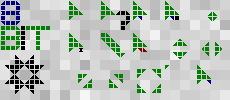
this is a little something i made for my typography class. it lets you type in 3d.its not perfect but i am not spending another minute on this because i spent
waaaaaaaaaaaaaaaaaaaaaaaay to much time on it as it is
 .
.so how does it work?
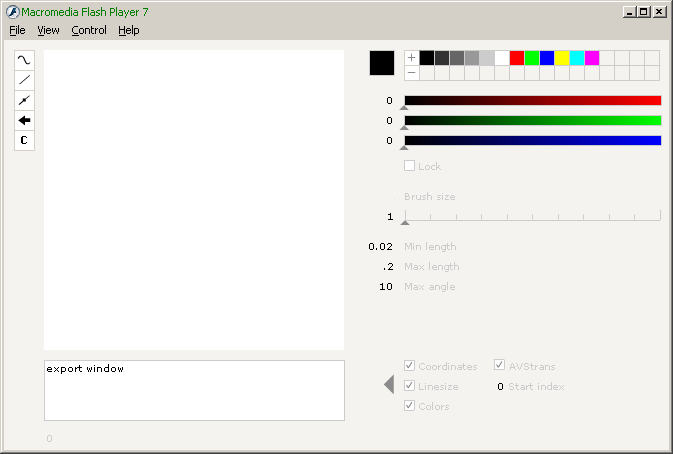
the gui is split in three parts: colour, character orientation, cursor movement
colour:
this lets you change the colour of the sides of the cube.
you klick the side you want to change, pick a colour, optionally do the other two and press ok.
from there on the cubes will have that colour.
character orientation:
this lets you control how the character will be oriented relative to the cursor.
by klicking on the sides of the cube once you chose the plane on which the
character will lie. if you klick more times you switch the axes of this plane.
by klicking on the plane you can choose one of the four positions the character
can have relative to the cursor. you can also flip the character
cursor movement:
this lets you control where the cursor will move after you type the next character
the cube with arrows lets you pick the direction of the movement.
the three cubes under it control the amount of movement for each
axis separately (these are 3 rows of 3 radio buttons)
other controls:
with the mouse you can drag the cursor around.
if you klick on it and drag it, it moves on the red-green plane.
if you hold down the shift key before you klick it moves along the blue axis.
by klicking on a character you move the cursor to where it was before
the character was created. shit+klick moves it to where it was after the
character was created.
backspace deletes the last char.
left/right cursor keys move the cursor like you are used to.
up/down cursor keys move it up or down for the height of the line.
limitations:
no matter how you place the chars they are always on the same
line/chain - you cant insert or delete the chars anywhere else but
on the end, so you have to think ahead. this is because of the
structure of the program and because it would be waaay slow if i
tried to redraw the whole line at once.
you can type yourself off-screen. if you do that just hold backspace
until you come back or click a letter.
because this is all done in vectors it gets slow quite fast. i optimised
it as much as i could.
supported chars: a-z A-Z 0-9 !?.,
the ? doesnt work for me - i guess flash player has trouble with
non english keyboards (the reason i didnt include any other non letter chars).
thats it, have fun.
Related content







Comments: 78


kinda confusing at first but once you get how to use it it's fun
👍: 0 ⏩: 0


I did an escher with it. I'm so proud. [link]
👍: 0 ⏩: 0


oh...my...god
THIS IS AWESOME
i wish i could learn how to do this
👍: 0 ⏩: 0


Reall nice ,didnt take long to use it either, congrats
👍: 0 ⏩: 0


it rocks, reminecent of a font i designed. But yours is living and very cool.
👍: 0 ⏩: 0


This is sooooo fun! your a great game maker!
👍: 0 ⏩: 0

it types backwards when you make another rcolour...
👍: 0 ⏩: 0


when you type lol the l and o get combined...
Plz fix... Oh yeah and nice by the way!
👍: 0 ⏩: 1

they arent combined for me. but with so many different options and combinations i guess you pulled of one where they are
👍: 0 ⏩: 0

I like it, you always seem to come up with the most interesting things =]
👍: 0 ⏩: 0


lol, thats cool
And this is not your most viewed Devaint, its LINERIDER!!! (i know, this was made before Linerider)
👍: 0 ⏩: 0


this is wonderful! thanks for spending too much time on it
👍: 0 ⏩: 0


This is fantastic. You have such a talent for things like this, it's amazing. Keep up your awesome work.
👍: 0 ⏩: 0

This is a great typing tool if you want a fancy head-line, or title on your web page! it is also possible to make it standalone by just open the .swf in internet explorer (You wil also get full screne if you do so).
👍: 0 ⏩: 1
or just klick on the download link
👍: 0 ⏩: 0


nope. but you can make one if you want.
first download the swf (after pressing the download button save the page as a swf)
go to the adobe site and download a standalone player. open the swf with the player.
then go to: file/create projector
thats it
👍: 0 ⏩: 0

He he its really cool.^^ I wrote my name lol
👍: 0 ⏩: 0


I like it. Your very creative. I wish I had the patience to create something so creative.
👍: 0 ⏩: 0

wow!!, impressive project, i wonder how you made the code...
👍: 0 ⏩: 0

I think people get overwhelmed by the concept of isometrimic rotations and 3 faced text that can be color coordinated, plus with all the controls.
People are simple, most people anyway,,, :Amused:
👍: 0 ⏩: 0

thats a cool idia ,,verry nice job....
only if i can copy it and paste on to my computer.... n_n
👍: 0 ⏩: 0


| Next =>