HOME | DD
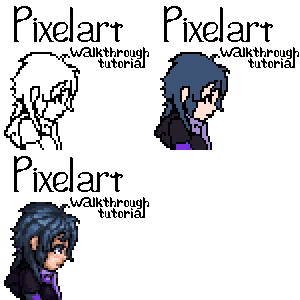
 GarGar — Pixel art Walkthrough Tutorial
Published: 2010-12-18 02:05:30 +0000 UTC; Views: 20259; Favourites: 589; Downloads: 627
Redirect to original
Description
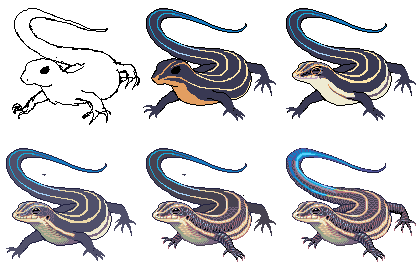
HERE WE ARE. And I kinda love it. It's basically just a walkthrough of what I do when I'm making pixel art, there's plenty other more in-depth and technique tutorials out there if you need that.IF SOMEONE NEEDS TIPS OR SOMETHING go ahead and comment here.
And I can explain more about the coloring the lines thing, if it's not obvious from the example, I wasn't very specific about that.
bluh bluh
I can't submit it in tutorials because it's flash? :c
Related content













Comments: 51

i never did pixelart...
this is very helpful.
thank you for providing this

👍: 0 ⏩: 0

i all was get the head right but I can never get the hole body down ,so it's all was floating heads and plain colors but I was able to find piskel.com which is only helping in shading but it's free ,aaawwww°M°yeah.......I think
👍: 0 ⏩: 0


Pixel art seems so complicated but will try based on this ;u; thank you!
👍: 0 ⏩: 0


I have used your tutorial to colour my avatar. It was really helpful! Thank you for uploading it ^^
👍: 0 ⏩: 0

OMG this is amazing! I would use this but I can't draw very good so could you make another tutorial of how to make a person?
👍: 0 ⏩: 0


It's a bit different than how I do pixel art, but it seems we're both awesome!
👍: 0 ⏩: 0


Thank you <3 mine still looks like crap but ya knows!! XD anyways its my second ever pixel animation (first was a tiger)
👍: 0 ⏩: 0

Well I was able to make my icon thanks to your tutorial!
👍: 0 ⏩: 0
This tutorial helps so much! I'm going to try making a human icon
👍: 0 ⏩: 0


Wow, great tut. I tried it once, but I had to skip steps 8 and 9 because I was making an avatar and I ran out of pixels! This really helped me out a lot with my hair shading, though. Perhaps I'll even use it in my drawings!
👍: 0 ⏩: 0


This just makes me reminded once again how much I'm terrible at the formations of hair.
Still, I think I can learn a thing or two here :c I will keep this in mind. It is a nice tutorial.
👍: 0 ⏩: 0


Brush size? Uhm, it's low res pixel art, there's no need for anything above 1px pencil, 1px eraser, and the occasional bucket fill tool
👍: 0 ⏩: 0

wow! you're great! i'm interested in drawing pixelarts too, so i have a question to ask you: do u use a tablet or just the mouse for sketching? which one do u advise more? or u draw the sketch on a sheet of paper, scan it and draw on it with photoshop? thanks in advance and keep up the good work!
👍: 0 ⏩: 1
I can't really remember what I used for this one, I think I may have used a tablet at least for the beginning rough lines, but I've done plenty of pixel works with either mouse or tablet. Really doesn't seem to matter much, I find usually it's easier to do the details and stuff with the mouse, but you can easily do the whole thing without a tablet.
👍: 0 ⏩: 0

And thank you for stopping by c:
👍: 0 ⏩: 1

Oh wow i have paint.net and this sorta kills my program :U
👍: 0 ⏩: 1
WHAT DO YOU MEAN?
I haven't used paint.net all that much, last time I did was I think years ago.
I wonder if it works well for pixel art?
👍: 0 ⏩: 0

Is this made in flash ?
I want to start pixel art but I have no clue what program to use or how to start ..
👍: 0 ⏩: 1
Sorry I'm really late, I've been quite inactive on DA lately, but I'm trying to get back into it and catch up on stuff again.
The tutorial was put together in flash, yes. The pixel work itself was made in the GIMP. I just saved progress in individual steps as I went along.
If you want to start that's great, there really isn't much of a specific program you have to use, all you need is pixel-by-pixel bitmap editing and a good zoom, classic MSpaint even works wonders. Layers defenitely help a lot though, so if you've got any version of Photoshop, pull out the pencil tool and have at it. Another I use is the 'GIMP', it's free and open source and works just fine as well, though it is a bit more clunky at times.
If you really want to start trying pixel art, it REALLY helps to immerse yourself in other artist's pixel works, just to get a really good feel for the look and style and shapes. From there there's loads of different tutorials for many different types and styles and techniques of working. I had to really keep trying, going through a few scrapped and failed attempts over the years before inspiration hit and something just clicked and I had something I was proud of.
Good luck, and sorry for the wall of text @_@
Apparently I'm in a writey sort of mood tonight.
👍: 0 ⏩: 0

Thanks for making this! It really helped me, because I'm new to this style of art.
Btw, it also helped me make my icon.
👍: 0 ⏩: 1
Oh awesome, thank you too!
Good work, especially for being new. I had been jabbing at pixel art for years before posting the first one I was proud of up on DA, lots of things i just scrapped, until one point I looked at a pixel artist's work and was inspired and something just clicked and it was quite satisfying.
I'd say if you want to continue with this, definitely look at other pixel art and try to get a feel for the look, and next step would be to clean up the lines a bit. It's looking good though.
👍: 0 ⏩: 1
Thank you! That means a lot.
Yeah, I know the lines are horrible, 
👍: 0 ⏩: 0

^ .^ wonderful!! thanks i really wanna start workin on this style of art 
👍: 0 ⏩: 1
Thank you much~ :D
I've been really inactive on DA lately but I'm gonna get back into this I hope! /solate
you should really give it a go, it's quite satisfying
👍: 0 ⏩: 1
hehe, your welcome. and i hope u do become more active on DA :>
👍: 0 ⏩: 0


Thank you!
I've been really inactive on DA lately so I'm kind of months late, sorry D:
trying to get back into it though!
👍: 0 ⏩: 0

:DD
yay, thank you. It was fun to make
👍: 0 ⏩: 1


.....mhhhhh... why do't you do the classic corner touch pixel?
👍: 0 ⏩: 2
if I assume you meant what I think you meant, that's because I think it's inefficient. I used to do it like that, laying out pixels so precisely and I would get frustrated that things never turned out right, and they looked too inorganic. If you're doing isometric art or geometric shapes that's a perfectly fine way to do things, but I've found with characters, it's much more easy to lay down lines with reckless abandon, clean it up, and then adjust the lines as you color. If you notice, the lines don't stay that way once I'm done coloring a particular section, in fact, once I'm done coloring, there's hardly any line left. If I was doing something less detailed or more cartoony, I would consider that. But for me, I'll stick with using a more "painting" sort of style.
bluh bluh, huge wall of text no one is going to read.
👍: 0 ⏩: 0
what does that mean? you mean like, having no more than 2/3 pixels touch? I've heard that before.
👍: 0 ⏩: 0