HOME | DD
 gokool — Rebuild Icon Cache v2
Published: 2010-11-04 16:25:06 +0000 UTC; Views: 13204; Favourites: 39; Downloads: 1454
Redirect to original
Description
 Description
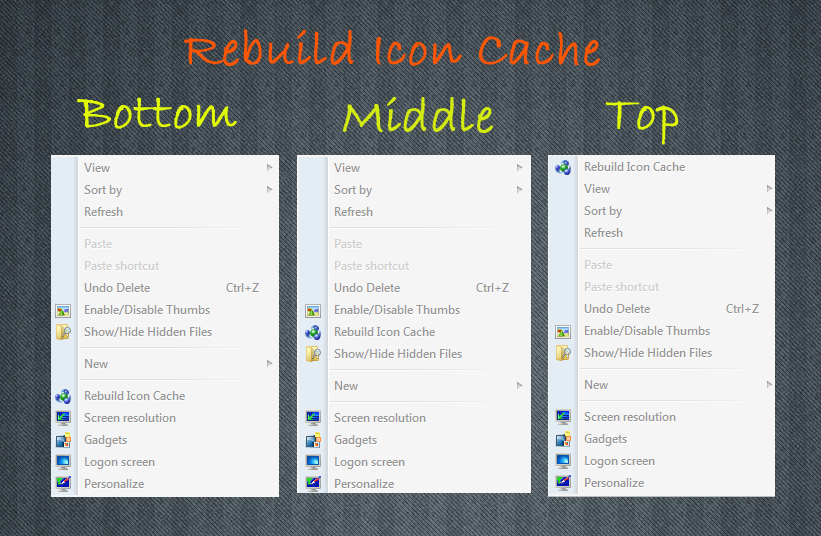
Here is a simple script which rebuilds icon cache and restarts explorer via context menu.
Installation1. Unrar Archive
2. Run Rebuild Icon Cache.exe
3. Merge Install.reg
(3 varieties are available,each has different position in context menu)
ChangesFixed Detection Of Environment Variable
 Note:
Note:If you don’t want context menu extension then just extract the Rebuild Icon Cache.exe and run the script.
Thanks!
Related content





Comments: 18


Hello!
Many thanks for updating!
Whether probably to open in the context menu a folder
For example - to open a folder Windows or folder Web ...?
👍: 0 ⏩: 1
Thanks for link - Thumbs and Hidden Files
👍: 0 ⏩: 1

To open a new window from a folder just ctrl double click on the folder

👍: 0 ⏩: 1
I would like to open folders in cont.menu - [link]
It is possible?
👍: 0 ⏩: 0


Dude, it's not like it was you who figured out that deleting the iconcache file would do it, plus gokool has made his own vbs script, compeltely different from yours.. I dont see how he took anything you made.
👍: 0 ⏩: 0

thanks . can u do a script for "Show/Hide Hidden Files ... and Enable/Disable Thumbs , pls
👍: 0 ⏩: 1
Dude,those scripts can be found
Here & Here
👍: 0 ⏩: 1




ok ive understand, its to put it on windowfolder!!

👍: 0 ⏩: 1