HOME | DD
 knowledgeorb — windows 7 cursor pack for xp
by
knowledgeorb — windows 7 cursor pack for xp
by
Published: 2009-03-01 19:50:41 +0000 UTC; Views: 83200; Favourites: 47; Downloads: 47273
Redirect to original
Description
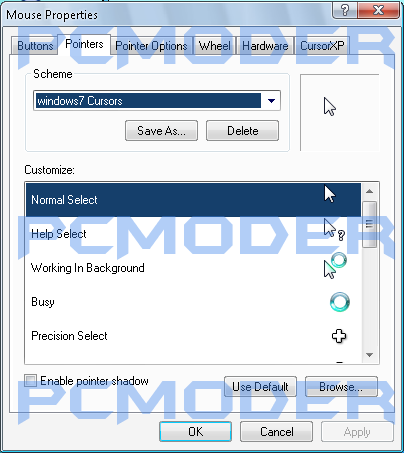
I have extracted the windows 7 cursor'sHow to Install:
- Extract the archive to a temporary folder.
- Right click the "Install.inf" file and click on "Install"
- Choose the cursor set in the control panel mouse applet It appears as "windows 7 cursors"
Troubleshooting:
-When the shadow on the cursors look bad (which can happen on some systems) you should turn 2D hardware acceleration a nod down. You can do that this way:
- Display Properties -> Settings -> Advanced -> Troubleshoot *Set "Hardware Acceleration" one nod down
By:Knowledgeorb (a.k.a pcmoder)
[link]
Related content






Comments: 42

👍: 0 ⏩: 0

👍: 0 ⏩: 0

👍: 0 ⏩: 1

👍: 0 ⏩: 0

👍: 1 ⏩: 1

👍: 1 ⏩: 0

👍: 0 ⏩: 0

👍: 0 ⏩: 0

👍: 0 ⏩: 0

👍: 0 ⏩: 1

👍: 0 ⏩: 0

👍: 0 ⏩: 0

👍: 0 ⏩: 0

👍: 0 ⏩: 2

👍: 0 ⏩: 0
👍: 0 ⏩: 0

👍: 0 ⏩: 0

👍: 0 ⏩: 0

👍: 0 ⏩: 0

👍: 0 ⏩: 0

👍: 0 ⏩: 0

👍: 0 ⏩: 1

👍: 0 ⏩: 0

👍: 0 ⏩: 0

👍: 0 ⏩: 0

👍: 0 ⏩: 0

👍: 0 ⏩: 0

👍: 0 ⏩: 0


noice i have windows 10 but i like the windows 7 cursors, and this was perfect. thanks!
👍: 1 ⏩: 0

I have windows 8.1 but i like the windows 7 cursors So.. Thanks dude
👍: 0 ⏩: 0

👍: 0 ⏩: 0


to change windows 7 cursor to xp, follow these steps:
1. go to control panel, then search mouse in the box, click on change how my mouse looks, click the drop down box then click on none.
2. click apply.
3. if the mouse has no shadow, go to system, (located in system and security) and click on advanced system settings. then click on the one with enable cursor shadow. alternatively, you could click on enable shadow in the box used for step 1.
hope it helps!
👍: 0 ⏩: 1

👍: 0 ⏩: 0

The real windows 7 cursors are at:
www.filedropper.com/win7cursor
👍: 0 ⏩: 1
link doesn't work but that's probably bc this was posted about 3 years ago XD
👍: 0 ⏩: 0


Hello!
I was writing a journal for Transforming XP to 7.......
Can I include Link to this? This is the best set of cursors iv'e Seen
~RDTSOD
👍: 0 ⏩: 0

Thanks man!
And extra thanks for the instructions on fizing the shadows xDD That was a big problem to me ;D
👍: 0 ⏩: 0