HOME | DD
 LithTech — ltConfig v3.3

Published: 2010-10-24 12:28:41 +0000 UTC; Views: 24798; Favourites: 43; Downloads: 2476
Redirect to original
Description
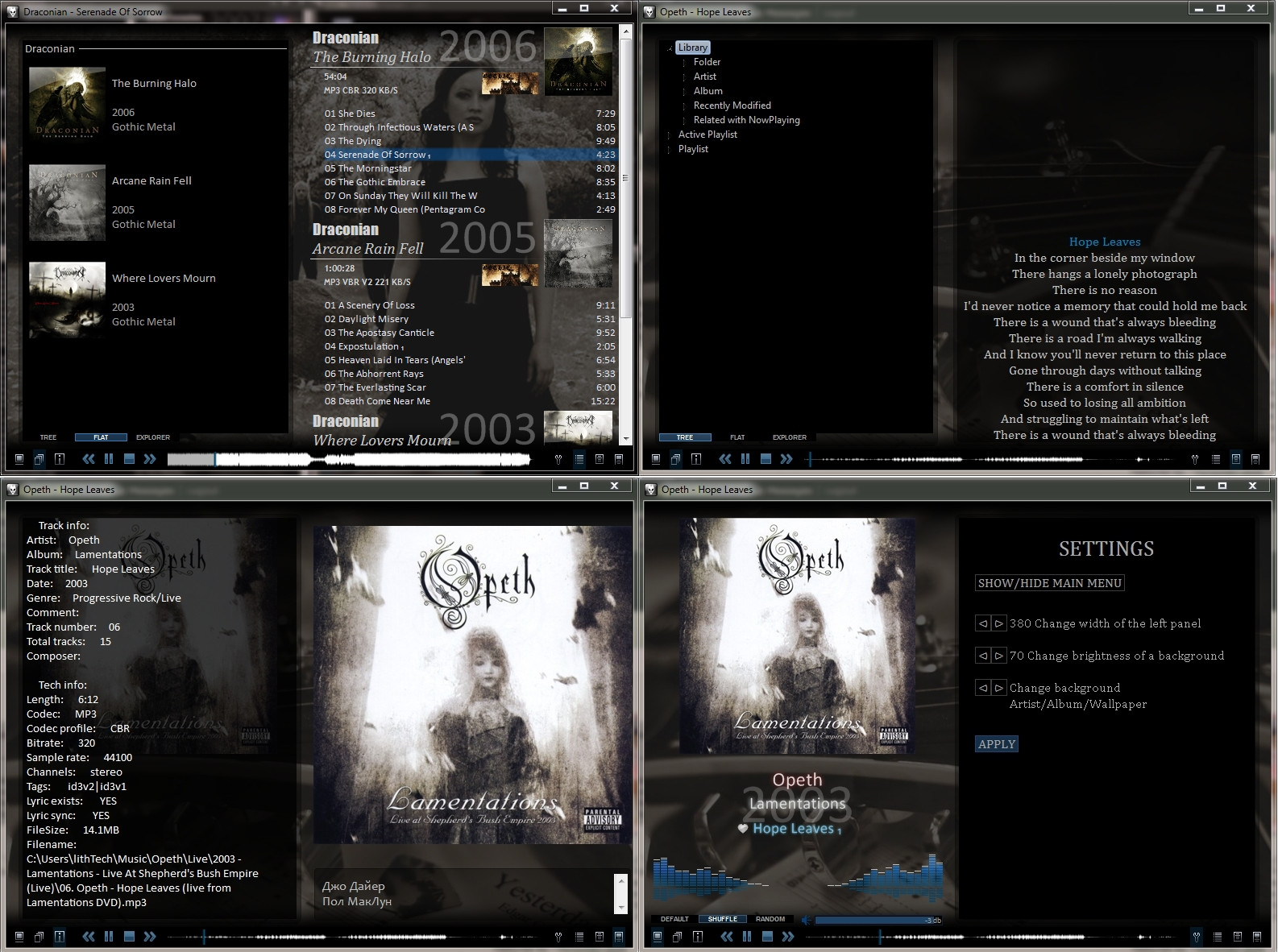
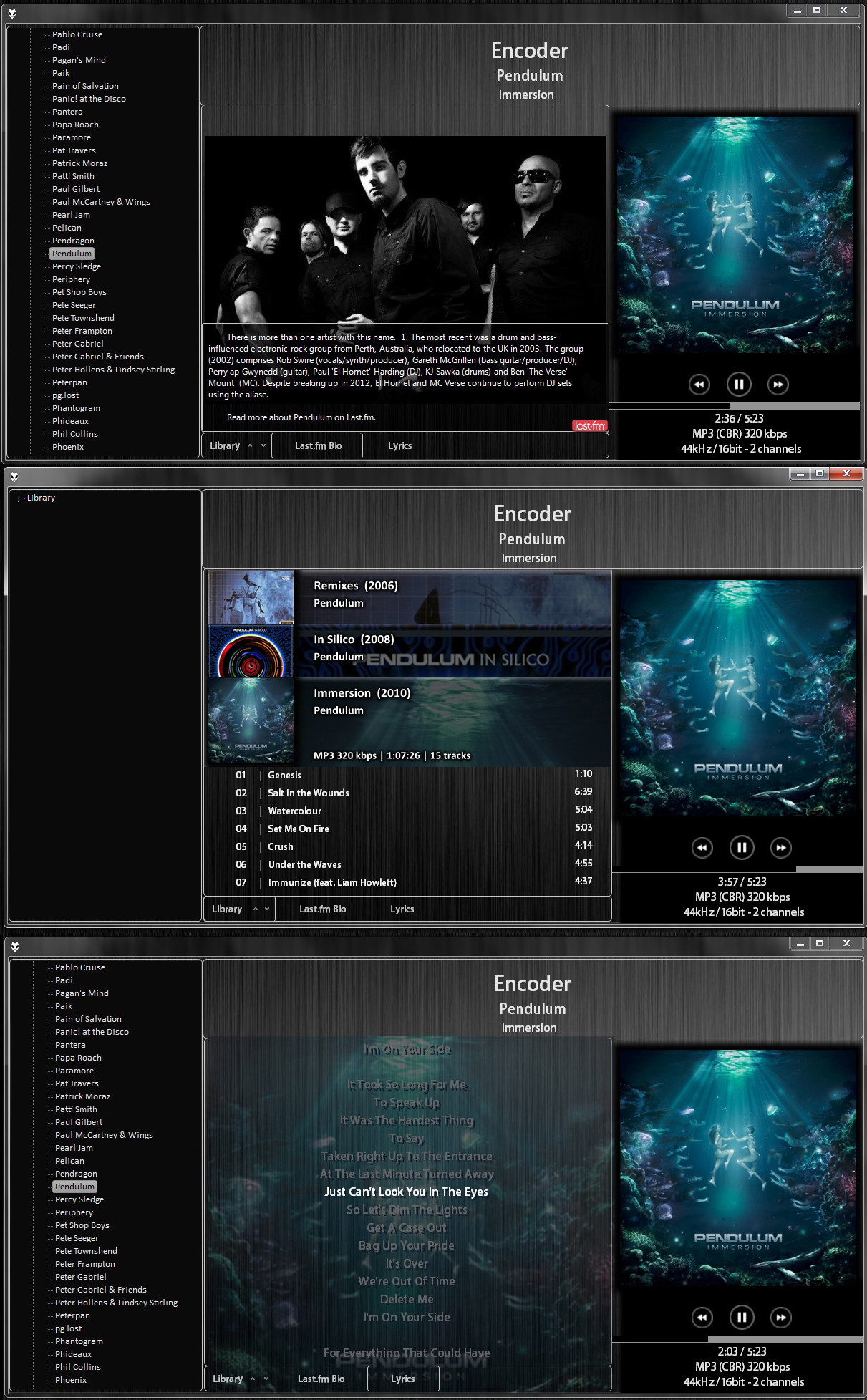
New version is here: [link]So, ltConfig v3.3 is released!
Features:
- Autodownload and view an album art/artist art/band logos/lyrics
- Last.fm integration
- 2 modes: full and lite
- lyrics, biography
Changes since v.3.1:
- Cosmetic changes
- Added "Playlists" panel
- Bug fixes
- Components update
Installation:
You need foobar2000 player [link]
Next steps in readme.txt in archive.
Note, that core.cfg is not modified, so if you already have foobar2000, you not lost your keyboard shortcuts settings, total time played, playcounts...
If you like my config, please fav
Related content




Comments: 94

then it's rolled back to be complicated. I guess the spirit of foobar is to be simple, isnt it?
👍: 0 ⏩: 0

Thank you so much. I will try your new version now. You rock!
👍: 0 ⏩: 1

hope so. I'll try to make it before New Year's holidays
👍: 0 ⏩: 0

Лучший конфиг который видел когда либо видел!
Автор не подскажешь как заменить lyrics2 на lyrics3?
👍: 0 ⏩: 1
Спасибо) Описывать долго, сборку еще не знаю когда выложу... попробуй конфиг импортировать, свой бэкап не забудь сделать только...
[link]
👍: 0 ⏩: 1
Спасибо, работает!
С нетерпением ждем новой сборки.
👍: 0 ⏩: 0

Now with so many new updated .dll that have been released I think it would be great for a update of this player config by it's excellent author. Still this is number one in my book.
👍: 0 ⏩: 1

One more thing. Whould try to make lossless version of your skin like [link] when I just copy a needed components it doesn't work well, sound isn't as good as in Shades Lossless, there are some noises and other strange sounds.
👍: 0 ⏩: 0
Now I have Windows 7 and something is wrong. Normal foobar without your files works fine but when I copy it and try to run player it doesn't apear I can see it only in windows manager precess.
👍: 0 ⏩: 1
Sorry, I cant reproduce this behaviour. On My win7 all works just fine
👍: 0 ⏩: 1
When I delete foo_uie_explorer.dll everything works fine - so far
👍: 0 ⏩: 0
I'm tryin' to change art path to F:\Music\Images\%artist% for artists and F:\Music\Images\%artist% - %album% for album (metadata F:\Music\Images\Metadata\%artist%. Now I can't see any art on my foobar. What do I have change to get this work?
👍: 0 ⏩: 0

Привет. Подскажи какие переменные вписать в Biography Server -> Last.fm, чтобы обложки загружались в папку с файлами с именем cover?
👍: 0 ⏩: 1
Проипиши во вкладке Album:
$replace(%path%,%filename_ext%,)cover
👍: 0 ⏩: 1
Спасибо. Ещё один вопросик: раньше при добавлении сердечка в плеере оно передавалось на last.fm, сейчас нет. Где покрутить?
👍: 0 ⏩: 1
Видимо, обновили компонент, в нем изменилось название пункта меню.
Нужно ПКМ на информации о треке слева - в Splitter Settings - Script - Найти там строчку "Last.fm Love " и изменить ее на "Last.fm Love Track ". Пробел в конце строчки обязателен
👍: 0 ⏩: 1
Не работает, к сожалению 
Делал точно так как написано.
👍: 0 ⏩: 0
How to change list in ItConfig Standard Mode like in Lite Mode
[link]
then move that list as much as we can to the right side with black backgorund and resize artist background to that list
👍: 0 ⏩: 1
I can post config like this:
[link]
👍: 0 ⏩: 1
Looks better but I'm looking for something like this
[link]
but please post your config
BTW - thanks for God Is An Astronaut - I've never heard before
👍: 0 ⏩: 1
How to change resize mode in lite mode
[link]
because in most times I can see olny a part of the image
👍: 0 ⏩: 1
You cannot change resize mode, this needs a total recoding of how wallpaper will fit the background
👍: 0 ⏩: 0
how to change font color and size and is there any possibillity to have album cover like yours?
[link]
👍: 0 ⏩: 1
Cant understand. Top img is old playlist ElPlaylist, bottom image is what I was posted, Es playlist. Es is faster than El, but have a limits of customization
👍: 0 ⏩: 1
As you can see album cover on the bottom has something like shine on it - this what I wish to have.
When I change foobar with your config I can't change other things even when I change that part [link] .
Maybe instead of all config you could post just that part - Track List and Group Header - I don't know if that works.
👍: 0 ⏩: 1
Oh, this one... scroll down in group header scripts, and uncomment (delete "//" symbols) from the last 2 string rows:
//$puts(pth,images\highlight.png)
//$imageabs($get(art_left),$get(art_top),$get(art_size),$get(art_size),$findfile($get(pth)),,)
👍: 0 ⏩: 1
thanks
some changes and now it's ok
[link]

👍: 0 ⏩: 0


I've been using foobar since it was first released, and this is by far the best skin I've ever used. It meets all of my expectations and needs, so thank you!
👍: 0 ⏩: 1

I know it's been a minute but I was wondering if you could help me. How do I set the album art to ONLY detect cover.jpgs? I've already disabled downloads.
👍: 0 ⏩: 1
Right click on album art -> Spliter settings (first item) -> Script tab
Find next strings:
$puts(kcp,$findfile(
$if($not($strcmp($substr(%path%,1,4),'http'),$if(%album%,0,1)),$get(main.dir)/images/radio.jpg,),
$get(pdir)\albums\%artist%\$get(alcn).jpg,
$get(pdir)\albums\%artist%\$get(alcn).png,
$get(pdir)\albums\%artist%\$get(alcn).gif,
$get(fdir)*front.jpg,
$get(fdir)folder.jpg,
$get(fdir)cover.jpg,
$get(fdir)front_bv.jpg,
$get(fdir)*.jpg
))
And replace it all with this one:
$puts(kcp,$findfile($get(fdir)cover.jpg))
👍: 0 ⏩: 0

This is the first and best config that I use for Foobar. After using this, any config I tried turns meaningless 
However, there is smth I want to know: about artist auto-download. When it is not the correct artist, I don't know how to change into another one.
One more thing is about how to sort. I wonder if I can add more sorting type other than "Default", cuz everytime I add, it does not goes into album/track number, but sometimes display a artist in a multi-artist album.
👍: 0 ⏩: 1
Thank you
1. Tag a correct artist (select trac->Properties->enter artist name), try to play song. Biography should be download automatically (may be after some time), and an artist images too. You can also scroll images in biography page, choose one, then Context menu -> Save image -> As..., and save with 'artist.jpg' filename. Config always shows this filename first.
2. Hmm... try to context menu on playlist->Settings->Behaviour; In bottom look at "Context menu", choose in combobox a "Sort", and then check "Show". In Misc you can add additional sort format.
👍: 0 ⏩: 0

How can I set this up to show random artist images? I have 6 photos for each artist. I changed 'pdir' to reflect my images folder. But I'm stumped on what to do next in order to randomize the artists pics.
👍: 0 ⏩: 1
Sorry, but i dont know how to implement a random in panel stack splitter. It seems to impossible
👍: 0 ⏩: 0

Another great config. I have few issue however:
1. volume bar doesn't work. Dunno why.
2. How do I enable genre images in playlist? Can't find "Images\genres_". Sorry

👍: 0 ⏩: 1
Thanks.
1. Do you use non standart sound output, such as wasapi, kernel or asio?
👍: 0 ⏩: 1
ASIO, then Wasapi, but this was in your previous build - 3.1. In this one I use primary sound drive.
👍: 0 ⏩: 1
Cant figure, whats wrong... Try to install blank foobar2000 and test its volume bar
👍: 0 ⏩: 1
Nevermind, I have managed to fix that finally
Thanks for excellent foo config
👍: 0 ⏩: 0
Any chance of a update to this excellent player. It's my favorite and nothing else compares to it.
👍: 0 ⏩: 1
functionality of the current version is enough for me, so I wasn't planning any updates. At present I provide only support.
if you need I can make some simple functions (changes)
👍: 0 ⏩: 1
LithTech,
Thank You. Your config of this player is the best. I had some problems with the player, however after re-installing the OS (7 SP1) and the player (1.1.4) with your config it's working awesome.
Thanks Again and keep up the good work,
-rave2roll
👍: 0 ⏩: 0

Tnx dude your setup rocks!
After several days of using it i can say it is best setup i ever use
Just few qustion..
1. Can i and how add some my pictures/photos... except of yours with guitar
2. I can't see it/faind or there is no search option?
👍: 0 ⏩: 1
| Next =>