HOME | DD
 Mathness — Reaction Diffusion AVX2 OpenMP

Published: 2017-11-05 16:13:58 +0000 UTC; Views: 759; Favourites: 7; Downloads: 10
Redirect to original
Description
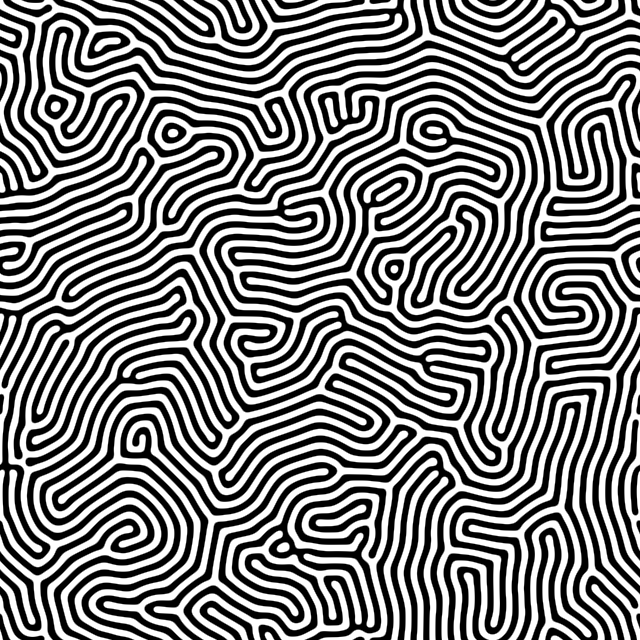
Result from an old project updated with OpenMP and AVX2, giving a nice speed boost. C++ code is added below, if you find it useful please give credit and leave a comment. Download image for full size. Enjoy.
#include
#include
#include
class ReactionDiffusion
{
private:
// Dimensions of data
uint16_t data_width ;
uint16_t data_height ;
// Current data
float *a ;
float *b ;
// Temp data when processing current data
float *a_next ;
float *b_next ;
// Values from zero to one, not all give good images
// Test values, should "fill" the image (looks boring)
const float f = 0.035f ;
const float k = 0.045f ;
public:
bool Setup( uint16_t set_width , uint16_t set_height )
{
if ( ( set_width < 10 ) || ( set_height < 10 ) ) return false ;
data_width = set_width ;
data_height = set_height ;
width = _mm256_set1_epi32( data_width ) ;
// Assign memory, return false if not possible
a = new ( std::nothrow ) float[ data_width * data_height ] ;
if ( a == nullptr ) return false ;
b = new ( std::nothrow ) float[ data_width * data_height ] ;
if ( b == nullptr ) return false ;
a_next = new ( std::nothrow ) float[ data_width * data_height ] ;
if ( a_next == nullptr ) return false ;
b_next = new ( std::nothrow ) float[ data_width * data_height ] ;
if ( b_next == nullptr ) return false ;
// Fill memory with valid start data
for ( uint32_t i = 0 ; i < ( data_width * data_height ) ; i++ )
{
a[ i ] = 1.f ;
b[ i ] = 0.f ;
}
// Add "seeds" to grow, two adjacent seeds works better than a single seed
b[ 3 + 4 * data_width ] = 1.f ;
b[ 3 + 5 * data_width ] = 1.f ;
return true ;
}
void Iterate()
{
#pragma omp parallel for schedule ( dynamic )
for ( int16_t y = 1 ; y < data_height - 1 ; y++ ) // Edges are left untouched
{
for ( int16_t x = 1 ; x < data_width - 1 ; x++ ) // Edges are left untouched
{
int32_t index = x + y * data_width ;
float a_current = a[ index ] ;
float b_current = b[ index ] ;
// Gray-Scott model
float reaction_rate = a_current * b_current * b_current ;
a_next[ index ] = clamp( a_current + ( Laplacian_Operator_AVX2( x , y , a ) - reaction_rate + f * ( 1.f - a_current ) ) ) ;
b_next[ index ] = clamp( b_current + ( Laplacian_Operator_AVX2( x , y , b ) * 0.5f + reaction_rate - ( f + k ) * b_current ) ) ;
}
}
std::swap( a , a_next ) ;
std::swap( b , b_next ) ;
}
// Access method to save data as image
const float *get_data_ptr() const
{
return a ;
}
protected:
// Clamps value to [ 0 ; 1 ], might be superfluous
inline float clamp( float value )
{
return value > 1.f ? 1.f : ( value < 0.f ? 0.f : value ) ;
}
// Laplacian
const __m256i dx = _mm256_set_epi32( -1 , 0 , 1 , -1 , 1 , -1 , 0 , 1 ) ; // X axis offsets
const __m256i dy = _mm256_set_epi32( -1 , -1 , -1 , 0 , 0 , 1 , 1 , 1 ) ; // Y axis offsets
const __m256 lw =_mm256_set_ps( 0.05f , 0.2f , 0.05f , 0.2f , 0.2f , 0.05f , 0.2f , 0.05f ) ; // Laplacian weights
__m256i width ; // Multiplier for memrory index
float Laplacian_Operator_AVX2( int32_t x , int32_t y , const float *read_data )
{
// Generate memory index
__m256i px = _mm256_add_epi32( _mm256_set1_epi32( x ) , dx ) ;
__m256i py = _mm256_add_epi32( _mm256_set1_epi32( y ) , dy ) ;
__m256i index = _mm256_add_epi32( px , _mm256_mullo_epi32( py , width ) ) ;
// Get values from memory and scale by weights, 4 = sizeof(float)
__m256 v = _mm256_mul_ps( _mm256_i32gather_ps( read_data , index , 4 ) , lw ) ;
// Get sum of all elements
__m128 sum = _mm_add_ps( _mm256_extractf128_ps( v , 1 ) , _mm256_castps256_ps128( v ) ) ;
sum = _mm_add_ps( sum , _mm_movehl_ps( sum , sum ) ) ;
sum = _mm_add_ss( sum , _mm_shuffle_ps( sum , sum , 0x55 ) ) ;
// Add centre with weight -1
return _mm_cvtss_f32( sum ) - read_data[ x + y * data_width ] ;
}
} ;
int main( int argc , char **argv )
{
// Lowering number of threads might increase performance!
omp_set_dynamic( omp_get_max_threads() ) ;
ReactionDiffusion rd ;
if ( !rd.Setup( 100 , 100 ) )
{
std::cout << "Could not assign memory, or size was too small." << std::endl ;
std::system( "PAUSE" ) ;
return EXIT_FAILURE ;
}
for ( uint32_t i = 1 ; i <= 10000 ; i++ )
{
rd.Iterate() ;
}
//SaveImage( "output" , 100 , 100 , rd.get_data_ptr() ) ; // Trivial, so code is omitted
std::system( "PAUSE" ) ;
return EXIT_SUCCESS ;
}
Related content









Comments: 2

So... I don't speak C++. So if its not to much to ask could you outline whats going on?
👍: 0 ⏩: 1

If you chuck out the class line, { after it, all the lines ending with :, and all rd. in main, you can compile it as regular C.
Staying with the C++ code, think of class{ } as a structure/sub-programme that is accessed with various methods (Setup, Iterate, essential like functions). First you have to create/construct it, that is done with 'ReactionDiffusion rd', first part is the class, second bit is the name we use to access it (similar to float x). That means we can run the methods in the public: part of the class, rd.Setup(...) for instance. The stuff in private: and protected: can only be accessed by methods in the class.
The Laplacian takes a point on a grid ( x , y ) as input. It takes the sum of the eight points around it and multiply with a weight (0.2 for direct neighbours, 0.05 for the corners) minus itself, and returns that. The AVX2 code is a speed up to calculate the eight points, since 256 bit is 8 floats (32bit each).
rd.Iterate is done 10k times, and each time all grid points (except edges) are used to calculate the new values, then new values are swapped to be the current ones ( std::swap( a , a_next ) just swaps the pointers).
If you can not compile AVX2 code, the following code does the same, although slower.
const float Laplacian_grid_weights[ 3 ][ 3 ] = { { 0.05f , 0.2f , 0.05f } , { 0.2f , -1.f , 0.2f } , { 0.05f , 0.2f , 0.05f } } ;
float Laplacian_Operator( int32_t x , int32_t y , float *read_data )
{
float value = 0.f ;
for ( int32_t dy = -1 ; dy <= 1 ; dy++ )
{
for ( int32_t dx = -1 ; dx <= 1 ; dx++ )
{
int32_t px = x + dx ;
int32_t py = y + dy ;
value += read_data[ px + py * data_width ] * Laplacian_grid_weights[ dx + 1 ][ dy + 1 ] ;
}
}
return value ;
}
I hope that helps.

👍: 0 ⏩: 0