HOME | DD
 milleniumsentry — Ultra Fractal Tutorial 3

Published: 2006-08-15 15:35:43 +0000 UTC; Views: 8575; Favourites: 80; Downloads: 191
Redirect to original
Description
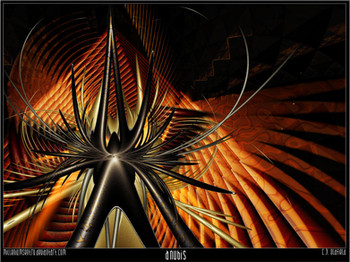
My third Ultra Fractal tutorial... this tutorial teachs you how to make the fractal Basketcase.. found here.. [link]Any feedback is welcomed, and as I do not have testers to go through it, please let me know if there are any snags or slip ups. It looks good for now, don't think I missed anything, but you never know.

Created by request for =lumi-nara

Guess that's it for now.. Have fun!
Related content







Comments: 29


Anytime. Feel free to send me a note if you hit a snag or have any other questions. Cheers!
👍: 0 ⏩: 0

Great tutorial - short and simple. I have the UF only 5 weeks and this gives me some new ideas. I was looking for some ideas how to go about things - I'm looking for a masking tutorials now.
👍: 0 ⏩: 1
Great! New ideas are what it's all about.
My UF
The idea is simple however. You have a layer, and your mask layer. Your mask layer should have some transparent areas set (via the gradient window or other method) and when used as a mask, it will transfer it's transparency information, to the layer it is used on.
Here is a quick example.
orbittrapmaskingexample {
::K4/Q+gn2tTVTPONMQ07Vq/HiydajdqzHg8l9IHAkYl44KvxONGcs9a7ub7/eGnk2UgigyBkQ
Upcw+N2vZ88eZadsmAT96lLSSCygSQTNuHlhgjZ7Z+vI1bF7Z9WlIN5FJP0RL2kl0Jkb7C0N
VZJK2BhzTJRCacCuM4BKeRLcvBhXjzgPUe6yFDnbINNMbQa0007YeZz9i9hdOgdjl1IDHoos
slL6ZWLk6xzL0BhjmtOLpntVTRLX0ac97Ushw9s9yYc4eJtSlQz6hHxHDMNn54r212nmAM4O
QT/gcvQB1iU7lcx4b2x0+W46ajWschZX4HDpkaBzdG58+PvaXj6Evw+X1eHkH7Dm2WvIEL2I
F2H8NMoniWlBrZ6tw6sh1+gwCLJHhH2nXOEzAKyzCPtckCr5FoIwrAG36YcJk0h6z3bMgecQ
4TkauYPNLpxoMOaVJqAXVNhG7Lj4oCEGVRITBwZD14YsNFka0Ug85bQKgeyowceO1mTp8osh
JkLKyvP6muHcT+Pdfsh+NCdSvI0Z4UQMDSLz7P13tMH8OHecRbYcxfkrAT+lui3uTJZpTylQ
wBZJvOvksGUqiqSysEsOqOPykKwmQR4qr2J5fyFuY5cmZauhNVTxfF9dMrgaNSdAQ4S46De+
B/S8AGHH2v50+Wn4pY4ZKGVUu0DJtRMBGOA02oMewAGh6cCfnRF7BYyZ3duZD+VvV0Eukn2o
k8x0oN/czqzEYDeD035bRFlllY0R/Z9mj4555IMBF5ZyTXiniVQIk8a8RLdd1Ee2Rv8m8JEC
CfFe5T/8guIaVkgjBOlr66ZsrbiXyzSv8RoTGbc3G+9/xwvZN/3ZO4txf3G/9P+4vZt9dmr9
/hbm/bm//Sm/lL+K1BGPKD==
}
Here you can see, how the transparency information from the orbit trap layer, is used on the fractal brownian motion (texture) layer. The color doesn't matter on the mask, only the transparency.
Hope this helps!

👍: 0 ⏩: 2
Thank you very much, I did copy and pasted it, I will study it now, I've done 3 masking tutorials but I still don't understand it, because the tutorials were to long and complicated, so I got lost. Thanks again for your effort. Happy Christmas.
👍: 0 ⏩: 0
I've just started with UF - Can you tell me what to do with the information you gave me? Thanks a lot. Do I copy and paste into open fractal window?
👍: 0 ⏩: 0

Another work with your tut ^^ I hope you like it.. Thanks again!!
xenodreaming.deviantart.com/ar…
👍: 0 ⏩: 0

bit rough what Trystian said imho... not seen many tuts from her despite her obvious awesomeness in making UF's .. perfectly suitable for a staring point which is all it professes to be!
👍: 0 ⏩: 1
I do prefer showing people the techniques used to make something, rather than reproduction. It wasn't exactly clear, so I can see how they may have missed that as the main focus of the tutorial. Tryst is a good sort though, usually only trying to help people, so it was hard to take offense knowing that about them.
I am glad very you found it useful.
👍: 0 ⏩: 0


Please point this beginner to a starting place for making Fractals and can Gimp be used? Thanks for your help...
👍: 0 ⏩: 1
Hello Vanwent.
I only use photo editing software for final production and image enhancement.
I use three different pieces of software to create my fractals.
I mainly use ultra fractal. It can be found at ultrafractal.com
For flame fractals, I use Apophysis, which can be found at apophysis.org
and for my 3d fractals, I use mandelbulb3d, which can be found at fractalforums.com
There are several plugins available for photoshop that allow you to make fractals. PS plugins can be used in gimp as well. Once you use them however, you'll quickly realize that they are very limited in their range of output. I would definitely recommend going with dedicated fractal software if you are interested in working with them.
Ultrafractal has a free version, but will watermark your images. If you enjoy it, let me know. I don't mind rendering some images for you from time to time. Apophysis, and Mandelbulb3d are both free as well, and do not watermark final output.
If you have further questions, feel free to message me.
👍: 0 ⏩: 0


I'm pretty bad at UF...
I can get a similar looking thing when I do triangle inequality avg, but the orbit traps don't look anything like yours...do you know what I'm doing wrong or can you give me the julia seed parameters so they're exactly the same?
👍: 0 ⏩: 2
It would take a while. It's backed up somewhere.
Wrote it like 3 years ago.
Sorry.
👍: 0 ⏩: 1
it's OK, I got it working
thanks for the tutorial
👍: 0 ⏩: 1
I finally got it to work!
it's a bit different and I didn't do the last steps(shadow onward)
if you make the thicker lines invisible and make the color next to it more opaque it makes a cool design, kind of like petals in the wind [link]
👍: 0 ⏩: 0

Just want to ask were do i find it in photoshop. if its CS2 or CS3 were do i find the Fractal or it is a plugin thnx.
👍: 0 ⏩: 1
I am afraid Sanoshuke, that it is a completely different program than photoshop called Ultra-Fractal. You can find it at ultrafractal.com.
It is designed specifically for fractal creation.
👍: 0 ⏩: 0

do u know of any mac fractal art generating software that this applies to?
👍: 0 ⏩: 1
unfortunately no.... I am not that familiar with Mac software. Since it uses fairly common elements (julia with orbit traps) it shouldn't be hard to replicate in other software using single layers and putting together in Photoshop. Very sorry I couldn't be of more help.
👍: 0 ⏩: 0

I am honestly disappointed with this tutorial, I don't think you're illustrating very good skills. The piece you wrote the tutorial about isn't that good and looks messy, for starters. Through almost the entire tutorial you've just used standard formulas, standard colourings, you haven't changed any settings on colouring algorithms and have even used the default gradient Ultra Fractal automatically uses. Where you have changed the gradient for the "3D" strand effect and shadow it hasn't even been done that cleanly and the gradient just looks like a slightly altered standard gradient, again. The only thing I thought was even remotely useful was how to make a shadow layer (which to be honest, could have been improved), the rest of it seemed like a how-to for using the least possible amount of effort to crank out a fractal.
I have seen your work, it looks like you put more effort and creativity into it than this. Why doesn't the tutorial reflect it? I know it looks like it was meant for complete beginners but I think you should give them a bit more credit.
👍: 0 ⏩: 1
Well, it was actually a request by another user on how I made one of my other fractals... basketcase. I know my others are a bit more advanced, but hey, we all gotta start somewhere...
Mostly, this was to illustrate how basketcase was done, not how to completely reproduce it... and to give folks a good starting point, not simply carbon copy a work they've seen. I stayed with standard colors to make it easier for people to learn.. I guess you would have made a different choice... and I respect that as I love your work... I dunno, I'm just going with what I know I guess.
at the end of the day, I can't make them all super complex.. and I made a promise to someone here on DA and I wanted to keep it... nothing more, nothing less...
Sorry you didn't find it more useful though. It is what it is, and I would have to work pretty hard to teach you any new tricks anyway.

👍: 0 ⏩: 0

wow very cool...have to give it a try ..i have a hard time learning uf....thanks for the tutorialss..very nice
👍: 0 ⏩: 1
no problem. I will keep trying to put them up as people seem to like them.
👍: 0 ⏩: 0
