HOME | DD
 Mrsagreen — Transmit

#glow #hatsune #lights #miku #mmd #mme #piccoli #render #vocaloid #append #ikpolishshader
Published: 2017-02-21 22:45:42 +0000 UTC; Views: 3828; Favourites: 127; Downloads: 0
Redirect to original
Description
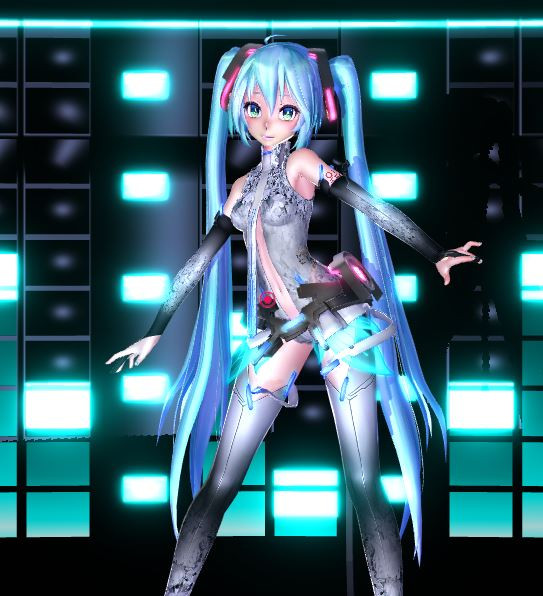
More ikpolish shader practice. Sorry the background isn't that gr8Credits
Model: Piccoli/ピコリ Miku
Stage: バランP
Lights: mashigaru
MME effects: HgSAO, dust, likeHDR, 4color, bleach-bypass, autoluminous, SvSSAO, colorfilter_negaBright, cheaplens, ikpolish shader
Edited like barely using Gimp
Posing: me
Related content




Comments: 32

👍: 0 ⏩: 0

Mistress: *bows down repeatedly* I LOVE YOUR ART ; ^ ; HOW CAN I BECOME SO GOOD LIKE CHU?! Teach me senpai!! !! I wish to learn what i'm doing wrong..look look my version of art *shoves it on your table* what chu think? I would love your advice on my art is what i'm saying..i wanna become much more better with it.
👍: 0 ⏩: 2

Oh shit lmaoooooo I responded to this comment thinking you commented on my most recent picture XD XD XD Raycast is NOT used in this picture lol. Well great I just made this all very confusing haha. I suppose when you are reading my silly advice and ridiculously long comment, look at my most recent pic where I DO use raycast. XD
I used ikPolish shader for this one. ikPolish shader is nice because, like raycast, it can shade your model AND affect the lighting and colors for the whole picture. And provide material shading like how I made her outfit look shiny almost like glass or metal. I like raycast better because I think it is better with lighting options/looks even MORE realistic. But that's just me ayyyyy.
I linked to both raycast and ikeno's page in my long comment for you :3
👍: 0 ⏩: 1
xD It's quite alright.
Ooh okay. Lol that ayyy tho. Thanks for the tips <3!!
Thanks vu v ~
👍: 0 ⏩: 0
Oh my goodness!! *0* I'm so flattered!!
Thank you so much for such a nice compliment!! You're so kind!
Umm um um I'm not a pro at all or anything, but I can give a little advice based solely what I think I'm doing better lol ><
1. Learn how to use raycast shader. Like that's why this picture looks amazing. Not so much my talent lol. It makes everything look realistic. You can get it here: github.com/ray-cast/ray-mmd There are a lot of tutorials on youtube, so there's a lot of guidance. #1 thing I learned recently to make my stuff better lol. Also it gets updated by the creator constantly so keep going back lol. I know it may seem overwhelming because it looks like there is a lot to it, but the tutorials do a good job. I was overwhelmed at first too until I watched a tutorial or two.
2. Play around with the light settings on the camera in MMD. Even if it's just changing the directions of the shadows or changing the color bias, lighting can make a huge difference. In this picture, I turned up the red lighting a lot to make it look like sunset lighting. And I moved the x,y,z settings to change the direction of the shadows.
3. Just always try new combinations of effects. I add and take away effects to experiment what looks good for each picture. And sometimes less is more. Honestly when I use raycast I need little else. I like using like_HDR a lot (I like really colorful/vibrant pictures). I used to love self-overlay because it made backgrounds look great, but it bleached models a lot or made their colors look weird. I mainly use HgSAO, ColorFilter_NegaBright to make things look softer (gotta turn that down to like 0.1 though in the Tr box lol) and I like ikBokeh too. Ikeno makes a lot of great effects. Raycast is nice because it doubles as a great shader and affects the entire picture like a .x effect. The atmosphere effect is nice too (turn it down in the Tr box too). That's another thing, effects can be manipulated in the Si and Tr boxes, usually to make them less intense. Which is a good thing. Bleach-bypass for example is pretty strong, so I usually shrink it in the Tr box (again because I like vibrant pictures. Many don't.)
4. Shaders. If you want a realistic look, go for raycast or ones like NCHL2 and N2+C or even ikPolish shader (raycast is less of a pain than all of those in my opinion) I personally just like a realistic touch; that's not what everyone thinks looks good though.
5. Pose hair (and I suppose clothes too) whenever possible/if necessary even though it's a pain. I like the dynamic look hair "in motion" looks even if the model may be standing mostly "still". Like an imaginary breeze came through, or as if they JUST stopped moving and the hair and clothes need to catch up. I guess this isn't mandatory or anything just a personal preference lol.
If you can use something like Photoshop though, you don't need to worry about effects so much. I have no idea how to use Photoshop lol.
Your picture honestly is not bad, and you used pretty decent effects. You use effects to make shadows/shading look good so that's nice. I would say if you did something with the lighting to show light direction or even used like an ikclut filter/some other filter it would look even better. Something to alter the background or shadows/make the background more happening idk?? Also they kinda look like they're...melting?? Is that the shader making those blobs in all the creases? Or hipstagram? Never heard of that one! Interesting!
I really like the lighting and colors in the background on this one:
So colorful!
What shaders do you use? Idk if you use it, but don't use adult shader lol. It can look nice, but it also looks...cheap? idk haha. I personally don't like shaders anymore that make the models look...greasy/shiny? In my opinion. I've been corrupted and spoiled with raycast.
Also aww you really like hugging poses ^^ I love happy cute pictures so I like those that you make :3
Sorry this was really long!! >< Sorry if it's just blah advice you hear from others O.o Or if it doesn't make sense >< Raycast fo sho tho. Again this was all just my personal opinion on what I think looks good and what my preferences are; everyone else thinks differently. Also I'm far from a pro artist. You do what makes you happy and what you think looks good. :3 I really don't think any of your pictures are bad. Really. Just need some extra spice and you're good 8D I'm really not a pro though so I very well may have no idea what I'm talking about lol.
Here is ikeno's page: seiga.nicovideo.jp/user/illust…
Any effect I rambled off that starts with ik can be found on his page lol.
Thanks again for the high compliment! You're wonderful! ><
👍: 0 ⏩: 1
Your most welcome :3!
And it's quite alright. Hehe any types of advice's or tips can help allot~ .
1. I actually learned to use that effects like I think when it was first coming out..I saw someone using it and I was like interested in how to use it. I looked up the original tutorial and i was getting it until i crashed and went fully dumb on it lol. I got confused and just was like..i give up and I gave it a bit of time until someone who's a spanish youtuber made a tutorial on how to use the effect (i understood what she was saying so it helped) and i was like sweet now i know how to use it~ Sort of. I ended up making my own video using that effect only once until later i found out more helpful tutorials and major updates you could do with the effect on here and on youtube. I was astonished of how crazy this one tiny effect got allot of love. But yes i understand fully. Another thing is that i never new the owner would consistently update it o - o so thanks for telling me.
2. Alright thanks for telling me that :3!
3. I actually no joke tend to use new effects but sometimes i'm either lazy on using it or i don't understand how to use it even when i bust my butt looking for a tutorial. But that was a while back now people are busting out with helpful tutorials on how to use effects i could've been using a year ago xD lol. But yes i do tend to use different effects or use the same ones cause i'm trying my best to understand the many effects and mess with them. Sometimes it comes out a bit too much x.x" or just like blah.
For HDR i don't use it that much as you do lol..I tend to use it when the effects are to blah not the way i wish it to come out as so i add a bit of HDR to balance it out best way i can and i love it. Self over lay lord i love that effect cx so i get what you mean. And have you've tried lowering it down to make the models look a bit less blurry? Or tried to mess with the Tr instead of being 1 first make it into a 0 and than on the 2nd 0's put a number and it should help tone it down..it worked for me with powerdof found out a different way to town down the blurry ness on the back without it coming out like crap. But if that doesn't help than damn. That sucks. Same i use that effect as well been using it allot over the years xD. I believe I used that effect only once? I don't know if i did and lol.
And i never learned to use ikbokeh o n o sadly i never knew how BUT thanks to this person on here i believe? She made a tutorial on how to use it so that made me happy.
That's completely true. It is fun to use those effects ik. But i tend to have trouble with three of them I don't know how to use them :s;. Which makes it hard for me to stinking go and try them out v.v". Oh and i notice that you love vibrant pictures which is pretty lively and fun to see..i've seen people using burning out the crap out of dark tone effects like damn :/ that's too much..please use something else o n o". And yes bleach bypass is nice to use but when you need to use it don't burn it out x.x"
4. Yeah raycast and ikpolish are two easy ones i can mess around with i just can't stand NCHL its annoyingly hard to use :/ if they were a way to use it without the computer fucking crashing and wanting to murder your own computer than sure xD lol. But yes I completely agree with you. I would love to use ikpolish more its so soft cute and a bit realistic which i adore. And raycast i would use it when its time to bust out the gorgeous effects xD i need some sun BAM RAYCAST blasts the shit out of the sun from your art lol.
5. Yeah..I knew it had to come down to that x.x" it isn't much of a pain not unless the models have glitches ._.". And lol xD i feel you tho..i love that pose too that's why when i see your art and others i tend to ask how the fuck do you even do that flowy shit? xD I get lost and just keep starring at it and all fan girl lol. But yes i would try that out ;3; hopefully posing gets on good terms for me. I'm not much of a pro at posing models..takes me time. I made this one pose right here:
I let the physics on didn't really bother to work with the posing of each of her locks and his nor her clothes lol. But i tried my best v.v than this one was pretty okay easy cause these two arts i used reference images that helped me out.
i really did love how this one turned out tho it was my fave one <3!
Yeah i don't..i dislike photoshop its a pain in the butt to use :/ ..i can't..i just tried but i failed. Aw thanks ;w;. <3!!! Thanks i try ;3;..Alright i sort of get what your saying..hmm i'll try that out o A o cause using shadow lightning isn't quite happy for me to use i tend to get a bit confused on whether it should go this way or not so i double it out to see how it turns out. Take my time x.x i hate rushing on the shadow and lightning i sometimes do and that's when i mess up x.x". But oh! Yeah i actually used greenshader, hgssao and hipstagram you were right there :3! I used others to make it come out like that ;3;. Took my time..i wanted it to make it soft but cute.
Aw >////www.youtube.com/watch?v=Ugl1J4… i tried to make it look decent..like a club effect but it didn't turn out well adult shader is just wow x.x" i used it on the stage = o!! And it just made it pitch black so i took it out and used real effect shader if i'm correct. To make it light..did my best. But yes above all that effect isn't a good tea to use not unless you know how to make it look less blah.
Lol it's okay xD can't blame you. And aw ;///w///; thank you so much and yes i can't help but make my couple pose either kissing or hugging sometimes hehe kinki e w e lol. xD lol. (but not much of kinki ness)
It's quite alright it being a long reply i'm happy with that :3! And yes i will use it when i can.
Alright v u v i'm okay with your personal opinion. It really helps out. Ah ;w; thanks sweety <3!! And ah i still think your a real pro at making lively art tho <3!! Its really cute! And plus your a 2nd person who made me love art with hatsun miku o w o! I don't really like her at all x.x so its hard to please this person with that model. Aw thanks and okay lol xD! Its okay your words make sense.
Why thank you <3!
And aw your welcome <3!! !!
👍: 0 ⏩: 1
Ahh glad I somewhat helped hehe :3
Oh, I'm glad you did eventually learn how to use raycast! It does take time to use. It makes my computer sooooo slooooow. It's so worth it though. I love how videos and pictures look when it's used.
Ahh see you didn't need my advice haha. You know how to experiment with effects and everything ;3 But yeah I think I use HDR more than everyone lol. I love what it does. Raycast usually needs a color boost anyway. And yeah usually when I do use self-overlay I have to turn it down. Idk somehow it fell off my list of effects I use all the time even though it IS a good effect. Oh yeah ikbokeh is nice, but idk if I use it right lol. I'mma have to look for that tutorial haha. Oh yeah and you use ikeno's effects. You really didn't need my advice XD You got all the materials haha.
Yeah and you even know how to use ikpolish and stuff so you're good for shading. Just always mess with the light settings to make shadows look better. Ikpolish can make skin look pretty dark. At least in my experience. I love how you explain what raycast does XD
Oh haha yeah the posing. For sure you'd see so much more improvement if you pose more than just the model's body. Eww yeah it's a pain though haha. And yeah if a model isn't rigged correctly and glitchy it can be hard to pose them correctly. As soon as I finish body posing, I turn the physics off so I can pose the hair and clothes. You just. You just have to be very very patient when posing hair and clothes. Don't move/rotate one bone too much because then whatever you're trying to pose looks kinky instead of smooth. I've learned how to make very small, subtle movements to hair bones. It's better when models have a lot of hair bones. Tda does not have many lol. Even just small adjustments can make the hair look dynamic; it doesn't have to be a dramatic scene. I wish I could use photoshop to draw hair to make it look even more realistic lol. As for body posing, it is hard to do more difficult ones. It helps to have a reference or a concrete image in your head of what you want the model to be doing. I don't make many pictures because I wait for good pose inspirations to magically come to me lol. Gosh I'm glad you like my posing so much ><
Oh I really do like that picture you made of the model in the cage!! The shading looks nice and so many colors! lol. Yeah greenershader is actually really good too if you want something easy. But yes it's okay if everything takes time! It takes me a long time too. And you did do a good job on the video! There are times and place for adult shader lol. It does work for that video. But adult shader is still way inferior compared to others in my opinion XD Sorry I'm so mean to you adult shader ><
Anyway you seem pretty armed with MMD knowledge so thanks for listening to my advice even though you didn't need it all haha. Well thanks for being such wonderful support for my art. You're wonderful. <3 Gosh I made you like Miku a bit more?!?!?! Wow. That's an honor!! I'm so happy! See, Miku is my empress. I love her so much. Both her voice and how she looks. I totally understand when people don't because we're all different, but I'm glad you like looking at her in my pics ^^
Thank you so much again!! <3
👍: 0 ⏩: 1
Yep
That's very true and yeah..i tend to forget how to use cool effects ;^;" like i totally forget how to use ikpolish..had to search up the tutorial for it..the German one i could understand. (I'm not German by the way)
Yeah i do ; A ; but i sometimes tend to forget how..and i just mix things up like i did with my yami x tea art ;w;..i mixed it up with new effects i don't normally use and it actually came out colorful cute. I do as well HDR is really good for color boost and i suppose? o A o..The world may never know. And it does? o - o I don't really put a color boost on raycast cause its fine without it. It's be known to have it's own beautiful color boos on it cx if not when your using darker colors than HDR is gonna do it. Yeah you have to set the self overlay down a bit because it can get over powering with your other effects you have and you don't want that overpower effect kind of look Dx. It won't show off your colors well. Aw that's sad xD, true tho. And hmm o A o you just wing it with ikboeh xD! Omg lol nice. But yeah i did you gave me some useful tips i never knew about C:!
Nah!! i actually (apparently) from the looks of it don't got the hang of ikpolish effect yet D:!! I found out that they are many ways to use it by stumbling upon tutorials that i never knew of on youtube of that effect. That's odd that i comes out dark skin tone models e.e..you must be using it wrong..or something happen? Cause i get that allot..all i do is keep on messing with the lighting add excellent shadow and some hgssao..and bam 
That's very true..I was litereally working on a new pose from this tumblr old post couple meme thing some blogger made; and the thing crashed and i lost it ; A ;"..but this is all you can see of how it would look like completed
...i have to remake the pose again!! Its annoying to make cause i have to constantly look at the image reference to see if i got the posing correctly made Dx!! That's true o-o...i tried putting a pose on a not properly rigged model and this happen e.e
...just why? I still have this model..she still needs to be fixed on her body x.x I wanted her with cactile body fit bases ya know the one that has more body on them = o! Cause hey its LSP she needs to show her lumps~ Lol. Hmm wow..that's true...i sometimes get freaky posing the hair..clothes i don't seem to be good at posing it o n o..not yet of course and with hair..i mean i'm okay with posing with it but not as good. Yeah that's true its fun to have lots of bones on the hair it may be a pain in the ass to pose but its fun to have cool hair poses on the model =3=~ Really? o-O i thought they did with all those stinking hatsune miku models they have xD. Okay nice :3 not unless someone crashes the mmd and makes the hair look way too dramatic if you get what i mean xD Ah same ; - ; i wish that too. Cause i've seen so many mmder artist using photoshop making they're art look fantastic and i'm just like over here with the cheaper way..not knowing squat crap of how to make shit on any cool program just why?! lol True very true on that = o! Ooh..that's why it takes you time o A o..no wonder why..oooh okay that makes sense <3! And your most welcome <3!!
And aw thanks ;w; i was really inspired with that model and the pose reference i chose cx when i made it. Glad you love it (aw thanks for liking the shaders ;w; i tried my best). *cough* *Cough* i'm too cheep and i take greenshader anyday ..too cheep to use great effects *cough* *cough* xD lol. True and aw thanks for the compliment! Really makes me happy you loved it <3!! It's cool..I understand you on your feelings towards adult shader.
Aw thanks <3!! !! But yeah i did need your advice and tips, i tend to LOVE to read advice's and tips from other great mmder's on the community cx it helps me out <3!! Reading yours really is good o w o! But yes v u v.. ! You did. I'm glad your happy but wow empress o A o..dang lol never knew you loved her more than anything..especially doughnuts I know and understand the way you feel v u v~
And your welcome <3!! Its very fun to see you make wonderful posing and art with her o w o~ It makes me smile :3 and say ooh and wow lol.
Your welcome <3
p.s sorry for responding late..i tend to do it with all of my replies i get with my friend and yours as well ; A ; i tend to get lazy..typing back replys can be a hassle since my dang wrist tends to hurt sometimes..its mostly due to my room being a bit too cold >A<''
👍: 0 ⏩: 0

If you don't mind me asking, how did you get the pass for the model? I can't seem to find the link for it.
👍: 0 ⏩: 1
Yeah sure, the link to the password and bowlroll file is found here: seiga.nicovideo.jp/seiga/im563…
The key is listed under ボディスーツ、水着
👍: 0 ⏩: 1
I'm not getting the hint, "Let's make it a big deal with some kanji" ? Or is my translator bunk?
👍: 0 ⏩: 1
Ha yeah I majorly struggled too with what google translate said. It said exactly that.
It wants you to write the first half of the key in kanji. So find out how to write this part in kanji: だいじにしてね
I used jisho.org to help me with the kanji.
👍: 0 ⏩: 1
Thats a lot of options lol. Thanks for the help. ^J^
👍: 0 ⏩: 1
Lol yeah. No problem hope you figure it out ^_^
👍: 0 ⏩: 1
Sadly, I must admire this one from afar... I can't figure it out!! *cries*
👍: 0 ⏩: 1
Oh my goodness thank you love <3
👍: 0 ⏩: 1

You're very welcome dear~<3
👍: 0 ⏩: 0

Oh my goodness thank you :3
I'm glad it looks like I've improved
👍: 0 ⏩: 1


Wow thank you so much :3
👍: 0 ⏩: 0
Ahhh wow thank you so much! O///O
👍: 0 ⏩: 1

Anytime! ahhh keep up the great work!
👍: 0 ⏩: 0

