HOME | DD
 Offering — Blending, Part 2

Published: 2004-12-05 06:29:00 +0000 UTC; Views: 7232; Favourites: 57; Downloads: 1090
Redirect to original
Description
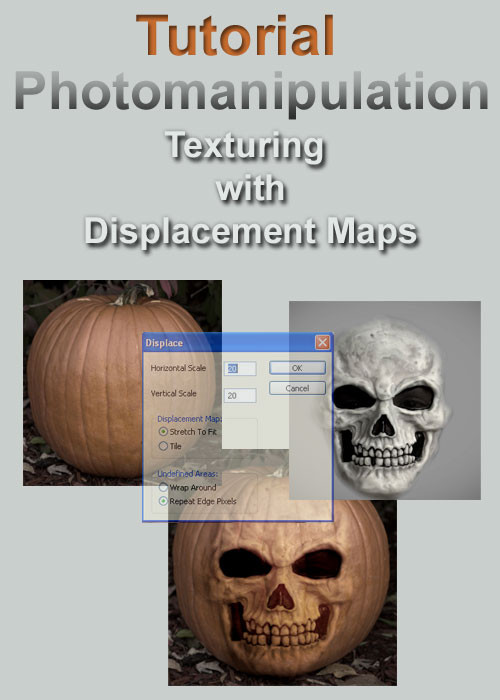
A slightly more advanced tutorial, which explains how to use Photoshop Channels to create a Displacement Map, to create a more convincing blend between images and textures.this is a continuation of the Blending Images and Textures tutorial, also in my gallery.
this tutorial once again uses a face from pigeon-stock , and a texture from insaneone . thanks.
if there's anybody out there who could explain how to perform the PrintScreen thing with an active dialogue box open in PS, could you please tell me?
Related content






Comments: 31

Again thanks a lot for your tutorial, I made this [link] and this [link] with your tut 
👍: 0 ⏩: 0
I was desperately looking for something like this. thank you a lot for making and sharing this tutorial
👍: 0 ⏩: 1

very useful! thank you so much..
by the way, do you also have a tutorial for
making gifs out from movie clips?
👍: 0 ⏩: 1

no, but i'm sure that if you google it, there's tutorials out there somewhere.
👍: 0 ⏩: 0


Great turorial! I'll try it at some point, definitely.
👍: 0 ⏩: 1
thanks!
.. and good luck with it.
👍: 0 ⏩: 0

thank you ..
if there's anything that's unclear, please just ask.
👍: 0 ⏩: 0

thank you
'tis appreciated.
👍: 0 ⏩: 0
please let me know if there's anything that seems difficult.
i'd like to make sure my tutorials don't 'lose' people half way through .. and thanks for the stock !!
👍: 0 ⏩: 1

Alright. I'll try it out soon, I hope and then I'll tell you if anything is confusing.
👍: 0 ⏩: 0

*shakes head* So many views and so few comments...
You realize of course that I will now be expecting more of these from you...
Great work. Easy enough to read and understand, simple enough to allow it to be applied in many styles/ways...

👍: 0 ⏩: 1
thanks.
even better than comments though, are the examples of work that have been created using the technique by other deviants. for example, meatloafsurprise has been creating some really good stuff ..
👍: 0 ⏩: 0

very good!! i always forget about using displacement maps....they come in handy..so thanks for reminding me about them!
👍: 0 ⏩: 1
thanks for trying the tutorial ..
👍: 0 ⏩: 0

thanks, it's a pleasure ..
👍: 0 ⏩: 0

it's good to know they're being used ..
👍: 0 ⏩: 0

now, i know there's a 'blushing' emoticon somewhere .. can't find it, so 
👍: 0 ⏩: 0

Good tutorial
Now I know why should I select blue channel
👍: 0 ⏩: 1
When you look at the red, green and blue channels, one of them will have stronger contrasts than the other two. The best Displacement Maps are created from the channel with the strongest contrasts. In the image that I used in the tutorial, the Blue channel was the strongest. Some images will have stronger Red contrats, others a stronger green. It all depends on the image.
Thanks for the opportunity to explain why I chose the Blue channel ..
and thank you for your kind words.
👍: 0 ⏩: 1
Hi,
Thanks for explanation.
Yes you are right it depend on image.
👍: 0 ⏩: 0

Awesome, will have to try this some time. I had kinda worked out the first blending tutorial on my own but with different textures,, this though is taking it that extra leap forward. Thanks
👍: 0 ⏩: 1
it's a pleasure ..
i'm beginning seeing some of the work that's been done with these tutorials .. makes it all worthwhile ..
👍: 0 ⏩: 0