HOME | DD
 OtisBee — ThaFrame
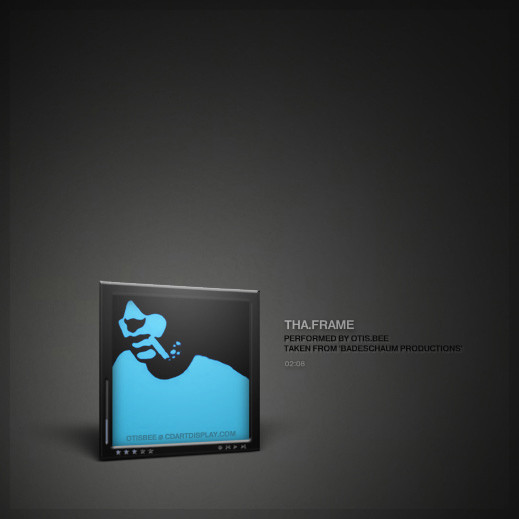
Published: 2009-03-24 09:51:39 +0000 UTC; Views: 33789; Favourites: 195; Downloads: 8494
Redirect to original
Description
initially released in july07-2007 (7.7.7) [link] ThaFrame was basically my attempt to create a perspectively distorted impression of a displayed cover. technically that's not possible to achieve with the features and settings of CAD alone, so i had to find some sort of a workaround and created some according graphics that would help to trick the eye. well, some covers might still reveal that it's just a trick and they'll probably look rather odd in ThaFrame, but in most occasions it works pretty nicely.you can easily apply (install) the skin in its *.cskin file format by simply doubleclicking on it or by dragging n'dropping the file onto a running CD ART DISPLAY.
well, have fun in reminiscing.

Related content



Comments: 118


what is description 53 file not found, for god's sake?
👍: 0 ⏩: 1

i already tried answering your question here.
👍: 0 ⏩: 0

great! thanks for the fav and feedback!

👍: 0 ⏩: 1

alter schwede.... 12 favs auf einmal ist ein echter hammer.
vielen vielen dank.


👍: 0 ⏩: 0

I really love this one. It's so clean and neat, excellent if you are going for a macish look as well

👍: 0 ⏩: 1
ah yeah, i really like this one a lot myself.
thanks for your nice feedback.

👍: 0 ⏩: 0

can u tell me hot to install a CAD should i simply drag the file to desktop
👍: 0 ⏩: 1
well, first make sure to install the software (version 2.0) from here or even better: version 3.0beta from here.
when you got that you can simply drag&drop a skin's cskin file onto a running "CD Art Display" or you can doubleclick that file and it will selfinstall to the appropriate folder.
in case there isn't a cskin file (like in many other skins you might download), just make sure to copy the extracted folder to CD Art Display's Skins folder and then select the skin from the app's rightclick menu.
i hope that was helpful.
👍: 0 ⏩: 1
Thank you for your response yes it was helpful
👍: 0 ⏩: 0

Hi OtisBee
i have some trouble with the fonts of the skin, they dont appears anymore

👍: 0 ⏩: 1
they don't appear anymore?
does this mean they were there before and then out of a sudden they just disappeared?
👍: 0 ⏩: 1
Absolutely :/
I had re-install fonts and the skin but nothing...
* Os: Windows 7
👍: 0 ⏩: 2
Ok thanks for your help
👍: 0 ⏩: 0
hmm, that's odd.
i don't know if this might help, but can you try if taking "folder ownership" of your CAD directory would solve the issue?
what player are you using? can you try CAD (+ this skin) in conjunction with another player and see if this would make any difference?
does it only happen with this particular skin or with other skins as well?
perhaps you can contact *Carlospr (the developer of CAD) and/or the CAD forum [link] about this.
actually, i don't think that this is really an issue with this skin, but more a technical problem and *Carlospr knows a lot more about the technical things than i do.
👍: 0 ⏩: 1
Can you tell me which fonts are joined to the skin, i'll try to uninstalled this one and re-install it...
👍: 0 ⏩: 2
I installed the font again and it works fine now! thank you OtisBee
👍: 0 ⏩: 0
the fonts are called BASIC5 and they're included in the skin.
you can try deleting (uninstalling) those fonts and also the skin and then download & install my skin again (doubleclick on the "ThaFrame.cskin" file).
you'll then be automatically asked by CAD, if you'd like to install the required fonts.
simply confirm with "Yes" and CAD will guide you through the next steps.
finally the skin will be applied in CAD and everything should be fine again.
if this still wouldn't work i'd definitely suggest that you'd take that issue to the cdartdisplay.com forum and report it there.
👍: 0 ⏩: 1

Same here. I cant see the font. I guess it's because of Win7, CAD cannot find the path to install. You have to install it manually, but I cant the the font on the Internet
👍: 0 ⏩: 1
the new CAD3 will make things a lot easier to install fonts or skins itself in win7. if you like you can already upgrade to the latest beta version of CAD3. just go to the #CD-Art-Display group and you'll find that beta.
or you can always rename a skin's cskin file to become a regular zip file and then extract it the usual way. inside of the archive you should then find a "Fonts" folder with the required fonts inside. close CAD, copy those fonts to your systemfonts and launch CAD again. that should do the trick and the text should be visible again.

👍: 0 ⏩: 0

well, welcome to CAD then.
it's great knowing that you're using it with one of my skins.
thanks a lot for the kind feedback and your fav, sir.

👍: 0 ⏩: 0

you're fine as long as it's windows XP, Vista or Win 7.
also check here for your system requirements.
👍: 0 ⏩: 0

This is so nice, but is there any chance to change lyrics width, i want it to show more lyrics, now it shows show little. Or is ti possible to edit lyrics size? I know how to change color but this i don't know.
Thanx mate!
👍: 0 ⏩: 1
thanks .. glad you like it.
go to:
Skin Editor >> Edit >> Lyrics >> Area
and alter the values for "width" and "heigth" in order to change the lyrics area size.
if you like you can activate the "draw guide lines" function for the time you'd make your changes as this will help you to see what size that area actually will be, but don't forget to deactivate that option again before you'd save your changes.
to set a different fontsize for the lyrics go to:
Skin Editor >> Edit >> Text Style >> select a textline to edit (lyrics)
and click Font.
you'll then be presented a new window where you can change some font-related attributes like for example the size.
i hope that was helpful.
thanks again for your kindness.
👍: 0 ⏩: 1
Ok, i changed font size, but i didn't find how to change lyrics area? I use latest cd art display software if that helps.
Thanx mate!
👍: 0 ⏩: 1
take a look at this screenshot: [link]
the lyrics area is defined by the two values marked in red there.
👍: 0 ⏩: 1
Damn i'm so stupid sometimes, or maybe i'm just blind 
Thanx mate!!!
👍: 0 ⏩: 1
...or maybe the SkinEditor just needs some adjustments and/or a revamp so that it'd be easier to find your way around in there.
either way .. i'm glad you got it working and while we're at it: thank you very very much for your fav.

👍: 0 ⏩: 0

thank you! 
👍: 0 ⏩: 1


declined? i'm not sure what you mean. 
👍: 0 ⏩: 1

I mean can you make a version for Bowtie ?
👍: 0 ⏩: 1
oh, i see.
well, unfortunately not, as i don't have an apple computer to test my attempts then.
👍: 0 ⏩: 1
Thx anyway dude ! Merry christmas, drink a lot ^^
👍: 0 ⏩: 1
will do.
merry christmas to you too.
👍: 0 ⏩: 1


very nice idea and very nice skin really great thx for that
👍: 0 ⏩: 1
oh, you're welcome.
thank you for the 
👍: 0 ⏩: 0
| Next =>