HOME | DD
 parassidhu — PinToStartMenu
Published: 2011-08-06 09:43:18 +0000 UTC; Views: 2295; Favourites: 16; Downloads: 213
Redirect to original
Description
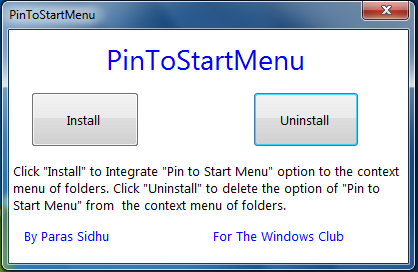
Download => [link]PinToStartMenu is a free and portable tool to add "Pin To Start Menu" option in the context menu of system folders. You can also see this option in the context menu of simple folders by "Shift + RightClick" on it. For example, Shift + right click on a folder named "New1" and click the option and you are done.
How to use:
Download and run the tool as administrator. Click "Install" to add the option. Click "Uninstall" to remove the option. Note that it only works when you run it as administrator.
Related content








Comments: 8


thx for this app man
Nice to see it's possible to pin any folders into the start menu
Just one question:
by default, even after you pin any folder into the start menu, we must click on this one and open it in order to see its content: could you create an application that will allows us to "expand" its content directly in the start menu (such a scroll), without opening it ?
👍: 0 ⏩: 1

Thanx!
Ah. Pin To Start Menu option in context menu is currently by Microsoft Defaults (Hidden). I have to make my own key to do so.
So I will look If its possible
👍: 0 ⏩: 0

