HOME | DD
 Raindropmemory — HowTo: Short Haired Girl
by-nc-nd
Raindropmemory — HowTo: Short Haired Girl
by-nc-nd

Published: 2011-08-27 12:16:26 +0000 UTC; Views: 20231; Favourites: 381; Downloads: 637
Redirect to original
Description
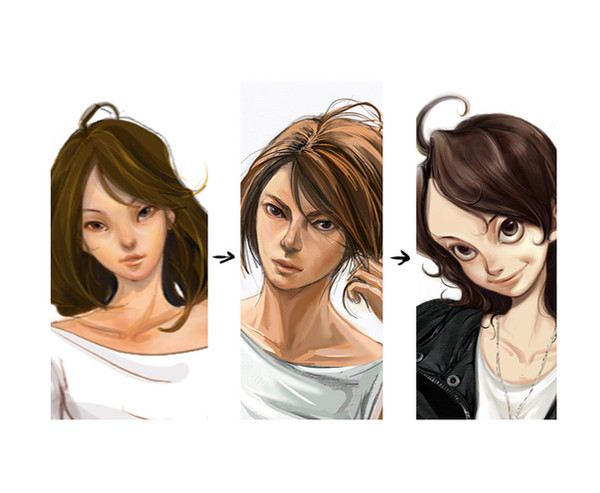
Video showing the image adjustment processes I use on 'Short Haired Girl' illustration. These are also my usual technique that I use in my various works.วิดิโอแสดงขั้นตอนการปรับแสงสีในภาพที่ผมใช้อยู่เป็นประจำๆครับ ทำตามได้ไม่ว่ากันครับ
Related Work:
Related content













Comments: 47


If you have some paper textures in stock you can add a bit of background clean paper.
I'm glad to see how you play with colour and level tools the same way I do..execpt that I start with the levels and contrast first.
Thanks for sharing!
👍: 0 ⏩: 0


Thanks for uploading this! I think it will be very helpful to me.

👍: 0 ⏩: 0


Thanks for this! I'm in a class, and they didn't even teach me this! ^^
👍: 0 ⏩: 1

^^ You're welcome!
👍: 0 ⏩: 0

wow~ >w<
i want to do it too~~~ i wish i can make them more unique using this~ tnx a
lot for this awesome tips~~~ hahahaha.....

👍: 0 ⏩: 0
Best music player!

👍: 0 ⏩: 1

I especially like its information bar - the semitransparent one!
👍: 0 ⏩: 0

nice! i like your process...what photoshop program is this?
👍: 0 ⏩: 1
Photoshop CS5, but any Photoshop can do this.
👍: 0 ⏩: 1

hey ~Raindropmemory can you make a tutorial for watercolors 
👍: 0 ⏩: 0

This gave me some valuable hints.
Thank you very much
👍: 0 ⏩: 0

Wah you're so cool!
👍: 0 ⏩: 0

wOW ! Do you draw in paper and color it using Copic marker , scan and adjusted on Photoshop? what about the rest? the same method? or you using fully Photoshop? Has any other "How To" sample? Would love to see you do your artwork from scratch until it complete XD
👍: 0 ⏩: 0


I suggest you use the mask. That way, if you accidently erase over something, you can recover it back.
👍: 0 ⏩: 0

Thank you for this!
I see I'm not the only one who needs to edit my drawing's scans!
👍: 0 ⏩: 1


aw thank you for making these "how tos" I'm so happy I could watch the process!
👍: 0 ⏩: 0


whoaa! thank u so much for sharing this! XDD
oh and btw, if i may know, what's the program u used to record the screen? Owo?
👍: 0 ⏩: 0

โอ้ คลีนสีจากระยะไกลได้สุดยอดเลยครับ
มีการปรับแต่งแต่งภาพพอสมควรเลยนะเนี่ย : )
ขอบคุณสำหรับ Howto มากครับ!
👍: 0 ⏩: 1
ขอบคุณเช่นเคยครับคุณเบอร์กี้~! ^^
👍: 0 ⏩: 0

This is interesting to watch! Thank you very much for sharing
👍: 0 ⏩: 1
Danke leinef~! Hope it can be any help to you.
👍: 0 ⏩: 1
yes sure :'D It was very nice! It's always nice to see some tricks when adjusting
👍: 0 ⏩: 0

Nice video! ^_^
I had actually thought that you add the white highlights on the ribbon etc. with a white paint (I use acrylic colour for things like that). So it's more Photoshop than I thought
How did you make the Flash video, btw? (If it doesn't take too long to explain, or maybe you have a tutorial link? ^^) I'd like to do something like that too...
The only thing that is missing a bit is a pause button xD

👍: 0 ⏩: 0


Why do you work on only one layer? Multiple layers would have been far easy. o-o;
But either way, great work!

👍: 0 ⏩: 0

COOLLL~!!
I like the way you make this paint clearer with some tools
Thanks for uploading this!
👍: 0 ⏩: 0


Awesome~! Is there like a play, pause, and toggle through video button? There are parts where I wanna pause it cuz you're actions go fast and I end up missing the text. :c
👍: 0 ⏩: 0

This is a wonderful video! Thank you, since I now have more ideas to clean up my watercolors!
👍: 0 ⏩: 0


thx! I always use brightness + contrast to clean the white one, but it results very bad
👍: 0 ⏩: 0

What recording program do you use?
And really nice! It's surprising to know that you also have to do so much work to refine it.
👍: 0 ⏩: 1
Thank you~!
I use Camtasia Studio to record it.
👍: 0 ⏩: 1
You're very welcome, and thanks~
👍: 0 ⏩: 0